Need help?
Do you have a question about the Hermle Labnet Z306 and is the answer not in the manual?
Safety instructions, points to dangerous situations, and intended use guidelines.
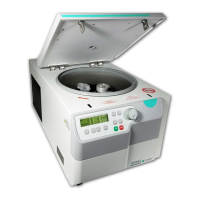
Brief description of the Hermle Z 306 centrifuge, features, and motor.
Lists the items included in the centrifuge package.
Explains the different fields, messages, and logos on the LCD display.
Explains general signs, disposal instructions, and direction of rotation.
Step-by-step instructions for safely unpacking the centrifuge from its carton.
Specifies the necessary space and environmental conditions for proper centrifuge installation.
Provides a guide for connecting and setting up the centrifuge.
How to enter the mode for adjusting basic settings like sound signals and volume.
Instructions to turn the sound signal on or off.
How to adjust the volume level of the sound signals.
Guide to selecting the sound for the end-of-run signal.
Instructions to enable or disable the keyboard sound feedback.
How to access operating data like starts, hours, and error logs (for qualified personnel).
Steps for correctly installing rotors onto the centrifuge drive shaft.
Steps for correctly installing rotors onto the centrifuge drive shaft.
Guidelines for symmetrical and balanced loading of angle rotors.
Instructions for loading swing-out rotors, including bucket placement and weight balance.
Information on maximum load, speed limits, and density calculations for rotors.
Procedure for safely removing the rotor from the centrifuge.
How to release and open the centrifuge lid after a run.
Explains the lid locking mechanism and its readiness indicator.
How to set the desired speed (rpm) or centrifugal force (RCF).
Setting the desired centrifugation time duration.
Adjusting acceleration and deceleration rates for the centrifuge run.
Instructions on how to save custom run parameters as programs.
Steps to retrieve and run previously saved programs.
How to exit the program selection or setting mode.
Procedures for starting a run using the 'start' or 'quick' keys.
How to interrupt a centrifugation run using the stop key.
General care instructions, lubrication, and suitable cleaning agents.
Detailed steps for cleaning and disinfecting the centrifuge unit.
Procedures for cleaning and disinfecting rotors, lids, and adapters.
Specific disinfection instructions for aluminum rotors.
Autoclaving and cleaning instructions for PP rotors.
What to do in case of glass breakage and how to prevent rotor damage.
Introduction to error messages and their potential causes and solutions.
How to manually open the lid in case of power failure.
How to manually open the lid in case of power failure.
Explains how error messages are displayed and where to find detailed information.
Guidelines for transporting the centrifuge safely.
Recommended environmental conditions for storing the centrifuge.
Information on proper disposal of the centrifuge according to regulations.
Declaration of conformity with relevant EC directives and standards.
Comprehensive technical specifications of the centrifuge.
Lists the permissible net weight for various rotors.
Maximum speed and RCF values for different rotors.
Acceleration and deceleration times for different speed levels and rotors.
A list of error codes, their descriptions, and potential causes.
Provides radius correction values for various rotors and adapters.
Defines common symbols, abbreviations, and units used in the manual.
 General
| Brand | Hermle |
|---|---|
| Model | Labnet Z306 |
| Category | Refrigerator |
| Language | English |

 To Next Page