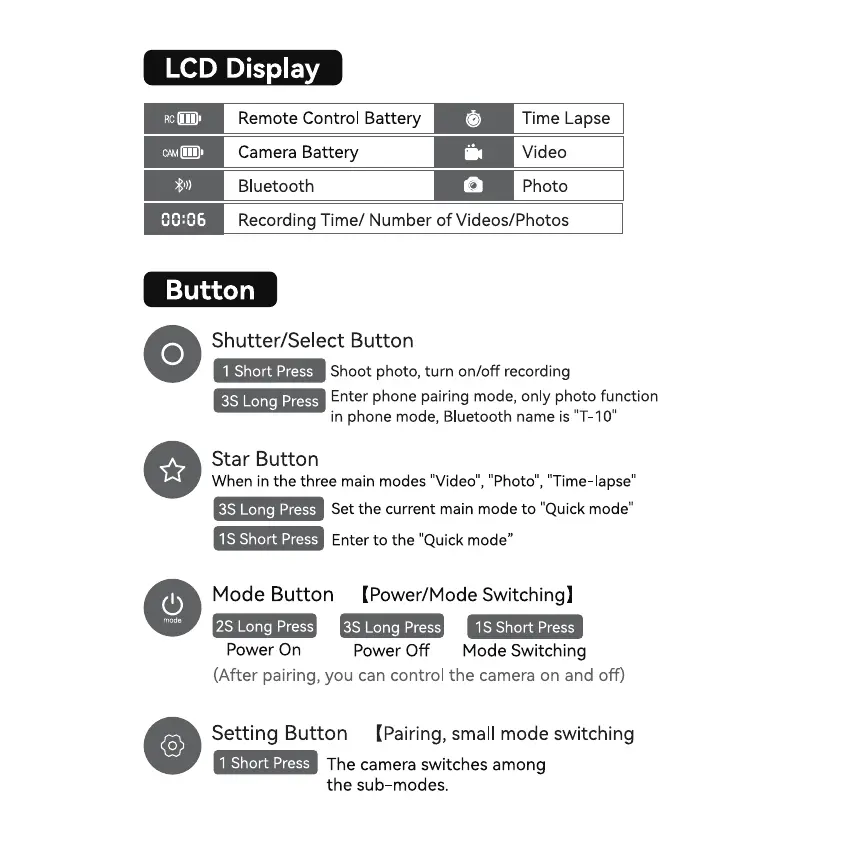
LCD Display
Remote Control Battery
Camera Battery
Bluetooth
Time Lapse
Video
Photo
Recording Time/ Number of Videos/Photos
Button
Shutter/Select Button
1 Short Press
Shoot photo, turn on/off recording
Enter phone pairing mode, only photo function
3S Long Press
in phone mode, Bluetooth name is "T-IO"
Star Button
When in the three main modes "Video", "Photo", "Time lapse"
Set the current main mode to "Quick mode"
3S Long Press
IS Short Press
Enter to the "Quick mode"
Mode Button (Power/Mode Switching)
2S Long Press 3S Long Press
IS Short Press
Power On
Power Off Mode Switching
(After pairing, you can control the camera on and off)
Setting Button (Pairing, small mode switching
1 Short Press
The camera switches among
the sub-modes.


 To Next Page
 Loading...