Charging
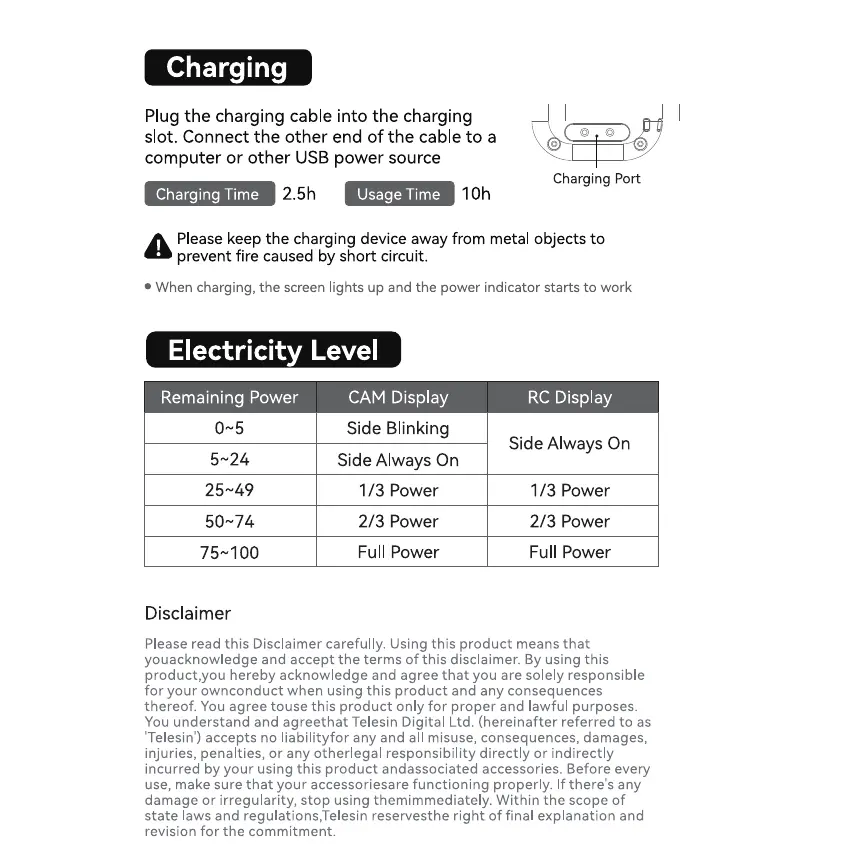
Plug the charging cable into the charging
slot. Connect the other end of the cable to a
computer or other USB power source
2.5h IOh
Charging Time
Usage Time
2+49
50N74
7+100
Charging Port
Please keep the charging device away from metal objects to
prevent fire caused by short circuit.
• When charging, the screen lights up and the power indicator starts to work
Electricity Level
Remaining Power
Disclaimer
CAM Display
Side Blinking
Side Always On
1/3 Power
2/3 Power
Full Power
RC Display
Side Always On
1/3 Power
2/3 Power
Full Power
Please read this Disclaimer carefully. Using this product means that
youacknowledge and accept the terms of this disclaimer. By using this
product,you hereby acknowledge and agree that you are solely responsible
for your ownconduct when using this product and any consequences
thereof. You agree touse this product only for proper and lawful purposes.
You understand and agreethat Telesin Digital Ltd. (hereinafter referred to as
'Telesin') accepts no liabilityfor any and all misuse, consequences, damages,
injuries, penalties, or any otherlegal responsibility directly or indirectly
incurred by your using this product andassociated accessories. Before every
use, make sure that your accessoriesare functioning properly. If there's any
damage or irregularity, stop using themimmediately. Within the scope of
state laws and regulations,Telesin reservesthe right of final explanation and
revision for the commitment.


 To Previous Page
 Loading...