The Qubo Car GPS Tracker is a device designed for real-time vehicle location tracking, ensuring "Safe Travels. Always." It utilizes Global Positioning System (GPS) technology to determine and record the precise location of a vehicle, transmitting this information to a cloud and a dedicated mobile application, Qubo GO App, for user monitoring.
Function Description:
The primary function of the Qubo Car GPS Tracker is to provide accurate, real-time location data of a vehicle. This data is accessible through the Qubo GO App, allowing users to monitor their vehicle's whereabouts. The device is designed for concealed installation within the car's cabin or dashboard, facing towards the sky for optimal GPS signal reception. It connects to the vehicle's electrical system for continuous power.
Important Technical Specifications:
- Power Supply: 12-24 V DC, indicating compatibility with standard car electrical systems.
- Connectivity:
- GPS: Utilizes GPS satellites for location data.
- GSM: Employs GSM for data transmission to the cloud and app, requiring a SIM card.
- LED Indicators:
- Power (Red LED):
- Quick flashing (0.3s interval): Low Battery
- Solid Red: Charging
- Flashing (1s interval): Full charge
- Slow flashing (0.1s interval): Working Normal
- OFF (Quick flashing on power off): Power off
- GPS (Blue LED):
- Quick flashing (0.3s interval): Searching GPS Signal
- Slow flashing (0.1s interval): Receive GPS signal normal
- OFF: No GPS signal
- GSM (Green LED):
- Quick flashing (0.3s interval): GSM initializing
- Flashing (1s interval): Receive GSM signal normal
- Solid Green: In communication with Phones
- Slow flashing (0.1s interval): GSM online
- OFF: No GSM signal
- Physical Features:
- QR Code: Located on the device back and packaging box for device setup and future reference.
- Power Cable Slot: For connecting to the vehicle's power supply.
- Top Cover Opening Slot: Provides access to internal components, including a toggle switch.
- Toggle Switch: Used to power on/off the device.
Usage Features:
The Qubo Car GPS Tracker is managed primarily through the Qubo GO App, available on Google Play Store and Apple App Store. Key features of the app include:
- Dashboard: Provides an overview of vehicle status, including:
- Current location on a map.
- Distance travelled.
- Average speed and top speed.
- Time taken for trips.
- ARM Mode ON/OFF for security.
- Your Location and Re-centre Map functions.
- Device Settings, Share Vehicle Location, Traffic Details, and Map Type options.
- History: Allows users to view past trips, including start and end times, distance, and duration.
- Events: Notifies users of various vehicle events such as:
- Harsh Brake
- Over Speeding Alert
- Harsh Acceleration
- Ride Start
- Ignition On
- Insights: Offers detailed analytics on vehicle usage, including total distance and average speed over time.
- Hamburger Menu: Provides access to:
- User profile.
- Add New Device.
- Geofence Setting.
- Tracker Setting.
- Notifications Setting.
- KYC.
- Subscription management.
- Logged in devices.
- Help and About sections.
- Sign out option.
- App Onboarding: Involves downloading the Qubo GO App, creating an account, and adding the GPS tracker device by scanning its QR code.
Maintenance Features:
- Installation: Requires technical knowledge and familiarity with the vehicle's electrical system. Professional installation by an Authorized installer is strongly recommended.
- Pre-installation Check: Install in an open space for better SIM and GPS connectivity, avoid basements. Take a photo of the serial number QR code for app onboarding.
- Location: Select a hidden and secure location within the car's cabin or dashboard, facing towards the sky, out of sight, and not easily accessible to potential thieves.
- Wiring: Identify Positive, Ground, and ACC wires in the fuse box. Connect the red wire to the battery positive terminal, black wire to ground, and orange wire to the Ignition ON/OFF terminal.
- Power On: Connect the power cable to the tracker; LEDs should start blinking.
- Toggle Switch: Remove the top cover, switch ON the internal toggle switch, and close the cover back.
- Troubleshooting:
- No Power: Ensure continuous power supply.
- No GPS Signal: Move to an open area with a clear view of the sky, as signals can be obstructed by buildings or foliage.
- SIM Card Issues: Check for sufficient credit, correct APN settings, and proper SIM card installation.
- Network Issues: Verify network coverage and traffic conditions.
- Technical Malfunctions: Contact manufacturer/supplier for support regarding firmware, hardware, or software issues.
- Secure Device: Before closing panels, test the tracker's functionality using the app. Secure the device with zip ties or brackets, ensuring the front faces the sky. Bundle and conceal exposed wires for a tidy installation. Double-check all connections.
- Safety & Compliance:
- Read all instructions and safety information before use.
- Concealed installation by a professional installer.
- Ensure waterproof installation, fix with cable ties or double-sided tape, and ensure the indicator faces up.
- Verify all features are working after installation.
- Not for use by individuals under 18.
- Intended for non-time critical data management.
- Requires active internet connection and live power supply.
- Do not touch during lightning storms.
- Do not dismantle the device.
- Proper e-waste disposal: Do not throw in household waste; return to authorized collection centers/recyclers.
Limited Warranty Statement:
- Warranty Period: 1 year or the first cycle of bundled subscription, whichever ends later, covering manufacturing defects.
- Coverage: Repair or replacement with new or refurbished parts/devices.
- Validity: Non-transferable and valid only in India. Subject to an active subscription.
- Exclusions: Broken warranty seal, modifications, improper maintenance, abuse, misuse, electrical fluctuations, acts of God, damages from spills or physical abuse, plastic/rubber components, and subscription extensions.
- Support: Contact the Toll-free helpline for warranty services. Device must be delivered in original or protective packaging.

 Need help?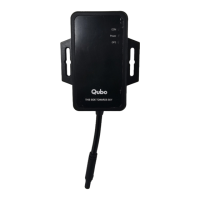

 To Next Page
 General