EasyManua.ls Logo

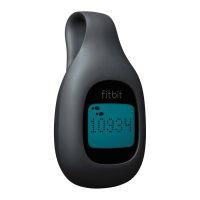
HES Fitbit Zip - User Manual

HES Fitbit Zip
7 pages
Print Icon
To Next Page IconTo Next Page
Loading...
© 2016 Health Enhancement Systems
1
Using the Fitbit is a fun and easy way to track your daily steps in
HealthTrails
. Just put it on
in the morning, sync it with your computer, and it automatically populates your
HealthTrails
account. The more steps you have, the farther you’ll move on the international trails – visiting
fascinating places along the way.
Wearing Your Fitbit
Try different locations to see where it’s most comfortable and secure. For best results, clip the
Zip
TM
or One
TM
inside your pocket and the Flex
TM
, Alta
TM
, ChargeHR
TM
, Blaze
TM
, and Surge
TM
to
your wrist:
Note: The Fitbit is not waterproof, but it’s rain, splash, and sweat proof. Don’t wear while swimming.
Understanding Your Fitbit*
Each Fitbit tracks a variety of activities:
*Although the Fitbit tracks more, only steps count as movement in
HealthTrails
.
Questions About Your Fitbit
If you’re having problems syncing your Fitbit with
your
HealthTrails
account, use the Contact link at the
bottom of the
HealthTrails
web page. A
HealthTrails
representative will respond within 1 business day.
12680
FITBIT
®
GETTING
STARTED
Zip
x x x
One
x x x x x x
Flex
x x x x x x
Alta
x x x x x x
ChargeHR
x x x x x x x
Blaze
x x x x x x x
Surge
x x x x x x x
Steps Distance
Calories
Burned
Stairs
Climbed
Active
Minutes
Hours
Slept
Quality of
Sleep

Question and Answer IconNeed help?

Do you have a question about the HES Fitbit Zip and is the answer not in the manual?

Summary

Fitbit Getting Started Guide

Wearing Your Fitbit

Instructions on optimal placement of Fitbit devices for secure and comfortable wear.

Understanding Fitbit Activity Tracking

Details activities tracked by Fitbit devices, noting steps count towards HealthTrails movement.

Fitbit Device Components Overview

Lists components included with Fitbit Zip and Fitbit One devices.

Supported Devices for Syncing

Provides information on compatible devices and a link to view supported models.

Setting Up and Connecting Your Fitbit

Guides on registering Fitbit, connecting to HealthTrails, and authorizing the link.

Summary

Fitbit Getting Started Guide

Wearing Your Fitbit

Instructions on optimal placement of Fitbit devices for secure and comfortable wear.

Understanding Fitbit Activity Tracking

Details activities tracked by Fitbit devices, noting steps count towards HealthTrails movement.

Fitbit Device Components Overview

Lists components included with Fitbit Zip and Fitbit One devices.

Supported Devices for Syncing

Provides information on compatible devices and a link to view supported models.

Setting Up and Connecting Your Fitbit

Guides on registering Fitbit, connecting to HealthTrails, and authorizing the link.

HES Fitbit Zip Specifications

General IconGeneral
BrandHES
ModelFitbit Zip
CategoryFitness Trackers
LanguageEnglish