Need help?
Do you have a question about the HF Protoss-PE11-H and is the answer not in the manual?
Provides a general description of the Protoss-PE11 device's functionality and purpose.
Details the technical specifications and parameters of the Protoss-PE11 device.
Lists the various applications and use cases for the Protoss-PE11 device.
Defines the pin configuration and functions for the Protoss-PE11 device.
Explains the RS485 interface, including wiring, length, and termination.
Details the RJ45 Ethernet port, including speed and auto-negotiation features.
Provides the physical dimensions and drawings of the Protoss-PE11 device.
Guides the user on how to install the Protoss-PE11 device.
Provides information on how to order different versions of the Protoss-PE11.
The Protoss-PE11 is a robust and versatile device designed to bridge serial communication with modern Ethernet networks, offering a comprehensive solution for data transfer in various industrial and commercial applications. At its core, the Protoss-PE11 functions as an RS485 to TCP/IP data transfer product, enabling seamless integration of serial devices into existing Ethernet infrastructure. This capability is crucial for systems that rely on legacy serial communication but need to leverage the advantages of network connectivity for remote monitoring, control, and data acquisition.
The primary function of the Protoss-PE11 is to convert RS485 serial data into TCP/IP packets and vice versa, facilitating communication between serial devices and Ethernet-based systems. It achieves this by integrating a powerful Cortex-M3 MCU operating at 96MHz, along with 2MB of Flash memory and 128KB of SRAM, providing ample resources for its operations. The device runs on the FreeRTOS operating system, ensuring efficient and reliable task management.
A key aspect of its functionality is its comprehensive support for various network protocols. The Protoss-PE11 can handle TCP, UDP, DHCP, DNS, HTTP Server/Client, ARP, AutoIP, ICMP, Telnet, and NTP, making it highly adaptable to diverse network environments. This broad protocol support allows it to serve as a flexible gateway for different types of data and communication requirements. For enhanced security, it incorporates AES 128-bit and DES3 encryption protocols, safeguarding sensitive data during transmission over the network.
The serial port on the Protoss-PE11 is an RS485 interface, supporting data bits from 5 to 8, stop bits of 1 or 2, and various check bits including None, Even, and Odd. It boasts a wide baud rate range from 600 bps up to 460800 bps, accommodating a variety of serial devices with different speed requirements. While it does not support hardware flow control, it does offer software Xon/Xoff flow control, providing a mechanism for managing data flow.
The Ethernet port is a 10/100 Base-T auto-negotiating interface, which means it can automatically detect and adapt to the network speed and duplex mode. It also supports AUTO MDI/MDIX, simplifying connectivity by allowing direct connection to a PC or a router using a standard Ethernet cable without needing a crossover cable. This plug-and-play capability streamlines installation and setup.
The Protoss-PE11 is designed for ease of use and flexibility in deployment. Its configuration can be managed through multiple methods, including a user-friendly webpage interface, a dedicated PC IOTService Tool, or via CLI (Command Line Interface). This multi-faceted approach ensures that users can choose the most convenient method for their specific needs, whether it's remote configuration via a web browser or local setup using specialized software. The device also supports customization of HTTP web pages, allowing for a tailored user experience.
One of its significant usage features is its support for Modbus TCP to RTU conversion and Modbus Master Function. This makes it an ideal solution for integrating Modbus RTU devices, commonly found in industrial automation, into Ethernet-based Modbus TCP/IP networks. This capability is vital for modernizing industrial control systems without replacing existing Modbus RTU equipment.
The device includes a heartbeat and register packet function, which can be used for maintaining connections and ensuring the device is active on the network. This is particularly useful in applications where continuous monitoring of device status is critical. For firmware updates, the Protoss-PE11 supports OTA (Over-The-Air) wireless upgrades via its webpage or IOTService Tools, simplifying maintenance and ensuring the device can be kept up-to-date with the latest features and security patches without physical access.
Power input options are flexible, with two main versions: Protoss-PE11-H for high voltage AC input (100~240VAC) and Protoss-PE11-M for medium voltage DC input (9~48VDC). This adaptability allows the device to be powered in various environments, from standard electrical outlets to industrial DC power supplies. The compact size of 97.60 x 64.95 x 27.50 mm and C45 rail installation support make it suitable for mounting in control cabinets and other industrial enclosures.
The Protoss-PE11 is built to withstand harsh conditions, supporting an industrial operating temperature range of -40 to +85°C and a storage temperature of -45 to +105°C with 5~95% RH (non-condensing). This robust design ensures reliable operation in demanding industrial environments.
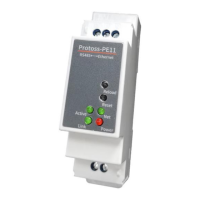
Maintenance of the Protoss-PE11 is simplified by several built-in features. The device includes a "Reload" button that allows users to restore the device to factory settings by pressing it for more than 3 seconds. This is invaluable for troubleshooting or reconfiguring the device from scratch. A separate "Reset" button provides a hardware reset function, which can be useful for resolving temporary issues.
LED indicators on the device provide immediate visual feedback on its status. The "Net" LED indicates the Ethernet connection status (On for OK, Off for no connection). The "Active" LED shows UART data transfer activity (0.3s Off -> 0.9s On for TX Output, 0.3s Off -> 0.3s On for RX Receive, On for bidirection). The "Power" LED confirms power input status (On for OK, Off for NG). Finally, the "Link" LED indicates the server connection status (On for netp Socket connection OK, Off for no netp Socket connection). These LEDs allow for quick diagnosis of connectivity and operational issues without needing to access the configuration interface.
The ability to perform OTA wireless upgrades for firmware ensures that the device can be maintained remotely, reducing the need for on-site visits and minimizing downtime. This is particularly beneficial for devices deployed in remote or hard-to-reach locations. The detailed pin definitions and interface descriptions provided in the manual also aid in troubleshooting and proper wiring during installation and maintenance. The RS485 interface, with its two-wire link (A(DATA+), B(DATA-)), supports up to 32 RS485 devices and a cable length of up to 1200 meters, with a recommendation to add a 120 Ohm terminal resistor for lengths over 300 meters, which is important for maintaining signal integrity and reducing maintenance issues related to communication errors.
 General
| Fiber Type | Single-mode |
|---|---|
| Wavelength | 1310 nm |
| Transmission Distance | up to 20 km |
| Serial Port | RS-232 |
| Power Supply | 5VDC |
| Storage Temperature | -40°C to 85°C |
| Humidity | 5% to 95% (non-condensing) |
| Weight | 200g |
| Ethernet Port | 1 x 10/100Base-T(X) auto-negotiation RJ45 port |


 To Next Page