EasyManua.ls Logo

HHC CH05B - User Manual

HHC CH05B
2 pages
To Next Page IconTo Next Page
Loading...
CH05BRemoteControlInstructions
1.ProductOverview
ProductNameRemoteControl
ProductModelNo.CH05B
FCCID:2AEQWCH05HHC006
2.Environmentrequirement
Operationtemperature:+10~+40.
Storagetemperature: 10~65.
OperatingHumidity10%~80%RHnoncondensing.
StorageHumidity10%~85%RHnoncondensing.
3. DirectionsforOperation
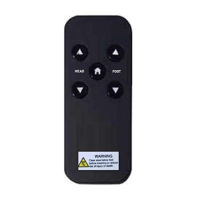
3.1PairingRemote
Unplugthe
bedfromthepowersource,thenpressandholdHEADDOWNandFLAT
Buttonssimultaneouslyuntilthebluebacklightsoftheremotecontrolareoff.
3.2ADJUST:
3.3ONETOUCHBUTTON:
Question and Answer IconNeed help?

Do you have a question about the HHC CH05B and is the answer not in the manual?

HHC CH05B Specifications

General IconGeneral
BrandHHC
ModelCH05B
CategoryRemote Control
LanguageEnglish

Summary

Product Overview

Environment Requirements

Directions for Operation

Pairing Remote

Unplug the bed, press and hold HEAD DOWN and FLAT buttons until blue backlights turn off.

Adjusting Bed Sections

Use HEAD and FOOT arrows to lift/lower respective bed sections.

One Touch Button

Initiates a one-touch flat position for the bed.

Matters Needing Attention

Additional User Attention and Compliance

Related product manuals