The Hi-Target iHand55 Handheld Controller is a professional data collector designed for surveying and mapping applications, operating on the Android 11.0 system. It combines physical buttons with a touch screen for operation, supporting multiple languages including Chinese and English. The device is built to industrial standards, ensuring durability and reliability in complex operating environments.
Function Description:
The iHand55 serves as a data collector for various surveying tasks, facilitating data transmission, image collection, and real-time voice broadcasts. It is designed to connect rapidly with RTK (Real-Time Kinematic) systems, enhancing efficiency in field operations. The controller's interface is optimized for ease of use, making it suitable for professionals in the field.
Important Technical Specifications:
- Display: 5.5-inch 720x1440 highlighted LCD, readable under strong sunlight.
- Processor: 2.0 GHz, eight-core 64-bit CPU.
- Memory: 32GB ROM + 3GB RAM.
- Storage Expansion: Built-in Micro SD card slot, supporting up to 256GB expansion (FAT32 and NTFS formats).
- Operating System: Android 11.0.
- Connectivity: Supports Bluetooth, Wi-Fi, and full 4G network (dual card dual stand-by, SIM1 and SIM2).
- Camera: Internal 13-million-pixel camera for field image collection.
- Battery: Internal removable 9200mAh/3.85V lithium battery, providing over 14 hours of work. Supports MTK PE2 fast charging.
- Durability: IP68 waterproof and dustproof standard, capable of withstanding a 1.5-meter drop onto a stainless steel floor.
- NFC: Internal NFC chip for rapid connection between RTK and the handheld controller.
- Input: Full keyboard input method, multipoint capacitive touch screen with touch pen support.
- Ports: Type-C port for USB data line and charging.
- Temperature Range: Must be used within -20°C to 55°C.
Usage Features:
- Industrial-Standard Design: Ensures resilience against chemical and impact damage, suitable for demanding field conditions.
- Highlighted LCD: Provides clear visibility even in strong sunlight, crucial for outdoor work.
- Wireless Data Transmission: Bluetooth, Wi-Fi, and 4G capabilities enable convenient and versatile data transfer with receivers.
- Image Collection: The 13-million-pixel camera allows for on-site image capture, useful for documentation and visual data.
- Long Battery Life: The large-capacity lithium battery supports extended working hours, meeting all-weather requirements.
- NFC Connectivity: Facilitates quick and seamless connection to RTK devices, streamlining setup processes.
- Fast Charge Technology: Reduces downtime by allowing rapid battery charging.
- Full Keyboard Input: Offers a comprehensive input method, complementing the touch screen for efficient data entry.
- Local Online Upgrade: Enables quick and easy software updates.
- Keyboard Functions:
- Power: Press for 3 seconds to power on/off; press for 1 second to toggle screen backlight.
- APP: Quick start for the default Hi-Survey Road software.
- Fn: Short press cycles input methods (English association, number 123); long press pops up system input method selection.
- Back: Cancels or exits current window operation.
- OK: Confirmation.
- Collect: Manual data collection.
- Delete: Deletes input.
- Space: Adds a space.
- Shift: Switches input function.
- Fn + Direction Up/Down: Adjusts volume.
- Power + Direction Down: Takes a screenshot, saved to Mobile phone storage → Pictures → Screenshots.
- SIM Card Installation: Supports DSDS with SIM1 as default, both SIM1 and SIM2 support full 4G. SIM cards are inserted metal contact side down after removing the left side cover. Slot 1 is Micro SIM, Slot 2 is standard SIM.
- Micro SD Card Installation: Micro SD cards (TF cards) are used for saving collected data and program files. Insert metal contact side down after removing the left side cover. Note: Ordinary SD cards are not suitable.
- Connecting to Computer: Connect via USB data cable. Files can be transferred by pulling down the notice column and selecting "USB for charging," then choosing "File Transfer (MTP)."
- Developer Options: To connect PC version mobile phone assistant, enable USB debugging by tapping "Build number" 7 times in "Settings → System → About Controller."
Maintenance Features:
- Care and Storage: The controller should be carefully used and maintained in a dry environment. Avoid exposure to extreme humidity, high/low temperatures, corrosive liquids, or gases to improve stability and prolong its usage cycle.
- Waterproof/Dustproof Port: The Type-C port has a rubber cover that must be closed when not in use to maintain its waterproof and dustproof integrity.
- Battery Storage: For long-term storage, charge the battery to about 70% and store it in a dry, low-temperature environment. It is recommended to charge and discharge the battery every 3 months.
- Charger Usage: Only use the product's standard charger. Charging should occur within a temperature range of 5°C-45°C. Initial charges require 3 hours; subsequent fast charges take less than 3 hours.
- Battery Safety: Use only the configured battery and charger. Do not expose the battery to fire or metal short circuits. Replace the battery if it becomes hot, deformed, leaks, emits an odor, or shows any other abnormalities during use, charging, or storage.
- Backlight Management: Turn off the backlight when the iHand55 is not in use to save electricity and extend working time.
- System Upgrade: Supports both local and wireless upgrades.
- Local Upgrade: Copy firmware to the SD directory, then use the "System Update App" to select the firmware and "Install Now." The system will restart and update.
- Wireless Upgrade: Access the "System Update App." If a new version is available, download the firmware update patch. After download, confirm the update (avoid operating the device during this time). The device will then enter the upgrade interface, complete the update, and restart automatically.

 Need help?
 General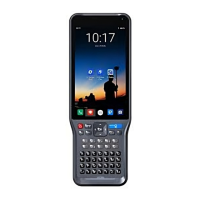

 To Next Page