Easy HD Expressway!
WWW.HIDES.COM.TW 4
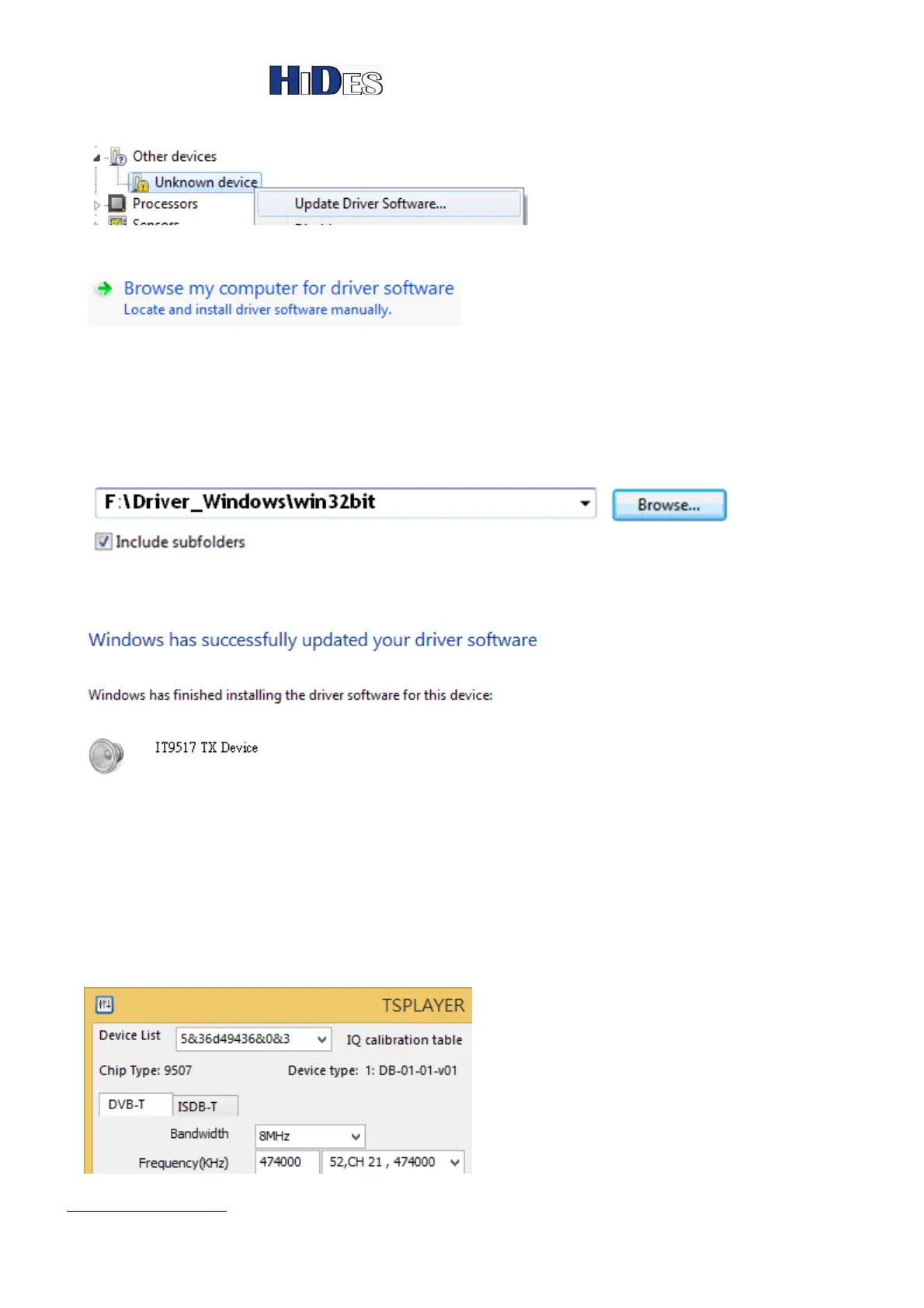
4. Right click on the “Unknown driver” and then click on “Update Driver Software”.
5. Click on “Browse my computer for driver software”.
6. Click on “Browse” button and select the driver folder. If you are installing on a 32-bit platform,
please select \ Driver_Windows\win32bit on the CD, otherwise select
\Driver_Windows\win64bit\vistax64 for Vista 64-bit OS.
or \Driver_Windows\win64bit\win7x64 for Win7 64-bit OS.
or \Driver_Windows\win64bit\win8x64 for Win8 64-bit OS.
7. Click on next and you will see the following after it’s finished.
TS Player - Play a transport stream file and set modulator
1. Make sure to connect UT-210 with the antenna first.
2. Double click on “TsPlayer.exe” in TsPlayer folder.
3. Click on the tab “DVB-T” or “ISDB-T”.


 To Next Page