The HIFIMAN HM1000 is a portable DAC (Digital-to-Analog Converter) that supports both Bluetooth and USB-C connections, designed for high-definition audio playback. This device serves as a versatile audio hub, allowing users to enjoy music from various sources with enhanced sound quality.
Function Description:
The HM1000 primarily functions as a high-quality portable DAC and headphone amplifier. It can receive audio wirelessly via Bluetooth or through a wired USB-C connection, converting digital audio signals into analog sound for headphones or external amplifiers.
For Bluetooth Direct Connection, the device powers on with a blue light flashing, indicating pairing mode. Users can then search for "HIFIMAN-HM1000" on their mobile phone or other Bluetooth source and connect. Once connected, the blue light remains steady, and high-definition Bluetooth music can be enjoyed with headphones connected to the HM1000. It's recommended to check the Bluetooth connection and supported protocol for optimal performance.
As a USB DAC, the HM1000 requires a driver installation, which can be found on the HIFIMAN official website. After installing the driver and connecting the HM1000 to a computer via a USB-C cable, pressing the Input button once will turn the main panel light green, indicating USB AUDIO mode. The computer's playback device should then be set to HM1000 for music playback. For iOS devices, a Lightning to USB3 Camera Converter is recommended, and the charging button should be set to no-charging mode before connecting and switching to USB AUDIO mode. Type-C to Lightning cables are not supported. For MAC connections, Apple's Type-C to Type-A adapter should be used.
The device offers multiple Output Selection options. Upon first power-on, the default output is balanced 3.5mm, indicated by a green light. Pressing the output selection key once changes the output to single-ended 3.5mm, indicated by a red light. Pressing it again switches to the 4.4mm Balanced headphone jack (green light). A subsequent press changes to 4.4mm Balanced line output / 3.5mm single-ended line output (green light). The HM1000 remembers the last used output configuration.
Input Selection defaults to Bluetooth mode after powering on. A flashing blue light indicates pairing mode, and a steady blue light means it's connected. When connecting via USB, pressing the input selection key once switches to USB AUDIO mode, with the light turning green.
Gain Selection provides three options: high, low, and super-low.
- High gain is suitable for lower sensitivity and higher impedance headphones, offering a relatively large driving force.
- Low gain is designed for headphones with higher sensitivity and lower impedance, providing a smaller driving force.
- Super-low gain is ideal for in-ear monitors (IEMs) with very high sensitivity and very low impedance, offering the smallest driving force.
Gain selection is performed by sliding a switch.
Charging the HM1000 involves connecting a charging cable from a power supply. A steady red light indicates charging, and it turns green when fully charged. Pressing the charge button switches to non-charging mode, where the charging status light flashes red and green. If the battery is low, the charging status light flashes red, and if too low for operation, the device will shut down.
Important Technical Specifications:
- Size (LxWxH): 115mm x 62mm x 18mm
- Frequency Response: 20Hz - 40kHz
- Battery Life: 9.5 hours
- Output Options:
- 3.5mm Single-ended
- 3.5mm Balanced
- 4.4mm Balanced
- 3.5mm Line output
- 4.4mm Line out
- Bluetooth Version: Bluetooth 5.0
- Codecs: LDAC, aptX-HD, aptX, AAC, SBC
- Sampling Rate: Up to 24bit/384kHz
- Supported Music Formats:
- WAV, FLAC, ALAC, APE, AIFF (aif-f) up to 24bit/192kHz (with some limitations for APE at higher sample rates).
- DFF and DSF for 1bit 2.8MHz (DSD64).
- Other formats: MP3, OGG, AAC, WMA.
Exterior Features:
The HM1000 features a sleek, rectangular design, typically in a red finish.
- Top Panel: Includes the Power Button, Volume controls (+/-), and a Micro SD Card slot (for firmware updates only).
- Side Panel: Features buttons for Output, Input, and Gain (High/Low/Super low).
- Bottom Panel: Houses the 4.4mm Balanced output, 3.5mm Single-ended LineOut, USB-C power and Data Input, and a Charging Switch.
- Front Panel: A large, black display area, though the body has no screen to show volume or other information.
Usage Features:
- Volume Control: Volume can be increased or decreased using the dedicated buttons. The maximum volume is 32, and the minimum is 0.
- Headphone Sockets/Lineout:
- The 3.5mm headphone socket supports both TRRS (balanced) and TRS (single-ended) jacks.
- The 4.4mm headphone socket defaults to balanced mode.
- Caution: Never connect headphones before selecting the output, and never connect headphones when the line out option is selected, as this may damage the headphones or the listener's hearing.
- Line-out can be connected to amplifiers or other audio equipment (cables sold separately).
- USB-C Connectivity:
- Connects to a computer for data transmission.
- Used with a power supply for charging.
- Connects to mobile phones for USB DAC features (phone must support USB AUDIO OTG).
- 4.4mm Balanced Line Output Wiring Specifications: Detailed diagrams are provided for various connections, including:
- 4.4mm balanced plug schematic.
- 4.4mm balanced to dual XLR connections.
- 4.4mm balanced to single-ended RCA connections.
- 4.4mm balanced to dual mono 6.3mm connections.
- 4.4mm balanced to dual stereo 6.3mm connections.
- 4.4mm balanced to single-ended 3.5mm connections.
- Warning: Do not use an ungrounded connector, as prolonged use may damage the HM1000.
Maintenance Features:
- Cleaning: Do not use any chemicals or detergents to clean the player.
- Environmental Conditions:
- Do not expose the player to water or other solvents.
- Avoid humidity, dust, smoke, and other harsh conditions.
- Operating temperature should be between -6°C to 40°C. Storage should be at normal room temperature.
- Disposal and Recycling: The device contains electronic parts and a battery, and should be disposed of separately from household waste. Contact local environmental departments for disposal and recycling information. The battery will be removed and properly recycled. In the European Union, the crossed-out wheeled bin symbol indicates that the product should not be disposed of with household waste, and consumers may be penalized for inappropriate disposal.
- Warranty: HIFIMAN provides a one-year limited warranty against defects in material or workmanship from the date of original retail purchase. The warranty does not cover damage from abuse, misuse, misapplication, unauthorized modifications, or lack of a valid dated receipt. Disassembling or modifying the product will void the warranty. For warranty claims, contact HIFIMAN customer service or an authorized dealer.

 Need help?
 General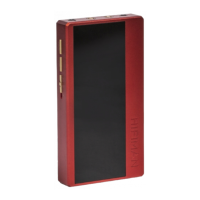

 To Next Page