Need help?
Do you have a question about the HiFiMAN TWS 500 and is the answer not in the manual?
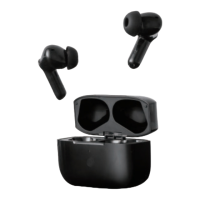
The HIFIMAN TWS 500 are true wireless earbuds designed for an immersive listening experience, featuring noise cancellation and a range of convenient controls for music, calls, and mode switching. These earbuds are accompanied by a charging case that not only protects them but also provides additional battery life, ensuring they are ready for use whenever you need them.
The TWS 500 earbuds are engineered to provide high-quality audio with the added benefit of active noise cancellation (ANC) and a transparency mode, allowing users to choose between blocking out ambient sound or staying aware of their surroundings. They operate wirelessly via Bluetooth, connecting seamlessly to your source device. The earbuds automatically power on when removed from their charging case and power off and begin recharging when returned. They also feature an indicator light for status updates.
The earbuds automatically power on when taken out of the charging case. When placed back into the case, they will power off and start recharging. If the earbuds are out of the case and off, you can manually power them on by pressing and holding both the left (L) and right (R) earbuds for 3 seconds. A "power on" prompt sound and a flashing white LED light will confirm activation.
To pair the TWS 500 with a source device, simply remove the earbuds from the charging case. They will automatically enter pairing mode, indicated by a flashing white LED light. You have a 3-minute window to connect the earbuds to your device. If no connection is established within this time, the earbuds will exit pairing mode and power off. To re-enter pairing mode, return the earbuds to the charging case and then remove them again. Once in pairing mode, open the Bluetooth menu on your device and select "HIFIMAN-TWS500." A "Connected" prompt will confirm successful pairing.
The TWS 500 offers flexible listening options, allowing you to use either the left or right earbud independently.
Calls can be initiated and answered using either earbud.
The TWS 500 offers various modes to enhance your listening experience.
To charge the earbuds, simply place them back into their charging case and close the lid. A white LED light on the earbuds will illuminate to indicate that they are charging.
Connect the charging cable to the charger port on the charging case. While the case is charging, the indicator light will flash. Once the charging case is fully charged, the indicator light will turn solid.
To check if the charging case needs to be charged, press the round button on the case once. If charging is required, the LED light will flash four times. If the LED light remains on, it signifies that the charging case is fully charged.
 General
| Driver Type | Dynamic |
|---|---|
| Frequency Response | 20Hz-20kHz |
| Bluetooth Version | 5.0 |
| Water Resistance | IPX4 |
| Type | True Wireless |

 To Next Page