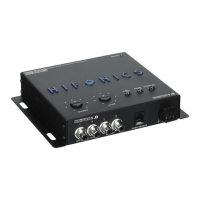
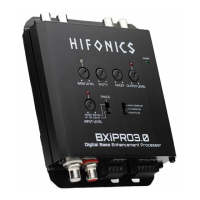
The Hifonics BXiPRO3.0 Digital Bass Enhancement Processor is a sophisticated audio component designed to enhance and restore bass levels in a car audio system. It offers extensive control over bass characteristics, input/output levels, and turn-on methods, making it suitable for both aftermarket and factory source units.
Function Description:
The primary function of the BXiPRO3.0 is to enhance and restore bass levels in an audio system. It achieves this by allowing users to fine-tune bass width and sweep, which are crucial for optimizing sound performance. The unit processes audio signals to generate a more impactful and defined bass output, which can then be fed to a subwoofer amplifier.
It features both low-level (RCA) and high-level (speaker level) audio inputs, making it compatible with a wide range of source units. The balanced differential inputs are specifically designed for noise reduction, ensuring a clean audio signal. The processor also includes input and output signal clip indicators, which help in setting optimal gain levels and preventing distortion.
For system integration, the BXiPRO3.0 offers multiple turn-on triggers: remote wire input, DC sense, and music sense. This flexibility allows for seamless integration into various car audio setups, whether using an aftermarket head unit with a dedicated remote output or a factory system that requires sensing a DC offset or audio signal to turn on.
The unit provides an adjustable bass enhancement preamp output, a preamp full-range output, and a mono adjustable subwoofer output level. The subwoofer output level can also be controlled remotely via the dual-function bass remote, which allows for on-the-fly adjustments of both bass level and output level.
Important Technical Specifications:
- Size: 109W x 134L x 30.5H (mm)
- Fuse Value: 1A mini ATC
- Voltage Range: 9.5V - 15V
- Bass Remote Type: HF-U-02
- Fixed Voltage Output Full Range: 4V
- Adjustable Subwoofer Output Voltage: 0V - 9V
- Maximally Flat Frequency Response Main (-3dB): 10Hz to >50kHz
- Input Impedance Low Level Inputs: 20k Ohms
- Input Impedance High Level Inputs: 20k Ohms
- Maximum High Level Input Voltage (before clipping): >48V
- Maximum Output Voltage at 1.0% THD+N (subwoofer output): 9.0V
- Signal to Noise Ratio (ref to 2Vrms out, unity gain): -84.0dBA
- EQ Boost: Variable to +8.1dB
- Unit Turn On Options: 30mV High Level Audio, 59mV RCA Audio, 2.2V DC Offset
- Current Draw: 0.32A
- Turn On Delay Time: 0.1 seconds
- Setup Test Tone Track: 100 Hz & 1000Hz
Usage Features:
- Adjustable Bass Enhancement Preamp Output: Provides a dedicated output for enhanced bass signals.
- Bass Remote Input: Connects to the included dual concentric bass knob for remote control.
- Preamp Full Range Output: Offers a fixed 4V full-range output for other amplifiers.
- Adjustable Bass Level Output: Allows for precise control over the overall bass output.
- Adjustable Bass Width and Sweep Adjustments: These are key features for fine-tuning the bass characteristics.
- Width Control: Determines how wide the frequency range is that is centered on the sweep frequency. A "Narrow" setting focuses on a tighter frequency band, while a "Wide" setting affects a broader range.
- Sweep Control: Allows selection of the center frequency (e.g., 50Hz or 100Hz) that the BXiPRO3.0 outputs, enabling users to target specific bass frequencies for enhancement.
- Output Level Control with Clip Indicators: Helps in setting the output gain correctly to prevent clipping and distortion.
- Input Level Control with Clip Indicators: Assists in matching the input signal level from the source unit, ensuring a clean signal enters the processor.
- Selectable Input Level Range (RCA or Speaker Level): A switch (8) on the unit allows selection between low-level (RCA) and high-level (speaker level) inputs, accommodating different source unit types.
- Selectable Turn On Trigger: Users can choose between remote wire input, DC sense, or music sense for automatic power-on, offering versatility in installation.
- Low Level Inputs (RCA Level): Standard RCA inputs for connecting to aftermarket head units.
- High Level Input (Speaker Level): Allows connection directly to speaker outputs from a factory head unit, supporting up to 48V RMS MAX.
- Power Connector with Two Remote Output Trigger Wires: Provides power connections and additional remote outputs for turning on other components like amplifiers.
- Dual Concentric Bass Knob (A. Bass Level, B. Output Level): The remote control allows independent adjustment of the bass enhancement level and the overall output level, offering granular control from the driver's seat.
- Test Tone Setup: The manual outlines a procedure for setting input and output levels using provided 1kHz (high level) and 100Hz (low level) test tones. This ensures optimal gain staging and minimizes distortion.
Mounting and Hardware:
- Mounting Location: Select a flat surface with sufficient room for connections.
- Mounting Brackets: The unit comes with attached mounting brackets and hardware. Ensure proper clearance and avoid wiring harnesses, mechanical components, or gas tanks underneath.
- Wire Routing: Route power, ground, and remote wires away from moving parts and heat sources to prevent damage.
Wiring:
- Power Wire: Connect to a constant or switched +12V source with a 1 Amp in-line fuse (provided).
- Ground Wire: Connect to a clean chassis ground point. Remove paint/primer to expose bare metal and use a ring terminal with a lock or star washer for secure connection.
- Remote Wire: Connect to the source unit's remote wire (amplifier turn-on or accessory wire) that provides +12V when the source unit is "on" and 0V when "off."
Maintenance Features:
- Troubleshooting Guide: The manual includes a comprehensive diagnostics and troubleshooting section to help identify and resolve common audio system issues such as low output power, hiss/white noise, electrical interference, ticking/whine that changes with engine RPM, and constant whine. This section provides step-by-step checks for connections, voltage levels, and component isolation to pinpoint faults.
- Secure Connections: Screw-in power and speaker connectors are designed to prevent accidental disconnection, contributing to system reliability and reducing the need for frequent re-connections.
- Balanced Differential Inputs: These inputs are specifically designed to reduce noise, which is a common issue in car audio environments, thereby contributing to a cleaner and more stable audio signal.


 To Next Page
 General