
 Need help?
Do you have a question about the Highland HIO75.2MP and is the answer not in the manual?
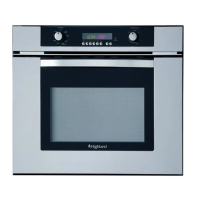
Illustration of a oven showing the components of the oven.
Oven cooling fan to cool the control panel. Runs after cooking/cleaning.
Oven rack guides at four levels. Position racks before turning on.
Buttons for controlling oven functions like clock, timer, cook, stop, and light.
Shows time, temperature, and function status. Includes icons for cavity selection and lock.
Selectors for cooking mode and temperature. Includes OFF, BAKE, GRILL, etc.
Covers Bake, Grill, Convection Bake, Convection Roast, and Fast Preheat functions.
Uses only the fan for defrosting without heating elements.
Details on flashing symbols, numbers, beeps, lock symbol, and power failure display.
Information on Fast Preheat, safety lock, default settings, and fan functions.
Explanation of F Failure Number Codes displayed for electronic control problems.
Tips on preheating, general suggestions, utensil use, and rack placement.
Information on oven condensation, temperature, and high altitude baking.
Instructions for removing standard and extendable oven racks.
Instructions for replacing standard and extendable oven racks.
Steps to set the clock using CLOCK, INC/DEC keys.
Steps to set the timer using TIMER, INC/DEC keys.
Move mode/temp knobs. Select desired temp or use preset. Cavity heats up.
Special low energy mode. Select Eco Bake mode and temperature.
Light key activates lights. Turn on/off automatically with door (75cm).
Select mode/temp, then cook time. Oven turns off automatically at end.
Set stop time using STOP key. Clock calculates start/stop times.
Bake on single rack, use proper utensils, check doneness at minimum time.
Chart providing rack position, temperature, and time for various food items.
List of foods suitable for convection bake, e.g., appetizers, cookies, cakes.
Convert standard bake recipes to convection bake by reducing temp.
Use for defrosting small pieces. Only fan operates, no elements.
Convert standard bake recipes to convection roast. Roasts take less time.
Chart for roasting meats with rack position, oven temp, time, and internal temp.
Chart for convection grill cooking of beef, poultry, and pork.
Chart for grilling beef, poultry, pork, seafood, lamb, and bread with settings.
Details on Sabbath Mode, Oven Offset, Unit selection, and Clock Format.
Instructions for setting and using Sabbath mode, including its limitations and behavior.
Clean with warm soapy water or glass cleaner. Do not use abrasives.
Use warm soapy water. Do not clean racks in self-clean function.
Clean area outside gasket with warm soapy water and non-abrasive pad.
Remove racks, wipe spills. Clean door edge/frame before cycle.
Rotate knobs to clean. Set cleaning time. Door locks automatically.
Select 2, 3, or 4 hours for cleaning. Adjust minutes if needed.
Set stop time using STOP key. Oven starts automatically at delayed time.
Open door, lift hinge bracket, hold firmly, remove door.
Insert hinges into slots, secure brackets, close door slowly.
Turn off power, remove lens, replace bulb, screw lens back on.
Problems with uneven browning, food too brown on bottom, dry food, slow baking.
Problems with soggy pie crusts, pale cakes, cracked cakes, and over-browned pie edges.
Troubleshooting F03, F04, F12 errors, and other display related problems.
Issues with the oven door being locked or not releasing.
Problems with oven not heating, uneven cooking, or temperature inaccuracies.
Troubleshooting oven light not working, staying on, or self-clean issues.
Problems with clock/timer function and excessive moisture during baking.
Guidance on contacting service and finding model/serial number.
List of tools required for installation: tape measure, pencil, screwdriver, level, etc.
Requires 230-240 VAC, 50 Hz electrical supply with copper wires ONLY.
Select convenient location away from drafts. Ensure electrical power availability.
Electrical ratings, connected load, and overall dimensions for 75 cm single oven.
Electrical ratings, connected load, and overall dimensions for 75 cm double oven.
Instructions for moving, installing, leveling, and securing the oven to the cabinet.
Instructions for moving, installing, leveling, and securing the double oven to the cabinet.
Critical safety warning about electrical connections and qualified installers.
Must use copper wire, multipole circuit breaker, and proper grounding.
Steps to connect the flexible cable to the oven's terminal block.
Verify correct electrical supply and grounding before proceeding.
Steps to set the clock using CLOCK, INC/DEC keys.
Move knob to BAKE, check fan/lights, listen for beep at 175°C.

 To Next Page
 General