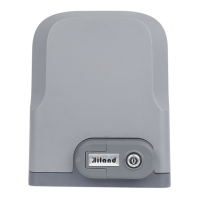
This document is the user manual for the Hiland SLG5150X/SLG5170X Sliding Gate Opener. It provides comprehensive instructions for installation, operation, and maintenance of the device.
Function Description:
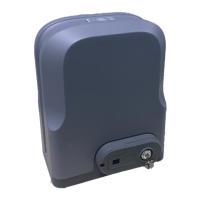
The Hiland SLG5150X/SLG5170X is a sliding gate opener designed for residential or commercial use. Its primary function is to automate the opening and closing of sliding gates, providing convenience and security. The gate opener utilizes a rack and gear transmission system for movement. It supports both single button and three button remote control modes, allowing for flexible operation. Safety features include obstacle reversal, infrared detection, and the ability to install safety stop blocks. The system can also be integrated with optional accessories such as wireless keypads, infrared sensors, and alarm lamps for enhanced functionality and safety.
Important Technical Specifications:
The manual details two main series, SLG5150X and SLG5170X, each with different power supply and gate weight capacities.
SLG51501 (SLG5150X series):
- Power supply: 110VAC/50Hz
- Motor power: 150W
- Gate moving speed: 13m/min
- Maximum weight of gate: 500Kg
- Remote control distance: ≥30m
- Remote control mode: Single button mode / Three button mode
- Limit switch: Magnetic limit
SLG51503 (SLG5150X series):
- Power supply: 220VAC/50Hz
- Motor power: 150W
- Gate moving speed: 13m/min
- Maximum weight of gate: 500Kg
- Remote control distance: ≥30m
- Remote control mode: Single button mode / Three button mode
- Limit switch: Magnetic limit
SLG51701 (SLG5170X series):
- Power supply: 110VAC/50Hz
- Motor power: 170W
- Gate moving speed: 18m/min
- Maximum weight of gate: 800Kg
- Remote control distance: ≥30m
- Remote control mode: Single button mode / Three button mode
- Limit switch: Magnetic limit
SLG51703 (SLG5170X series):
- Power supply: 220VAC/50Hz
- Motor power: 170W
- Gate moving speed: 18m/min
- Maximum weight of gate: 800Kg
- Remote control distance: ≥30m
- Remote control mode: Single button mode / Three button mode
- Limit switch: Magnetic limit switch
Common Specifications for all models:
- Noise: ≤58dB
- Working duty: S2, 20min
- Recording of up remote controls: 40
- Frequency: 433.92 MHz
- Working temperature: -20°C ~ +70°C
- Package weight: 10Kg
The gate opener is suitable for gates weighing less than 500kg/800kg and with a length less than 8m. It must be installed inside an enclosure or yard for protection.
Usage Features:
- Remote Control Operation: The system supports both single-button and three-button remote control modes. In three-button mode, separate buttons control OPEN, CLOSE, and STOP functions. In single-button mode, one button cycles through OPEN/STOP/CLOSE/STOP.
- Pedestrian Mode: A dedicated fourth button on the remote control allows for pedestrian access, opening the gate for approximately 1 meter.
- Automatic Close Function: The gate opener can be configured for automatic closing after a delay of 3s, 10s, or 30s, or this function can be cancelled.
- Obstacle Reversal Function: When enabled, the gate will reverse its direction if it encounters an obstacle during closing, enhancing safety.
- Infrared Sensor Integration: Optional infrared sensors can be connected to provide security protection. If the infrared ray is covered by people or objects during closing, the gate will open immediately.
- Soft Start Slow Stop: After the initial installation or re-powering, the control unit learns the gate width during the first open/close cycle, enabling a "soft start slow stop" function for smoother operation.
- Adjustable Parameters:
- VR1 (Motor working total time adjustment): Allows adjustment of the motor's total working time from 10 to 90 seconds.
- VR3 (Motor auto-reverse force adjustment): Enables adjustment of the reverse force when the gate meets an obstacle.
- DIP Switch Adjustment: Several functions can be configured using DIP switches, including:
- Automatic close delay time.
- Remote control mode (three button or single button).
- External button switch mode (single button or three button).
- Left/Right installation setting for door opening direction.
- Limit switch setting (Normal open or Normal close).
- Obstacle reversal function (enabled or disabled).
- Infrared detection delay when closing (1 second or disabled).
- Battery Backup: The system supports connection to a storage battery, ensuring operation during power outages. It also includes a charger for the battery.
- Solar Panel Connection: The manual illustrates how to connect a solar panel and solar charger to power the system, offering an eco-friendly and off-grid power solution.
Maintenance Features:
- Regular Inspection: Users are advised to check whether the gate operates normally every month.
- Safety Device Inspection: It is suggested that each gate be equipped with an infrared protector, and regular inspection of these safety devices is required.
- Troubleshooting Guide: The manual includes a comprehensive troubleshooting section that lists common problems, possible reasons, and solutions. This covers issues such as the gate not opening/closing, remote control not working, motor noise, and limit switch problems.
- Professional Installation and Maintenance: The document emphasizes that installation and maintenance must be carried out by professionals to ensure safety and proper functioning.
- Cable Protection: To ensure normal operation and protect cables, motor and power cables, and controlling cables should be buried separately in two PVC tubes.


 To Next Page
 General