6.6 ELECTRONIC KEY DX100
With the readers DX100 it’s possible to read the PX keys and to execute following operations:
- To connect the installation into modality TOTAL, PARTIAL A and PARTIAL B.
- Disconnect the installation.
- To read or to write new PX keys.
Also through the two LED it’s possible :
- To visualize the modality with to connect the installation.
- To visualize the status of the installation :
- Disconnected /Connected and visualization connection type
- Temporization action of EXIT during the connection.
- Status alarm installation.
- Status of the alarm memory installation
- Presence open zones .
- Presence of excluded zones.
- Connection error or configuration
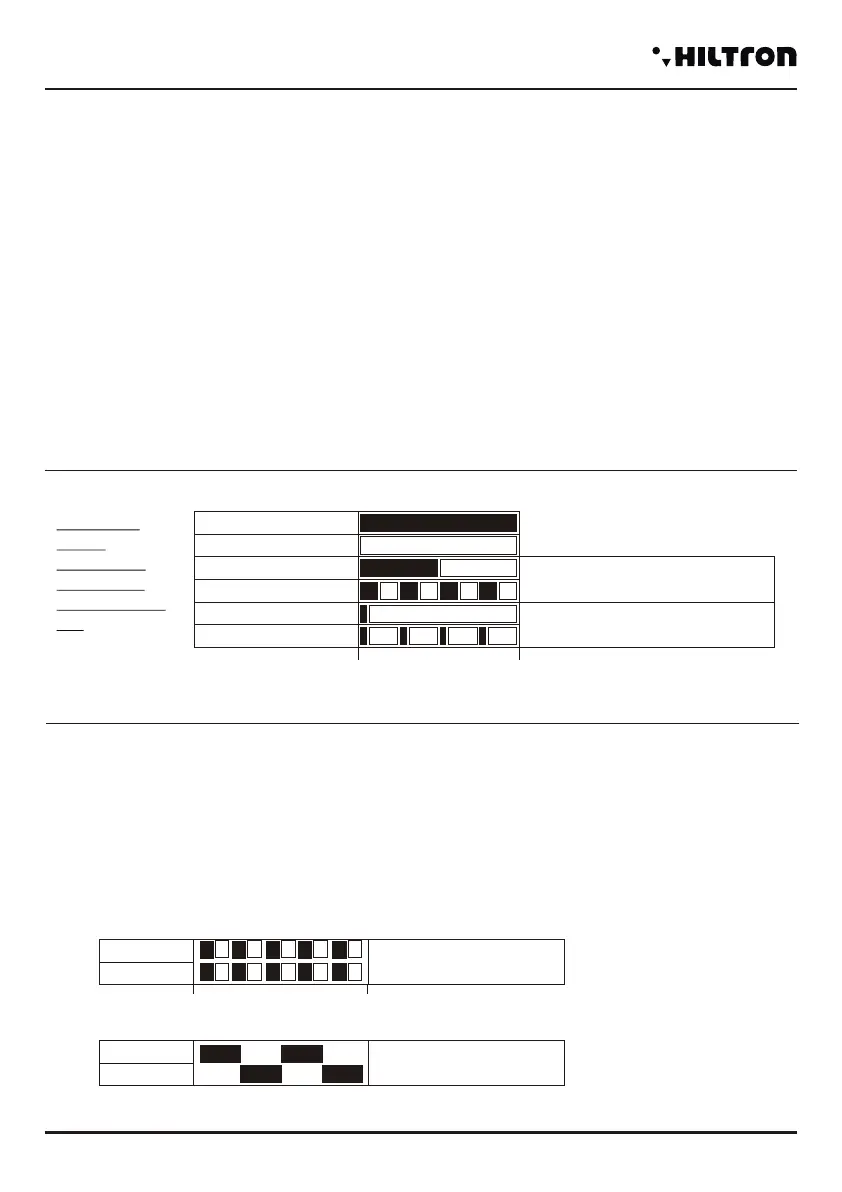
LED SIGNALISATION MODE TABLE
Fast flashing
Slow flashing
On
Off
Fast flash
Slow flashing
Similar time of ignition and
switch-off
Stay on for a short moment and
then off for the rest of the time
The black
depth
Indicates t
time when
the LED stay
on.
0 500ms
6.6.1 KEY USE
RECOGNITION KEY
The recognition visualized through the led:
To approach the PX key to the reader Dx100 and to wait
- Valid key = Contemporary FAST flashing
- False Key = Alternate FAST flashing
Green Led
Red Led
Valid Key
Green Led
Red Led
Key not valid
Flashing is alternate
500ms
0
PROTEC4GSM - PROTEC8GSM - Installation guide and use
security
58
PARTIAL CONNECTION A / B
1 - Bring the key to the reader and
wait the visualization pf correct
recognition(double BEEP).
2 - Away the key
The LED will visualize in sequence the
different connection moodes :
3-To reconnect the key when LED
indicate the connection mode desired.
DISCONNECTION
1 - To approach the key to the reader
2 - When the led visualize the correct recognition
(Valid Key) get away the key to disconnect the installation.
TOTAL CONNECTION
1 - To approach the key to the reader
2 - When the led visualize the correct recognition
(Valid Key) to get away the key to connect the installation.
The Led will visualize the temporisation of EXIT.
VISUALIZATION CONNECTION TYPE
- When the installation is connected to
approach the key to the reader and to wait
before the recognition and then the
visualization of the current modality of
connection.
- The led will visualize the way to current
connection :
Exit Time
Green Led
Red Led
Partial A
Partial B
Total
Green Led flashes
Green Led
Green Led flashes
Red Led
Red Led flashes
Red Led flashes
Installation Disconnected
Green Led
Red Led
0
500ms
0
500ms
0
500ms
0
500ms
Total
Green Led flashes
Red Led flashes
Partial B
Led Verde
Led Rosso che lampeggia
Partial A
Green Led flashes
Red Led
(8+8)
0
500ms
0
500ms
0
500ms
NOTE. The visualization stay active for all
the time of the presence of the key.
When gets away the key,the central unit
isn’t disconnected.
security
Use of the central unit
59


 To Next Page
 Loading...