Need help?
Do you have a question about the Hiltron security XR500 and is the answer not in the manual?
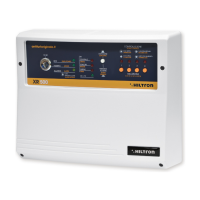
Provides a detailed overview of the XR500 central unit's features and capabilities.
Outlines the key operational functionalities and capabilities of the XR500 burglar central unit.
Details the technical specifications, including voltage, absorption, fuses, and dimensions of the XR500.
Provides essential guidance and precautions for installing the XR500 central unit safely.
Explains how to use the Radiophonic Listening function for optimal sensor placement and interference checking.
Details the connection and requirements for powering the XR500 central unit and its battery backup.
Guides on connecting various components and configuring the XR500 system wiring.
Specific instructions for wiring and configuring the wired Zone 1 of the XR500 system.
Instructions on how to connect a monochannel telephone dialer to the XR500 system.
Guidance on connecting additional indoor or self-powered sirens to the XR500.
Covers the initial steps and modes for programming the XR500 central unit after installation.
Explains how to perform RF channel testing to check peripheral radio device operation.
Details using the Radiophonic Listening function during RF channel testing.
Describes how to enable or disable the XR300 siren during RF channel testing.
Guides on setting various time parameters like exiting, entering, and alarm times.
How to set the time delay for exiting the protected area before the alarm triggers.
How to set the time delay for entering the protected area before the alarm triggers.
How to set the duration for which the alarm signal is active.
Covers various system settings and their configurations.
Configures audible alerts for system arming and disarming.
Sets up alarms for main power loss when the system is enabled.
Configures audible alerts for RF channel sabotage attempts.
Sets up audible alerts for power supply issues when the system is disabled.
Explains the importance and management of the system code for all connected devices.
Step-by-step guide on how to enter or program the 18-bit system code.
Describes how to view the currently programmed system code.
Covers exiting programming modes, including resetting defaults and saving changes.
Instructions for resetting all programmed settings back to factory defaults.
How to exit programming mode without saving any modifications.
How to confirm and save changes made during programming.
Details how to set up or program the XR20 remote control for the system.
Provides an overview of the XR500 central unit's front panel controls, LEDs, and indicators.
Explains the procedures for arming (enabling) and disarming (disabling) the security system.
Step-by-step guide on how to arm the XR500 security system using keys or remote.
Step-by-step guide on how to disarm the XR500 security system using keys or remote.
Information on connecting and using optional command systems for arming/disarming.
Describes how to exclude specific zones from the security system's operation.
Details the operational characteristics of different zones within the XR500 system.
Explains the operation of the wired Zone 1, including delay and immediate modes.
Describes the immediate operation of radio zones 2, 3, and 4.
How to access and interpret the system's alarm memory for event logging.
Provides a guide to understanding the various audible signals emitted by the XR500 system.
Guidance on periodically checking and replacing components like batteries.
Instructions for safely cleaning the XR500 central unit.
Information regarding the fuses for siren output and services, and their types.
 General
| Model | XR500 |
|---|---|
| Type | Security System |
| Manufacturer | Hiltron |
| Operating Temperature | -10°C to 50°C |
| Communication | Wi-Fi |
| Compatibility | iOS, Android |

 To Next Page