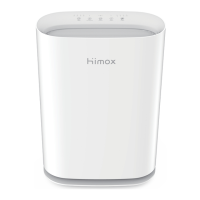
The Himox Mini Desktop Air Purifier, Model No.: HIMOX-H09, is a compact air purification device designed to improve air quality in personal spaces.
Function Description
The primary function of this device is to purify the air. It utilizes a composite filter to remove pollutants and improve the air quality in its immediate surroundings. The purifier operates by drawing in air through a 360° air inlet, passing it through the filter, and then releasing purified air through the top air outlet. It also incorporates an ion generator and a fan to facilitate the purification process.
Important Technical Specifications
- Model Number: HIMOX-H09
- Dimensions: 4.7 inches (Φ) x 7.7 inches (H)
- Net Weight: 0.46 kg
- Power: 2W
- Rated Voltage: DC 5V
- Filter Type: Composite filter
Usage Features
The Himox Mini Desktop Air Purifier is designed for ease of use with a touch-sensitive "Power" button for operation.
Power On/Off and Modes:
- Standby Mode: After connecting to power, the red indicator light illuminates, and the machine enters standby mode.
- Working Mode: Pressing the "Power" button from standby will turn the machine on, and the blue indicator light will illuminate, indicating it's in working mode.
- Sleep Mode: Pressing the "Power" button again (from working mode with blue light) will turn off the indicator light, and the machine enters sleep mode while still purifying.
- Switching Modes: Another press of the "Power" button from sleep mode will turn the blue indicator light back on (working mode), and a subsequent press will switch it back to standby mode.
Installation:
- It is crucial not to install the device near objects that might obstruct the air inlet or outlet, as this could lead to contamination or malfunction.
- Avoid installing the purifier in environments directly exposed to condensation.
- For optimal purification, ensure there is sufficient space around the air purifier.
Restrictions on Use:
- The product should not be used without a filter installed.
- Avoid inserting fingers or foreign objects into the air inlet or outlet.
- Do not block the air inlet or outlet.
- Keep the device away from heat sources (e.g., stoves) or places where it might come into contact with flammable gases.
- Immediately unplug the device if any malfunction occurs, such as smoking or a peculiar smell.
- Do not use the product in environments rich in hydrogen, natural gas, propane, or other flammable gases to prevent electric shock, fire, or other damage.
- Avoid using the product in unstable places where it could easily tip over, or in areas with high temperature or humidity, to prevent electric shock, fire, or damage.
Moving the Device:
- Always stop the device and unplug the power cord before moving it.
Maintenance Features
Filter Replacement:
The filter is a critical component for effective purification and requires regular replacement.
- Shut Down: Turn off the air purifier by pressing the "Power" button, then unplug the power plug to cut off the mainframe power supply.
- Open Base: Rotate the purifier base according to the icon on the side to open it.
- Remove Old Filter: Take out the used filter and dispose of it properly.
- Important: When installing a new filter, remember to remove its plastic bag.
- Used filters that have reached their replacement cycle should not be reused, even if cleaned. Treat them as non-combustible waste.
- Install New Filter: Insert the new composite filter into the mainframe. Ensure it is installed correctly in the bottom slot and in the right direction.
- Close Base: Securely close the purifier base by rotating it.
- Restart: Plug in the power supply and touch the "Power" button to turn on the purifier.
Filter Replacement Frequency:
- It is recommended to replace the filter every 3-6 months, depending on usage and air quality.
Cleaning:
- Filter: Do not wash and reuse the filter.
- Machine Surface: Use a soft cloth to clean the surface of the machine. Avoid strong corrosive detergents, alcohol, or organic solvents, as these can damage the surface, cause sensor issues, or lead to electric shock or fire.
- Safety: Always unplug the power plug from the socket before cleaning or when the machine is not in use to prevent electric shock or fire due to short circuits.
Troubleshooting:
The manual provides a troubleshooting guide for common issues:
- Machine not starting: Check and reconnect the power plug.
- Odor from outlet: Indicates high pollution or a seriously polluted filter. Open windows for ventilation and replace the filter.
- No obvious dust removal/air quality improvement:
- Filter not installed correctly: Install the filter correctly (remove plastic bag before first use).
- Machine placed in a narrow or obstructed space: Remove blockages or move the machine to a clear area.
- Filter is too dirty: Clean and replace the filter.
- Running noise is too loud:
- Installation not tight: Contact after-sales service.
- Other matter stored in the machine: Clean out foreign objects.
- Filter cannot be installed: Filter is installed opposite. Adjust the filter to the correct direction and install it into the bottom slot.
For persistent issues after troubleshooting, contact the service center at support@himox.com.

 Need help?
 General

 To Next Page