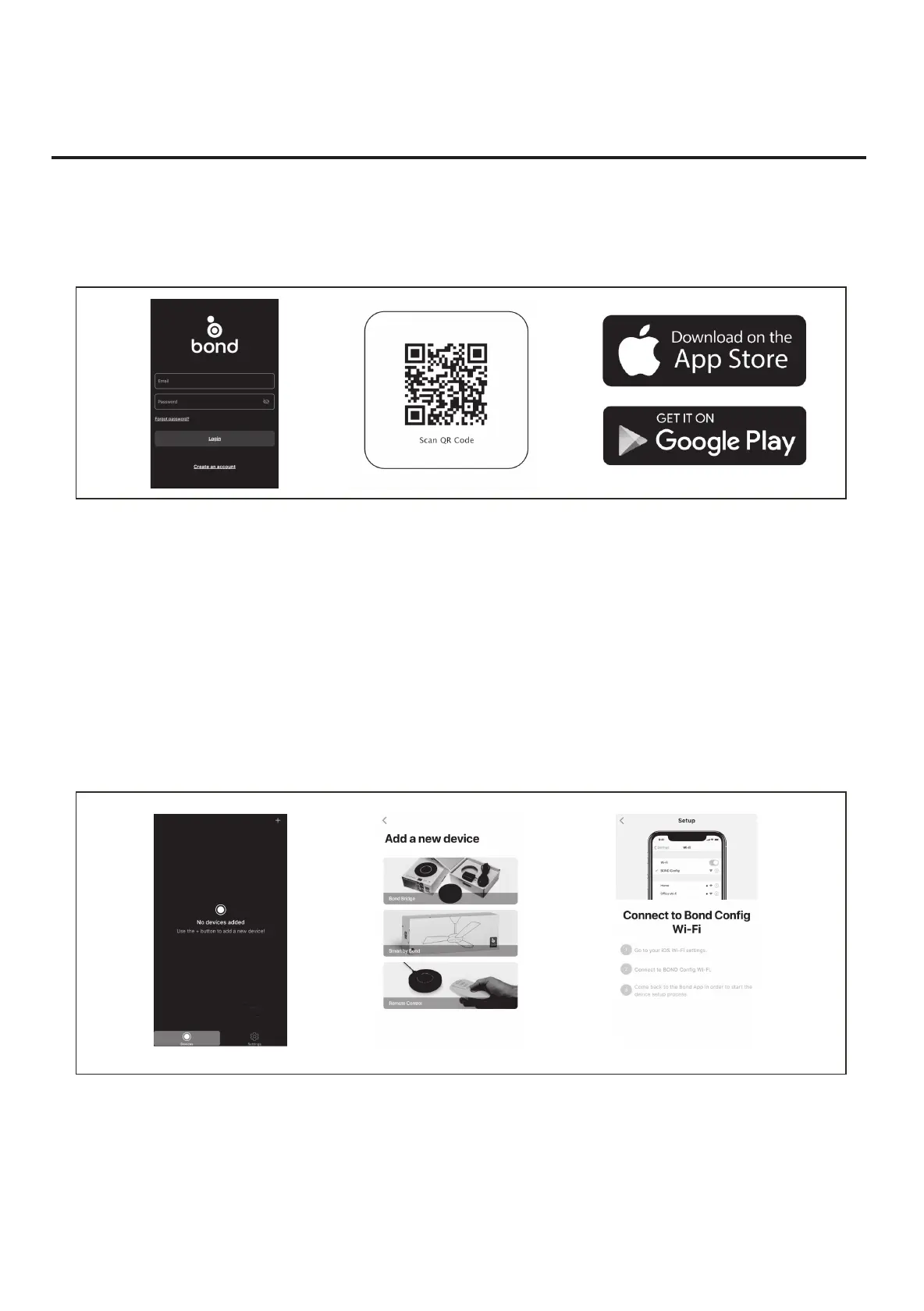
SMART PHONE install add device
1. Install with WIFI APP
A. To enjoy all the potential of your new device, you will need to download the BOND HOME app, available on the Google Play Store and
Apple App Store
B. Use the QR code presented in Figure 1 to download the app, or you can download the app using below link. http://bondhome.io/app.
2. Process to make the fan discoverable:
A. Press and hold the "off" button for 5 seconds. The light will turn on and off to indicate discovery mode.
B. Add a device per the instruction above.
C. After you download the app, register new account and password.
NOTE: Please keep this account property, you will use this account when you connect with you smart speaker.
D. After you Log into the main page, you will see the ”+ ”on the right side of top space.
E. You will see ADD a new device screen, and choose Smart by Bond. Then you could follow the config WiFi process to continue pairing.
F. After the pairing process is complete you can control. the fan speed, light functions on the app.
SMART CEILING FAN WIFI REMOTE CONTROL
INSTALLATION & OPERATING INSTRUCTIONS



 To Next Page