MP-1681 MMi R3 All right @Hinston Electronics Co., Ltd
2. Use device
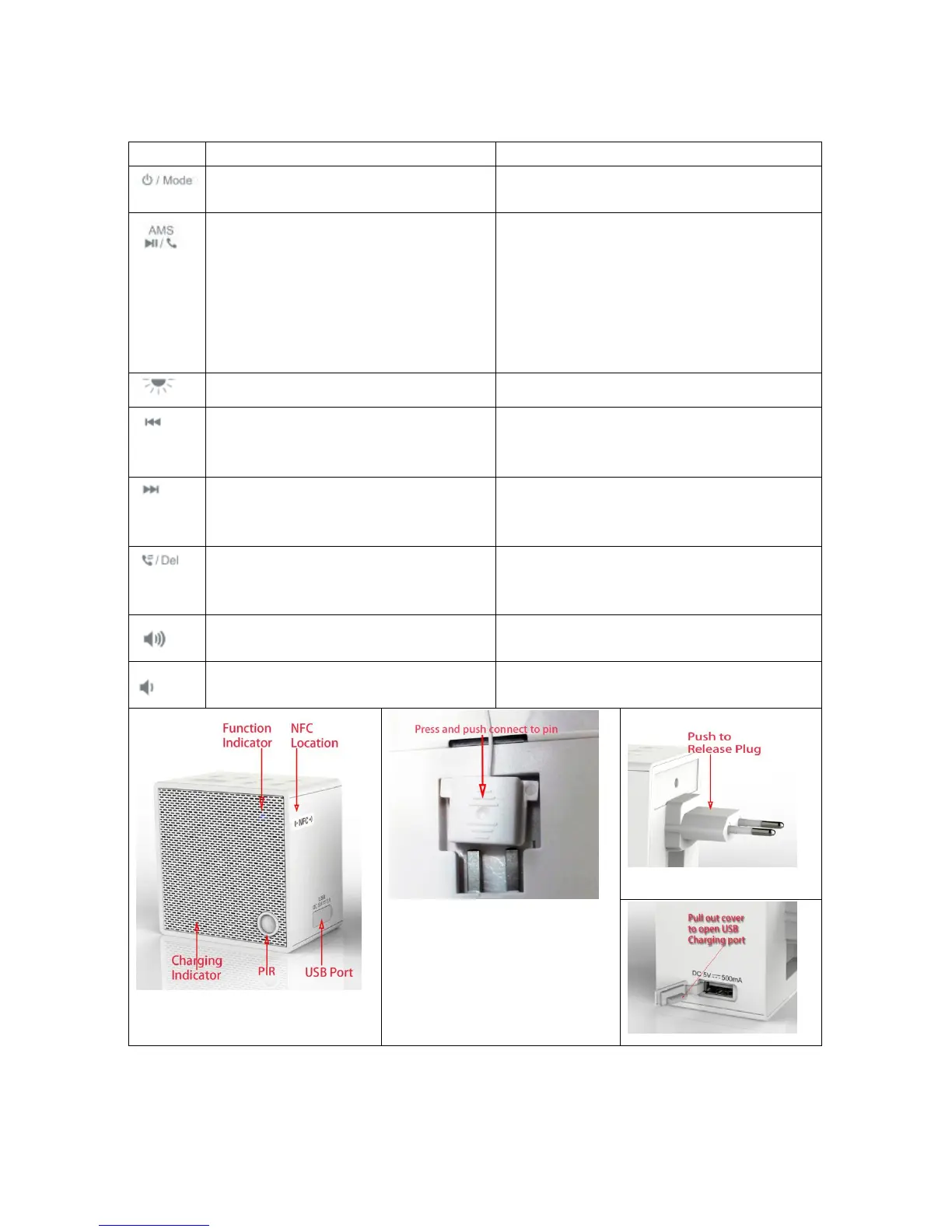
2.1. Button Map
Long press (over 2 seconds)
1,Power on
2,In power on mode, Mode select - radio, BT
1,Whenever receiving call in any mode, pick
up /end the call
2,In radio mode, Mute or not
3,In BT mode, Play/ Pause the music
4,When doing AMS, stop and exit
1, Reject a call any time
2,Start AMS on radio mode
3, Disconnect paired device and pairing new device
on BT mode
4,Select the voice prompt on/off ( only work when
device is standby)
1,In radio, preset station -
2, In BT mode, search the track backward。
1,Auto search lower station on radio mode
2,In BT mode, No function
1,In radio, preset station +
2,In BT mode, skip to next track
1, Auto search upper station on radio mode
2, No function on BT mode
1,In BT/FM mode, redial last call
1,No function on BT mode
2,Delete the existing preset station on radio
Attention:
Don’t connect antenna wire to
any AC shocket !


 To Next Page