8
7. How to connect a control Box
●
There are two pairs of output terminals, two (+) and
two (-), on the back of the body case. They are pro-
vided to divide main wires to two directions from the
main unit. When distributing the power pack in one
direction only, keep one pair of the terminals idle.
●
When connecting main wires to the terminals, be
sure to connect the red wire to (+) and the black wire
to (-).
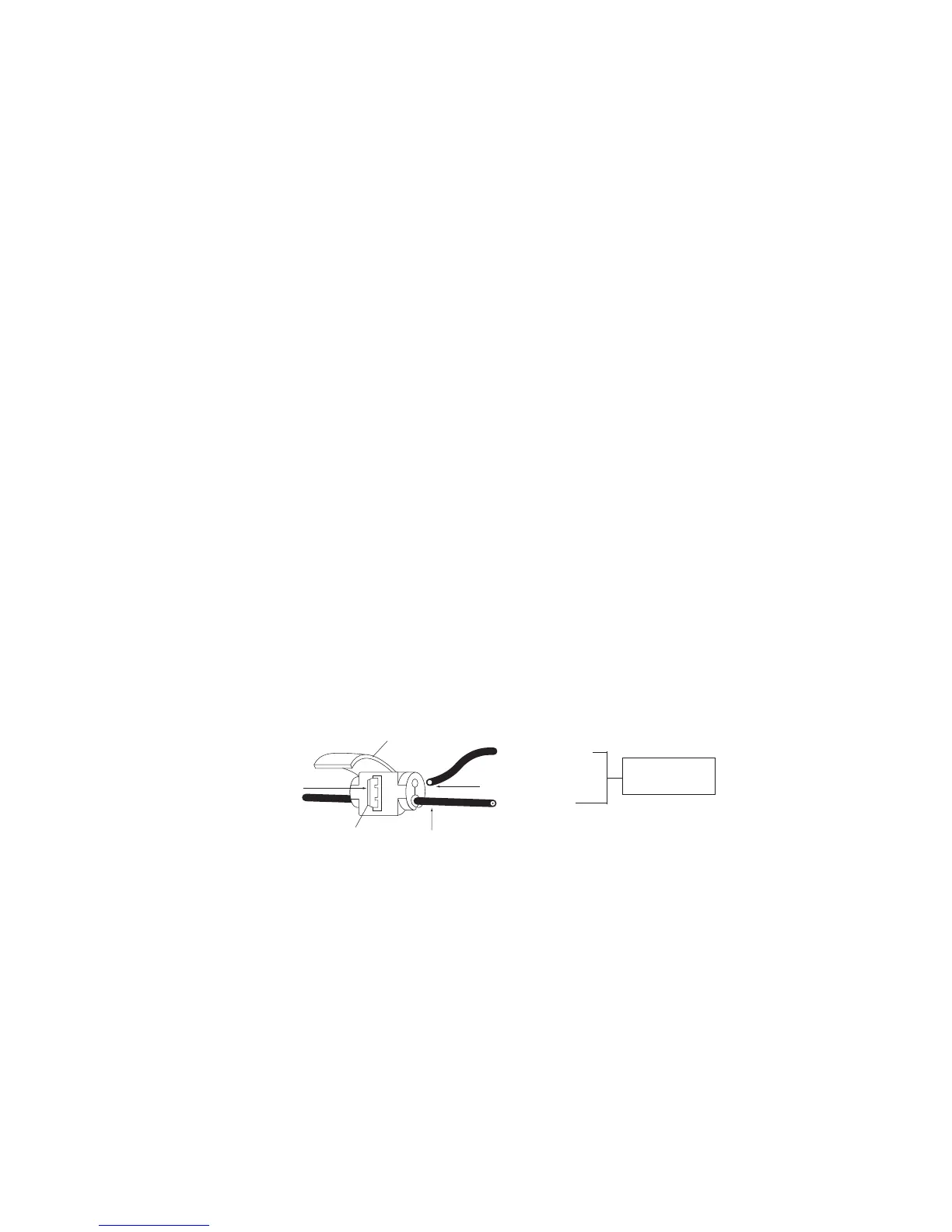
1. Connect the branch wire to the main wire at regular
intervals. Use a U-Element for connection. You can
connect wires without stripping off the wire coating.
2. Insert the main wire
①
into the groove by widening
the lower split (opening) of the U-Element.
3. Fully insert the branch wire
②
into the upper hole until
it stops.
4. Insert a U-shaped element
③
(the comb-shaped
metal part) with a pair of pliers to make it ush with
the plastic body. Only the coating is broken; both
wires still connected.
5. Put an insulation cover
④
on the element and snap it
shut.
6. The connected branch wires have plug receptacles
at their other ends. Connect the control box plugs to
these plug receptacles.
Branch wire
U-shaped element
Trunk-line
wire
Do not strip
coatings.
Insulation cover
①
②
③
④


 To Next Page