19
Operation Instructions
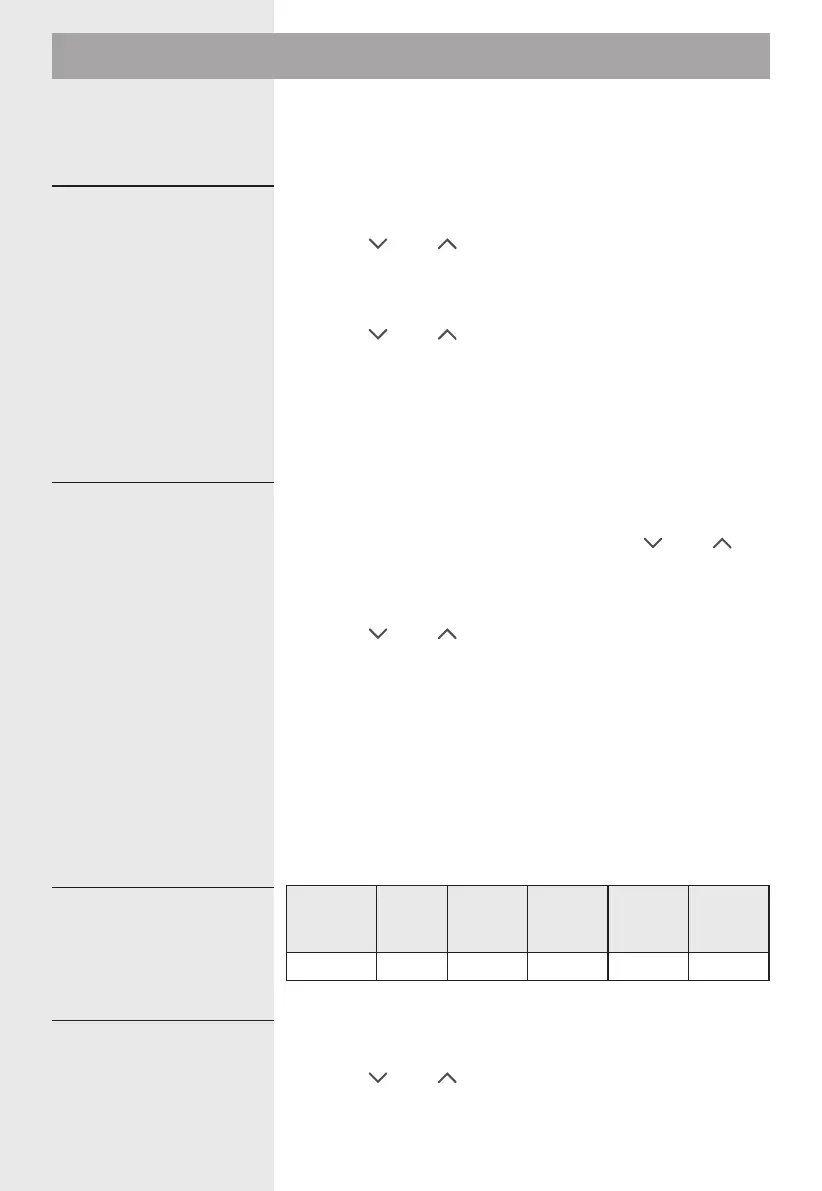
This microwave oven uses modern electronic control to
adjust cooking parameters to meet your needs better for
cooking.
1). Press " Kitchen Timer/Clock " twice "0:00" will display,
the hour figures will flash;
2). Press " " or " " to adjust the hour figures, the input
time should be within 0--23.
3). Press "Kitchen Timer/Clock" to confirm, the minute
figures will flash.
4). Press " " or " " to adjust the minute figures, the
input time should be within 0--59.
5). Press " Kitchen Timer/Clock " to finish clock setting.
Note:
If the clock is not set, it would not function when powered.
1). Press the " Microwave " key once, and "900W" will
display.
2). Press " Microwave" repeatedly or press " " or " " to
select the microwave power. "900W", "720W", "450W",
"270W", "90W" will display in order.
3). Press " Start/+30Sec./Confirm" to confirm setting.
4). Press " " or " " to adjust the cooking time. (The
maximum cooking time is 95 minutes)
5). Press " Start/+30Sec./Confirm" to start cooking
Note: the step quantities for the adjustment time of the
coding switch are as follow:
0---1 min : 5 seconds
1---5 min : 10 seconds
5---10 min : 30 seconds
10---30 min : 1 minute
30---95 min : 5 minutes
Microwave
Power
High
Med.
High
Med. Med.Low Low
Display 900W 720W 450W 270W 90W
1). Press " Kitchen Timer/Clock " once, the screen will
display 00:00.
2). Press " " or " " to enter the correct time. (The
maximum cooking time is 95 minutes.)
3). Press " Start/+30Sec./Confirm " to confirm setting.
1.Clock Setting
2.Microwave Cooking
" Microwave " Power
Chart
3.Kitchen Timer
19




 To Next Page