EasyManua.ls Logo

Hisense HR6FDFF701SW - My Fresh Choice Temperature Settings

Hisense HR6FDFF701SW
29 pages
Print Icon
To Next Page IconTo Next Page
To Previous Page IconTo Previous Page
Loading...
15
the icons of the control panel
for 3 seconds, and a
Child Lock is off.
And the temperature
Using the control panel on
The control panel on the fridge door
When the appliance is powered on for
first time
, the backlighting of the
the
display panel starts
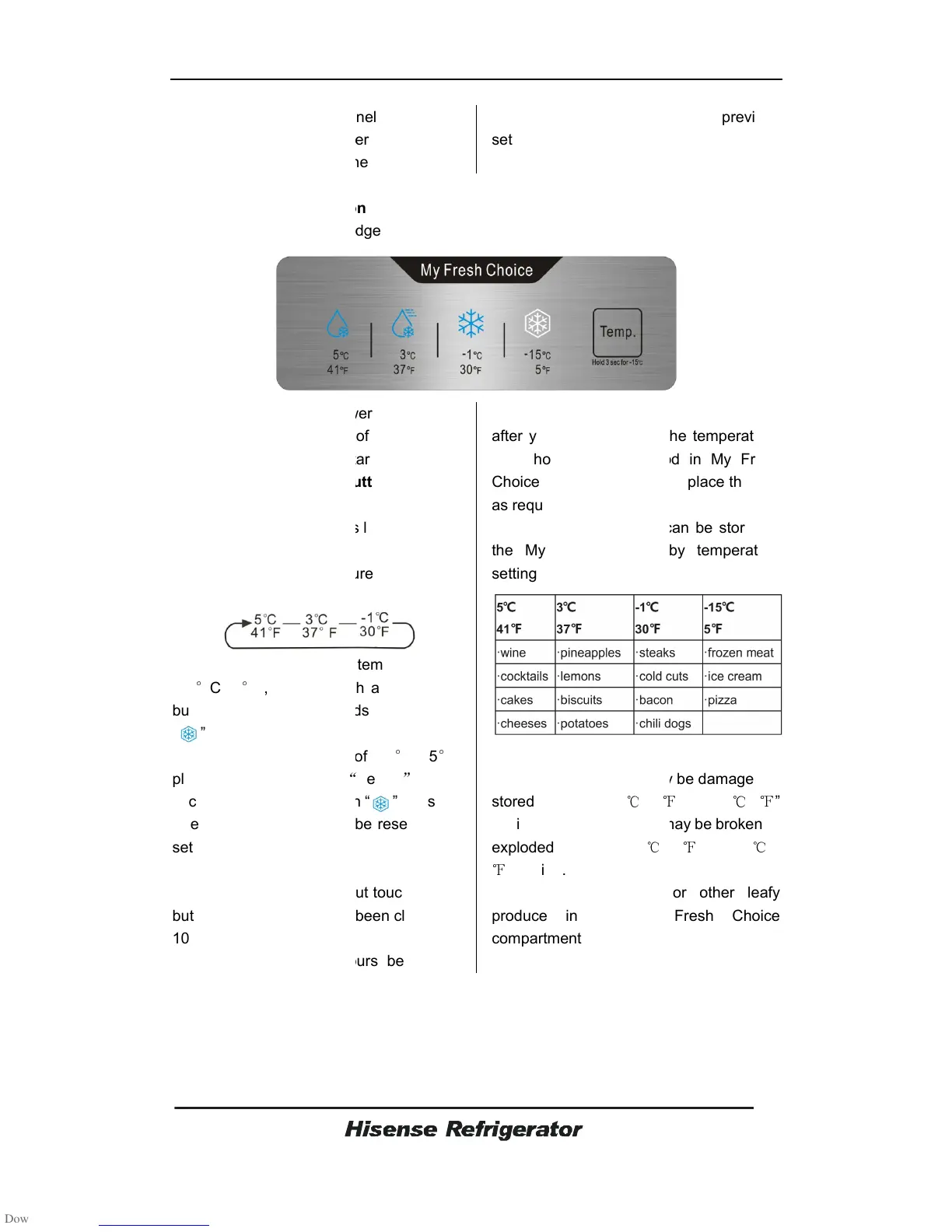
Temperature Selection Button
Press the button “Temp.”
repeatedly until
your desired temperature is lit.
When you touch the
button
continuously, the temperature
the following sequence.
If you want to
select the temperature
-15
°
C /5
°
F,
please touch and hold
button “Temp.” for 3
seconds
” lights.
To unlock the
temperature of
please press and hold
seconds again until
the icon
Then the
temperature will be
set before.
Note:
The light will go off without touching
button and
the doors have been
10 seconds.
It will
take about 4 hours before the
the icons of the control panel
will light up
buzzer sounds. The
And the temperature
setting reverts
back to the previous
setting.
Using the control panel on
My Fresh Choice door
The control panel on the fridge door
shows in the diagram below.
When the appliance is powered on for
the
, the backlighting of the
icons on
display panel starts
working.
Temperature Selection Button
repeatedly until
your desired temperature is lit.
button
“Temp.”
continuously, the temperature
will be set in
select the temperature
of
please touch and hold
the
seconds
until the icon
temperature of
-15
°
C /5
°
F,
Temp.
for 3
the icon
” goes out.
temperature will be
reset to you
The light will go off without touching
any
the doors have been
closed for
take about 4 hours before the
temperature reach to the
desired one
after
you have changed the
you should take the food in My Fresh
Choice room out
before you place them in
as required.
Examples of food items can be stored in
the My Fresh Choice by temperature
setting.
Caution!
Fruit and vegetables may be damaged if
stored under the “-1
/30
setting.
Bottles and cans may be broken or
exploded under the “-1
/30
” setting.
Do not store lettuce or other leafy
produce in the My Fresh Choice

compartment.
back to the previous
desired one
. So
you have changed the
temperature,
you should take the food in My Fresh
before you place them in
Examples of food items can be stored in
the My Fresh Choice by temperature
Fruit and vegetables may be damaged if
or “-15
/5
Bottles and cans may be broken or
/30
” or “-15
/5
Do not store lettuce or other leafy
produce in the My Fresh Choice
Related product manuals