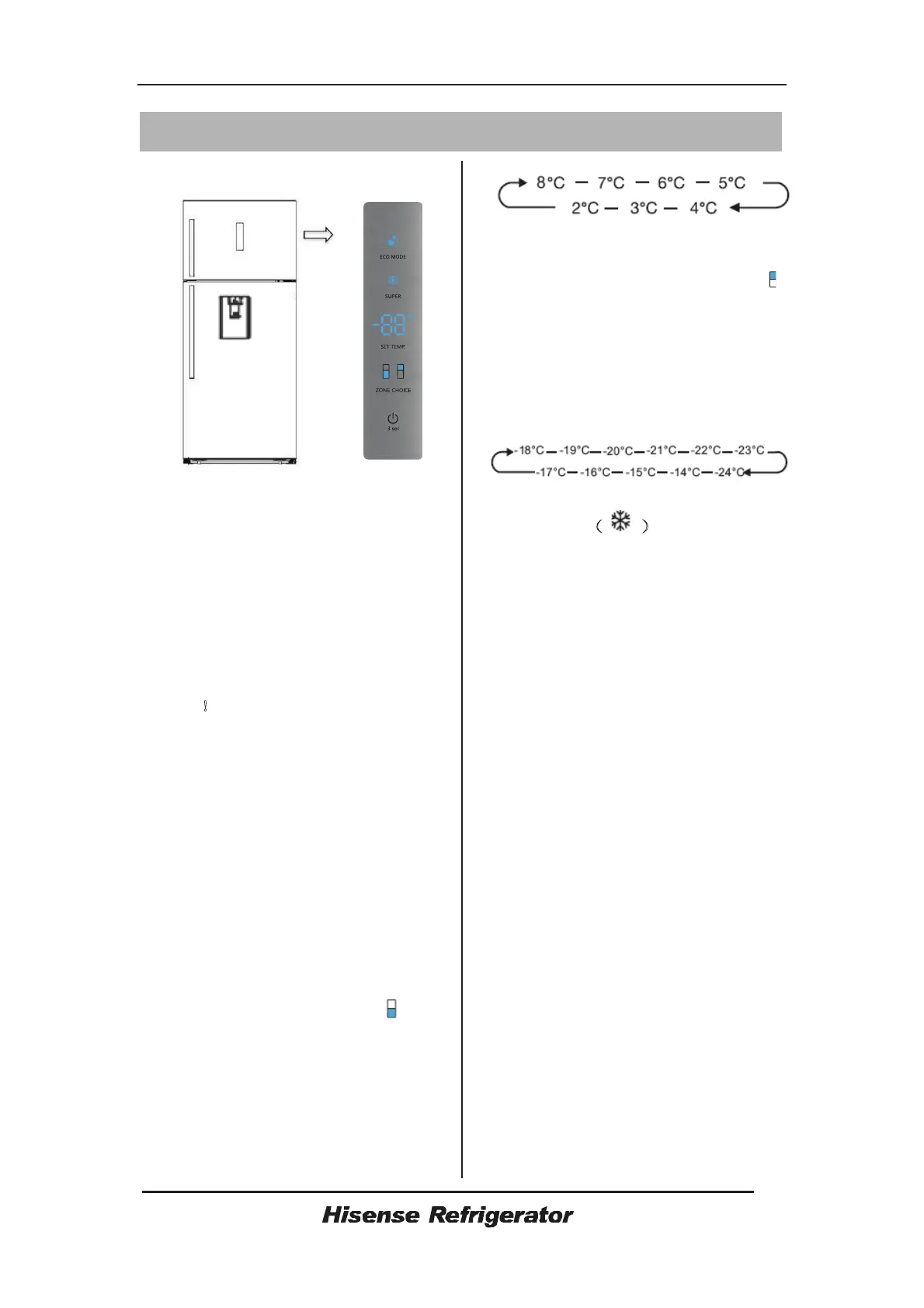
Display controls
Display panel on door
Display panel on door
Controlling the temperature
We recommend that when you start your
refrigerator for the first timeˈthe
temperature for the refrigerator is set to
4eCˈif you want to change the
temperatureˈfollow the instructions
below
Cautionʽ
When you set temperatureˈyou set an
average temperature for the whole
refrigerator cabinet. Temperature inside
each compartment may vary from the
temperature values displayed on the
panelˈdepending on how much food you
store and where you place them.Ambient
temperature may also affect the actual
temperature inside the appliance.
Fridge
ƽPressĀZONE CHOICEāˈtheĀā
light will turn on.Then press
ĀSETTEMPāˈyou can set fridge
temperature between 2eC and 8eC as
neededˈand display panel will display
corresponding values according to the
following sequence.
Freezer
ƽPressĀZONE CHOICEāˈwhen theĀā
light turns on.Then pressĀSETTEMPāˈyou
can set freezer temperature between -14e
C and -24eC as neededˈand display
panel will display corresponding values
according to the following sequence.
Super Freezer˄
˅
Super Freezer will quickly lower the
temperature within the freezer so food will
freeze faster.This can lock in the vitamins
and nutrients of fresh food and keep food
fresh longer.
ƽYou can pressĀSUPERāto get into
superfreezer mode.
ƽWhenesuperfreeze Mode is selected,
the light will be illuminated and the freezer
Temperature will be set at -24eC.
ƽIn case of the maximum amount of food
to be frozen,please wait about 24h.
ƽSuperfreeze automatically switches off
after 52 hours and then the freezer
temperature setting will revert back to the
previous setting.
Ecoenergy
This function makes the freezer work in a
power saving mode which is useful for
reducing energy consumption when you
are away.
ƽYou can pressĀECOMODEāto get into
economic energy mode.
ƽWhen economic energy Mode is
activatedˈthe light will be illunminated,
The freezer temperature will be set at -
13



 To Next Page