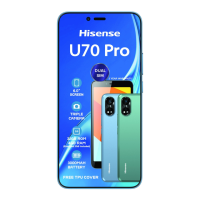
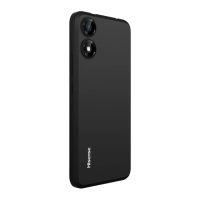
This document serves as the user manual for the Hisense U71 (HWCD119E) mobile phone, manufactured by Hisense International Co., Ltd. It provides comprehensive instructions for basic operations, troubleshooting, and safety guidelines.
Function Description
The Hisense U71 is a mobile phone designed for everyday communication and multimedia use. It supports various functions including making and receiving calls, managing contacts, sending messages, taking photos and recording videos, browsing the internet, and using utility applications like a clock, sound recorder, calculator, and FM radio. The device is designed to be user-friendly, with a touchscreen interface and a notification center for quick access to alerts and shortcuts.
Important Technical Specifications
Software and Hardware:
- Software Version: Hisense_HWCD119E_S03_01_01_ZA01
- Hardware Version: A507-MB-V1.7
Battery:
- Type: Rechargeable Li-ion Battery
- Model: LPW380300
- Voltage: 3.8V
- Capacity: 2900mAh
- Energy: 11.02Wh
- Manufacturers: SHENZHEN UTIL ITY ENERGY CO., LTD. and Phenix New Energy (Huizhou) Co., Ltd.
Charger (Optional 1):
- Model: TPA-97050100V01
- Input: 100-240V~, 50/60Hz, 0.15A
- Output: 5.0V 1.0A, 5W
- Manufacturer: Shenzhen Tianyin Electronics Co., Ltd.
Earphone Cable (Optional 2):
- Length: 1.0m
- Shielding: Unshielded
- Ferrite: Without Ferrite
- Manufacturer: Dongguan Keling Electronic Technology Co., Ltd.
Connectivity and Frequency Bands:
- GSM850:
- Tx: 824-849MHz
- Rx: 869-894MHz
- Tune-up Power: 33 dBm±2dB
- GSM900:
- Tx: 880-915MHz
- Rx: 925-960MHz
- Tune-up Power: 33 dBm±2dB
- GSM1800:
- Tx: 1710-1785MHz
- Rx: 1805-1880MHz
- Tune-up Power: 30 dBm±2dB
- GSM1900:
- Tx: 1850-1910MHz
- Rx: 1930-1990MHz
- Tune-up Power: 30 dBm±2dB
- WCDMA Band I:
- Tx: 1920-1980MHz
- Rx: 2110-2170MHz
- Tune-up Power: 23.0 dBm±2dB
- WCDMA Band II:
- Tx: 1850-1900MHz
- Rx: 1930-1980MHz
- Tune-up Power: 23.0 dBm±2dB
- WCDMA Band VIII:
- Tx: 880-915MHz
- Rx: 925-960MHz
- Tune-up Power: 23.0 dBm±2dB
- WIFI (802.11b/g/n(HT20)):
- 2412-2472MHz
- Tune-up Power: 16.0 dBm±3dB
- Bluetooth:
- 2402-2480MHz
- Tune-up Power: ≤8.0dBm
- GPS: 1575.42MHz Receiving
- FM: 87.5~108.0MHz Receiving
Specific Absorption Rate (SAR):
- Head: 0.687W/kg
- Body: 1.588W/kg
- The device complies with EU requirements for human exposure to radio waves, with a SAR limit of 2.0W/kg averaged over ten grams of tissue for head or body use, and 4.0 W/kg for limbs.
Usage Features
Basic Operations:
- Turning On/Off: Press and hold the power button. A force restart can be performed by holding the power button for more than 10 seconds.
- Touchscreen Gestures: Supports tapping, tapping and holding, swiping (left, right, up, down), spreading (zoom in), pinching (zoom out), and dragging.
- Navigation Bar: Includes buttons for Home, Recent Apps, and Back.
- Locking/Unlocking Screen: Press the power button to lock; press and swipe up to unlock.
- Notification Center: Swipe down from the top of the screen to view notifications and quick settings.
- SIM and MicroSD Cards: Supports correct insertion of SIM and MicroSD cards. Hot-swapping is not supported.
Communication:
- Phone Calls: Make calls directly, from contacts, or from recent call logs.
- Contacts: Import, create, and search for contacts.
- Messages: Send and view text messages.
Multimedia:
- Camera: Take photos and record videos. Supports zoom gestures.
- Photos: View and delete photos and videos, and share them via various methods.
- FM Radio: Requires headphones to activate and listen.
Utilities:
- Chrome: Browse the internet, search for information, and bookmark web pages.
- Clock: Set alarms, view world clocks, set timers, and use a stopwatch.
- Sound Recorder: Record, play, and manage audio recordings.
- Calculator: Perform simple and advanced calculations.
Safety and Regulations:
- The manual emphasizes reading all safety information to prevent fire, electric shock, injuries, or device damage.
- It advises against using unapproved accessories, operating outside ideal temperature ranges (0°C to 35°C for operation, -20°C to 45°C for storage), and using the phone in moist, dusty, smoky, or dirty environments.
- Users are instructed to follow local laws and regulations, especially regarding phone use while driving or flying.
- Recommendations for reducing radiation exposure include using the phone in areas with good reception, using hands-free kits, and keeping the phone away from the abdomen during calls (for pregnant women and teenagers).
Maintenance Features
Battery Charging:
- Fully charge the battery before first use or after long periods of inactivity.
- Use only approved chargers, batteries, and cables.
- Avoid using the phone while charging and ensure the charger is properly connected.
- Charge within the recommended temperature range (0°C to 40°C).
- Unplug the charger when not in use.
- If the battery is low, the phone may take a short while to start normally after charging.
- The phone and charger may heat up during charging, which is normal, but excessive heat requires stopping charging and moving to a cool place.
Cleaning and General Maintenance:
- Turn off the phone and unplug the charger before cleaning.
- Use a dry, soft, anti-static cloth to clean the phone.
- Do not use water, alcohol, detergent, or any chemicals for cleaning.
- Avoid scraping or altering the phone case or paint.
- Wipe dust off the power plug and keep it dry.
- Do not disassemble the device or its accessories.
- Contact the local vendor or service center if the phone or accessories do not work properly or if the battery performance decreases.
Troubleshooting:
- The manual provides solutions for common issues such as the phone not turning on, automatically turning off, application errors, short standby time, charging problems, touchscreen errors during charging, forgotten passwords, locked PINs, and connectivity issues (Internet/calls).
- For issues like the phone not making a sound when it rings, users are advised to check if silent or vibrate mode is enabled.

 Need help?
 General

 To Next Page