9
SIDE PANEL JACKS AND CONNECTORS
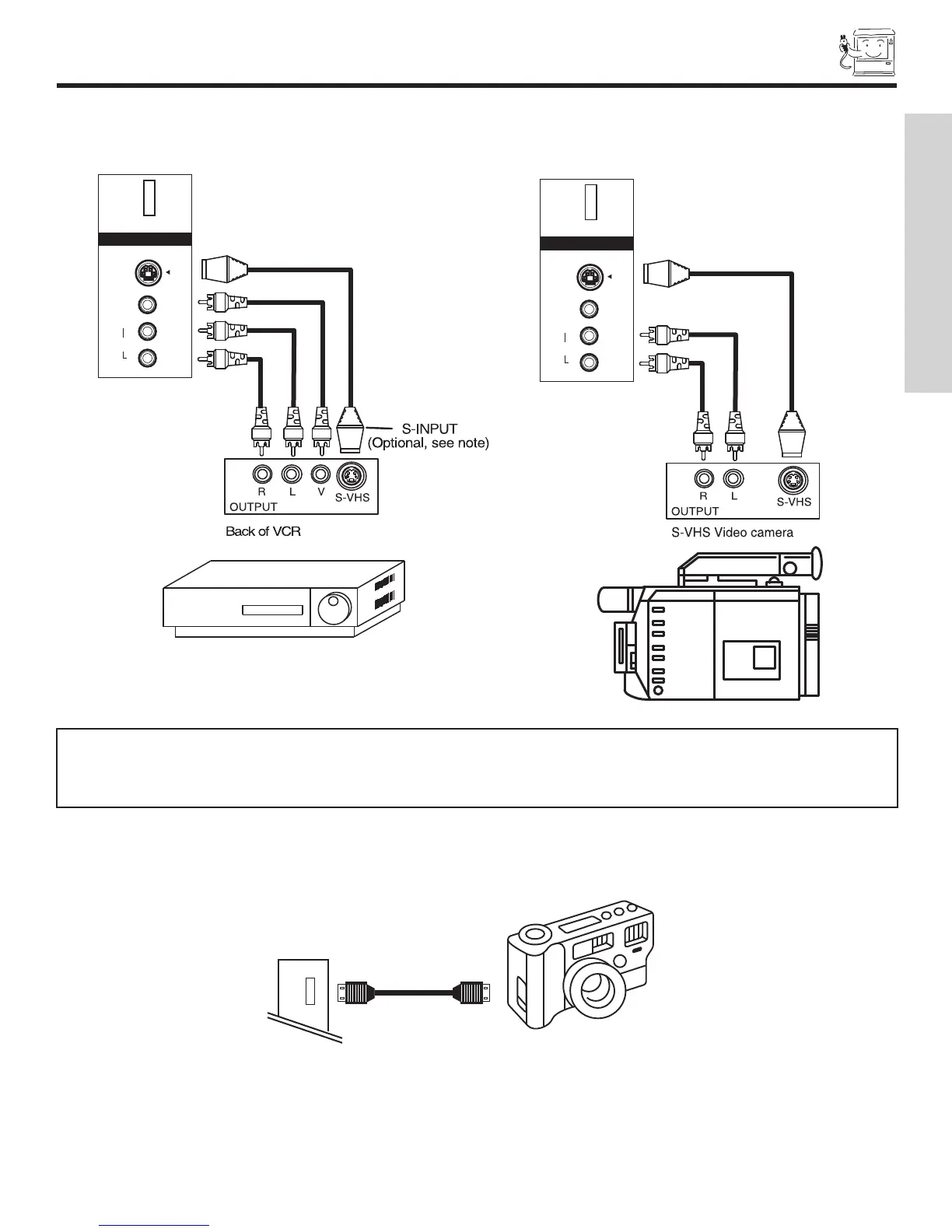
The side panel jacks are provided as a convenience to allow you to easily connect a camcorder or VCR as shown in the following
examples:
NOTE: 1. Completely insert connection cord plugs when connecting to front panel jacks. If you do not, the played back picture
may be abnormal.
2. If you have a S-VHS VCR, use the S-INPUT cable in place of the standard video cable.
3. If you have a mono VCR, insert the audio cable into the left audio jack of your TV.
S-VIDEO
VIDEO
AUDIO
L/MONO
R
INPUT 5
PHOTO
INPUT
S-VIDEO
VIDEO
AUDIO
L/MONO
R
INPUT 5
PHOTO
INPUT
FIRST TIME USE
PHOTO INPUT
The front panel Photo Input Jack is provided to view digital still pictures from your digital camera using a USB cable and displaying
them on the TV screen.
First, connect your digital camera to the Photo Input using a USB cable. Turn on the power of your digital camera.
Press the INPUTS button and select Photo Input (see pages 25-27).
USB CABLE


 To Next Page
 Loading...