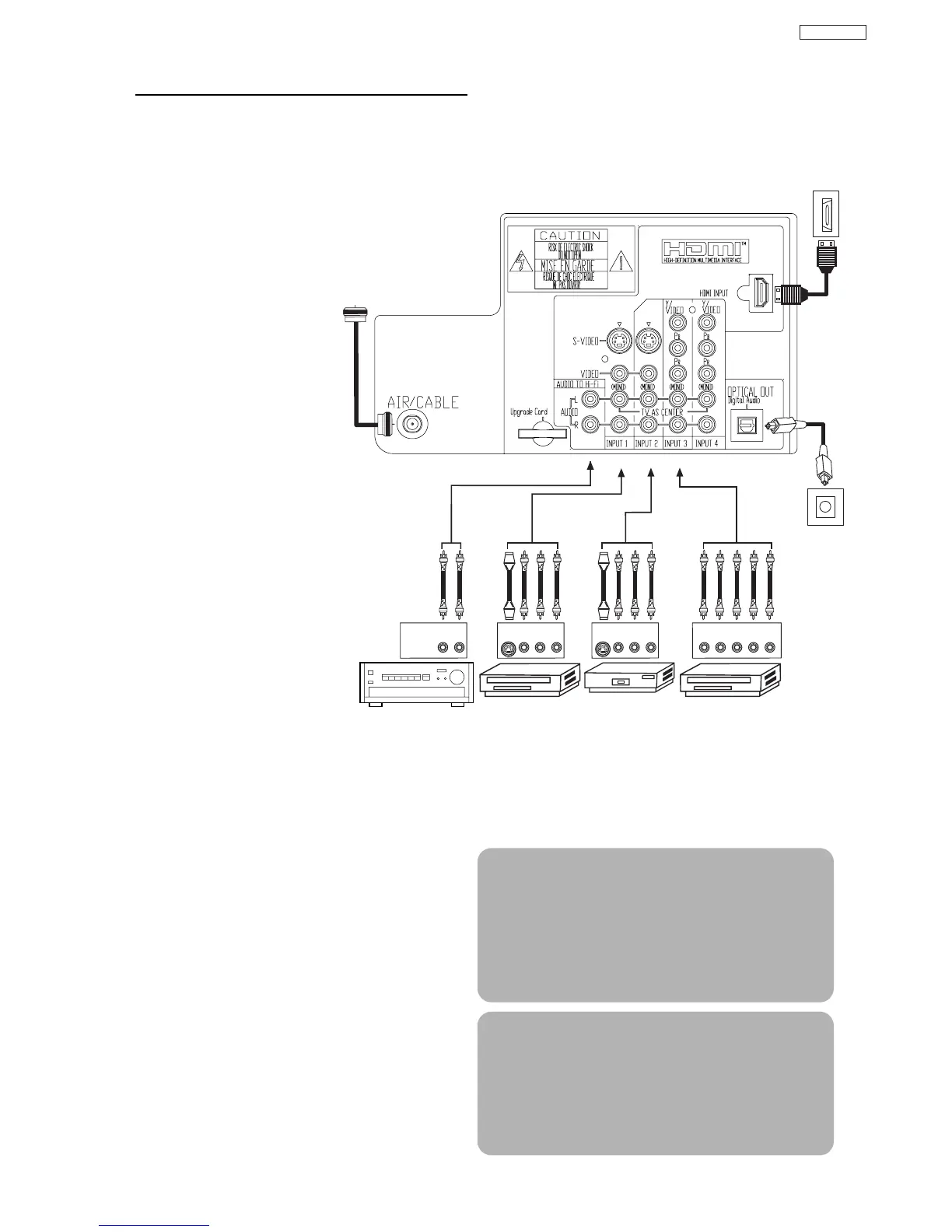
AUDIO AMP
capability.
TIPS ON REAR PANEL CONNECTIONS
• S-VIDEO, Y- P
BPR and HDMI
connections are provided for
high performance laserdisc
players, VCRs etc. that have
this feature. Use these
connections in place of the
standard video connection if
your device has this feature.
• If your device has only one
audio output (mono sound),
connect it to the left audio
jack on the television.
• Refer to the operating guide of
your other electronic equipment
for additional information on
connecting your hook-up
cables.
• An AUDIO system can be used
by connecting the AUDIO TO HI-FI
output of the TV. This can be
use when you like to control the
volume output by changing the
volume of the TV.
• You may use VIDEO or
S-VIDEO inputs to connect to
INPUT 1, INPUT 2 or INPUT 5,
but only one of these may be
used at a time.
• Connect only one component
(VCR, DVD player, camcorder,
etc.) to each input jack.
• COMPONENT: Y-P
BPR (INPUT 3 and INPUT 4)
connections are provided for high performance
components, such as DVD players and set-top-
boxes. Use these connections in place of the
standard video connection if your device has this
feature. INPUT 3 and INPUT 4 accepts both
composite and component video signals.
• Your component outputs may be labeled Y, B-Y,
and R-Y. In this case, connect the components
B-Y output to the TV’s P
B input and the
components R-Y output to the TV’s P
R input.
• Your component outputs may be labeled Y- C
BCR.
In this case, connect the components C
B output to
the TV’s P
B input and the components CR output to
the TV’s P
R input.
• You may use composite and component video
signals for INPUT 3 and INPUT 4.
• It may be necessary to adjust TINT to obtain
optimum picture quality when using the Y-P
BPR
inputs (see page 34).
• To ensure no copyright infringement, the
MONITOR OUT output may be abnormal, when
using the Y-P
BPR jacks.
• When using an HDMI input from a Set-Top-Box, it
is recommended that a 1080i or 720p input signal
is used.
NOTE: 1. Connect only one component to each
input jack.
2. Follow connections that pertain to your
personal entertainment system.
3. INPUT 3 and INPUT 4 can accomodate
Composite and Component video signals.
4. Cables are not included with the purchase
of this TV, except when noted as
“provided”.
MACROVISION NOTES:
1. Video signals fed through a VCR may be
affected by copyright protection systems
and the picture will be distorted on the
television.
2. Connecting the television directly to the
Audio /Video output of a Set-Top-Box will
assure a more normal picture.


 To Next Page