28
DP65
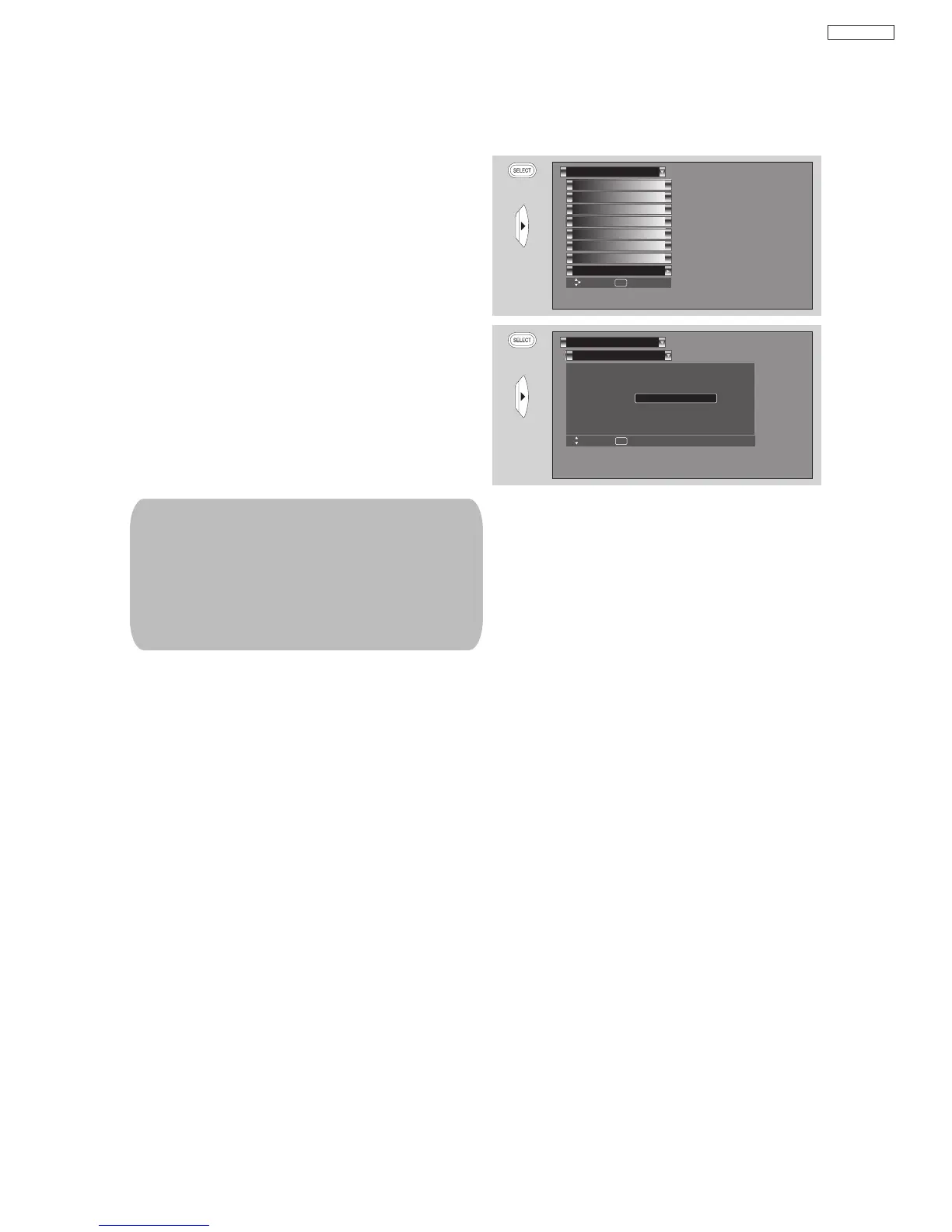
New Software upgrade process
OR
Set The Inputs
Menu Preference
Set Virtual HD
Magic Focus Tune Up
Set Closed Captions
Set Black Side Panel
Set Audio Out
Setup
Move SEL Set
Upgrades
Upgrades
It shows software information and easy upgrade
procedure. This function allows the TV software to be
upgraded by using a flash card (MMC CARD). If a
future software upgrade is required for your TV,
HITACHI will notify and provide you with a flash card.
In order to receive written notification and the flash
card, please complete and return the warranty card.
1. Insert MMC CARD
2. Press the CURSOR buttons
or to highlight
UPGRADE NOW.
3. Press the SELECT button to select and start
upgrading.
4. Unplug the power cord when the upgrade is
complete.
Upgrades
Setup
Move SEL Return
Software Version # : Main Vxxxx.xxxx
MMC Software Upgrade
Upgrade Now
Please Insert MMC card
before upgrading.
OR
MMC Vxxxx.xxxx
1. Any power interruption during the upgrade
process will cancel the upgrade. When this
happens, repeat the upgrade procedure.
2. The name of MMC Vxxx.xxxx upgrade
will only appears when a MMC or SD
card is inserted on the back of the TV ;
then it will show the MMC Vxxx.xxxx
file number.


 To Next Page