Digital Convergence Remote Control (DP65/G)2.12.6 Magic Focus Initialize
Adjustment Preparation
(1) Receive any NTSC signal.
(2) Digital convergence adjustment should have been
completed.
(3) Set is in DCU adjustment mode.
(4) Set R/C in DCAM mode.
Adjustment Procedure
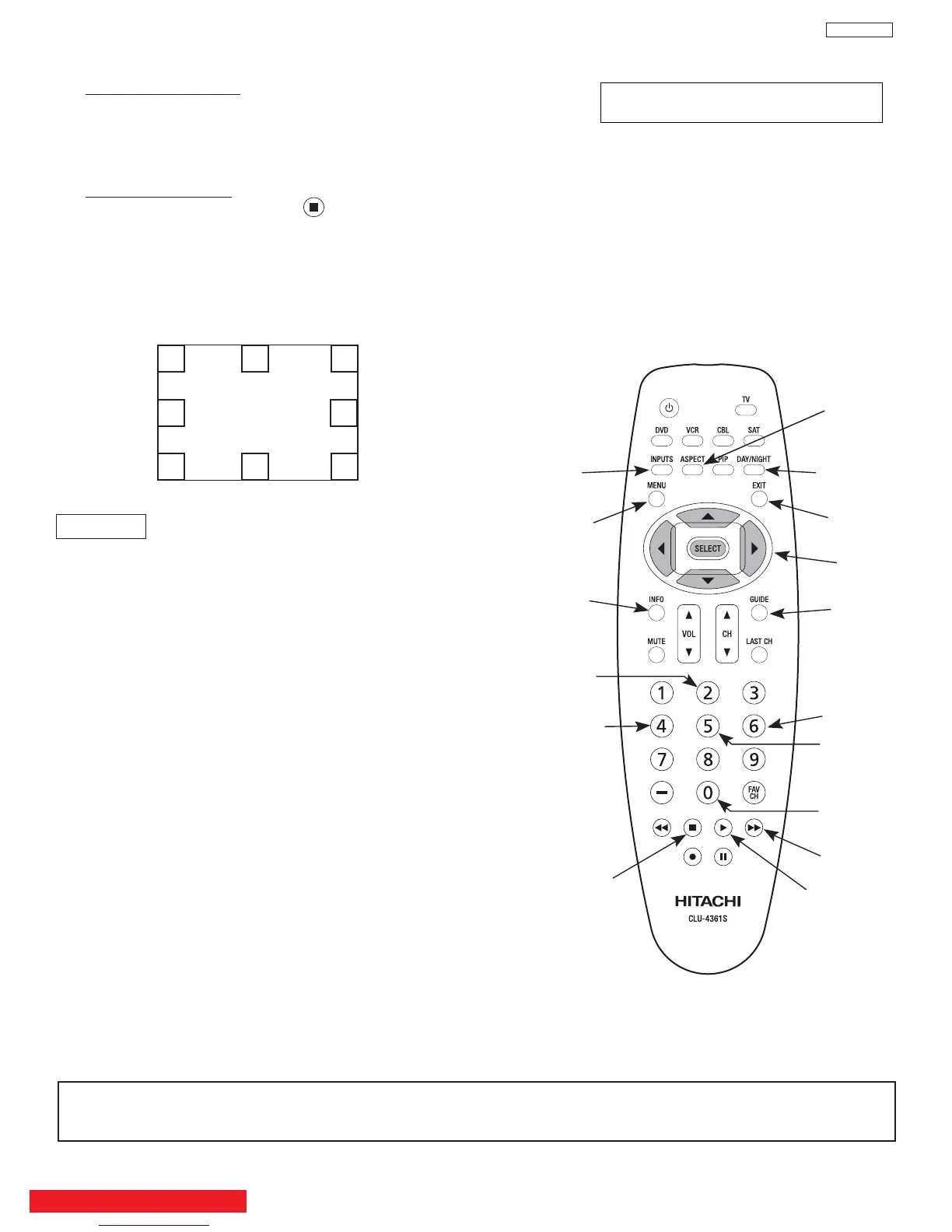
(1) Press “ASPECT” and then to initialize Magic
Focus. The initialize operation starts and several
windows appear during this operation. It takes about
30 seconds or less.
(2) When green dots appear, initialize operation is
finished.
(3) Turn power OFF on TV set.
REMARKS
Another way to start the initialize operation:
(1) Using a programable R/C send the code :509E hx
to start initaialization mode.
(2) When green dots appear, initalization operation is
finished.
NOTE: If there is an error message, red dots or an error
code, refer to page 39, CONVERGENCE
ERRORS.
DIGITAL CONVERGENCE ADJUSTMENT MODE (DCAM)
(1) HITACHI DCU Adjust Mode is intended for service
use only. Customers should not be given access to
this mode.
(2) To place the remote control into DCU Adjust Mode
use the following steps:
a. Hold down [TV] key.
b. Hold down [MENU] key.
c. Hold down [INFO] key.
d. Release [TV] key.
(3) See the picture of R/C for DCU mode IR codes
associated with this mode.
(4) To exit the DCU Adjust Mode, the user must program
the R/C of TV mode to the Hitachi device follow
2 Method.
Initialization Operation
NOTE: If the R/C is left in DCAM mode , the many TV options will not work. The only way to corrected id by following the
2 method , then R/C return to NORMAL mode.
When Convergence is adjusted by this R/C.
This R/C should be changed to DCU mode.
1. Method of go to DCU mode.
(1) Hold down [TV] key.
(2) Hold down [MENU] key.
(3) Hold down [INFO] key.
(4) Release [TV] key.
2. Method of go back normal mode.
(1) Hold down [TV] key.
(2) Push [0] key.
(3) Push [1] key.
(4) Release [TV] key.
49
DP65
BACK TO ADJUSTMENTS
ADJUSTMENT
CALCULATION
ROM READ
ROM WRITE
INITIALIZE
RASTER POSITION
Note:
(2) 3x3 Adjustment mode can be
accessed only when DCU is in
uncorrected state.
CURSOR UP
CURSOR RIGHT
CURSOR DOWN
CURSOR LEFT
BLUE
(13x9 Adj.)
REMOVE COLOR
CROSS HATCH/
VIDEO MODE
PHASE
GREEN
RED
(7x5 Adj.)


 To Next Page