51
DP65
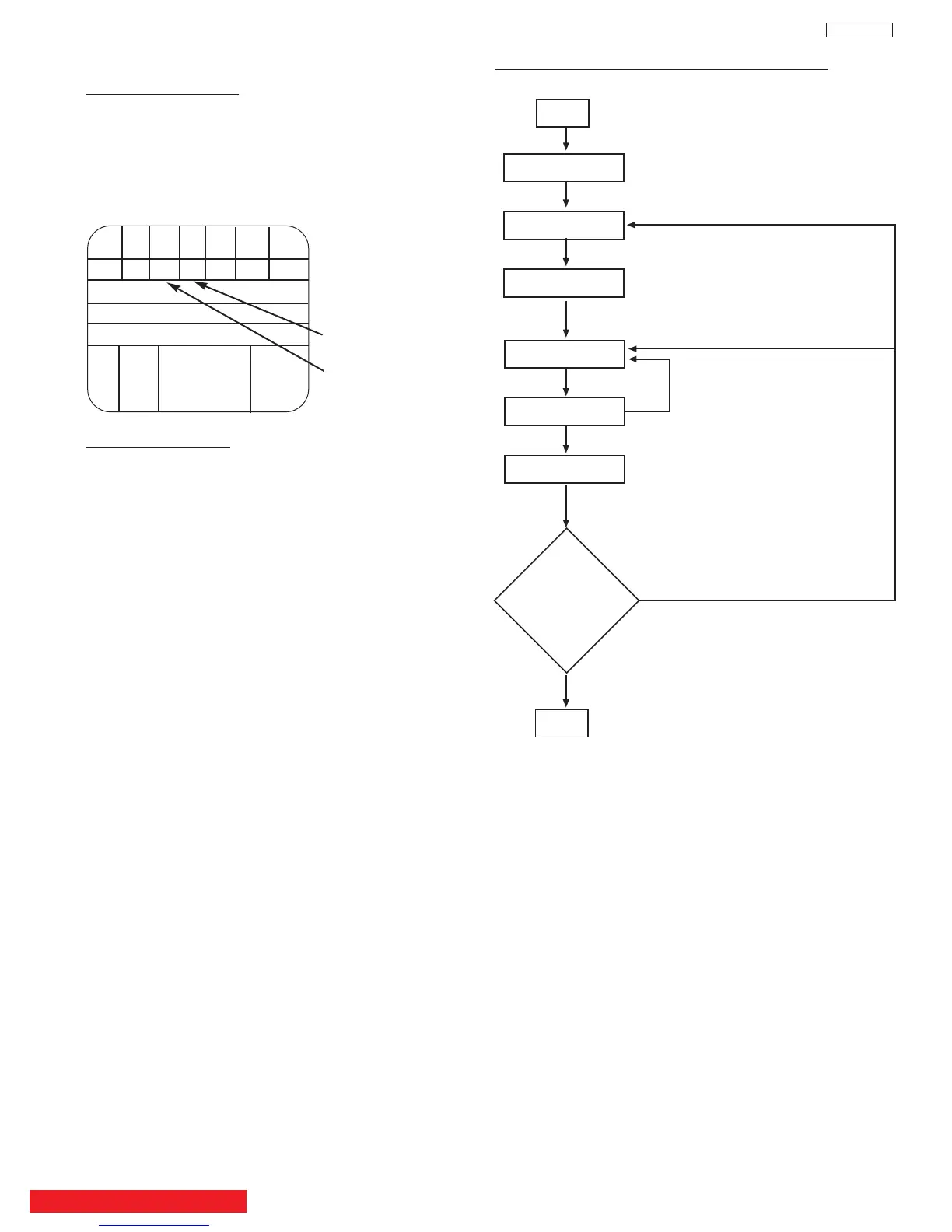
2.15 Sub brightness adjustment
Adjustment preparation
(1) Start adjustment after the power is turned ON
for 20 minutes or more.
(2) Receive the color bar signal (7 step gray scale).
(3) The vertical incident illumination on the screen
should be 20 lux or less. (Room should be dark).
(4) Picture Formats is 16:9 Standard Mode.
Should sink
to black
Should rise
slightly from
black
Adjustment procedure
Y CY G MG R BL
A7 A6 A5 A4 A3 A2 A1
B
C
D
Q I W 100% BLK
W
75%
BACK TO ADJUSTMENTS
WHITE BALANCE ADJUSTMENT FLOW CHART
START
Cut Off Adj.
Blue defocus Adj.
Sub bright Adj.
Adj. High Light W/B
Adj. Low Light W/B
Sub bright Adj.
Check
Low Light W/B
High Light W/B
FINISH
Repeat two or three times, until no
adjustment is needed
If NOT OK
If OK
(1) Go to “Sub Brightness” adjustment in I
2
C
ADJUST mode (By press MENU+MENU+8+
SELECT on the Remote Control ), using CURSOR
G, H and then CURSOR E.
(2) Then adjust “Sub Brightness” using CURSOR
F, E to increase or decrease the value,
according to figure. (Visually adjust).
(3) After adjustment, press MENU button to exit I
2
C
ADJUST mode. (Data is stored in memory).
Note: When selecting SUB-BRIGHTNESS mode the
microprocessor sets the CONTRAST and
COLOR to MIN. automatically, but make sure
that the other conditions are center.
Directly observe the screen by eye without using
a mirror.


 To Next Page
 Loading...