GB - 8 -
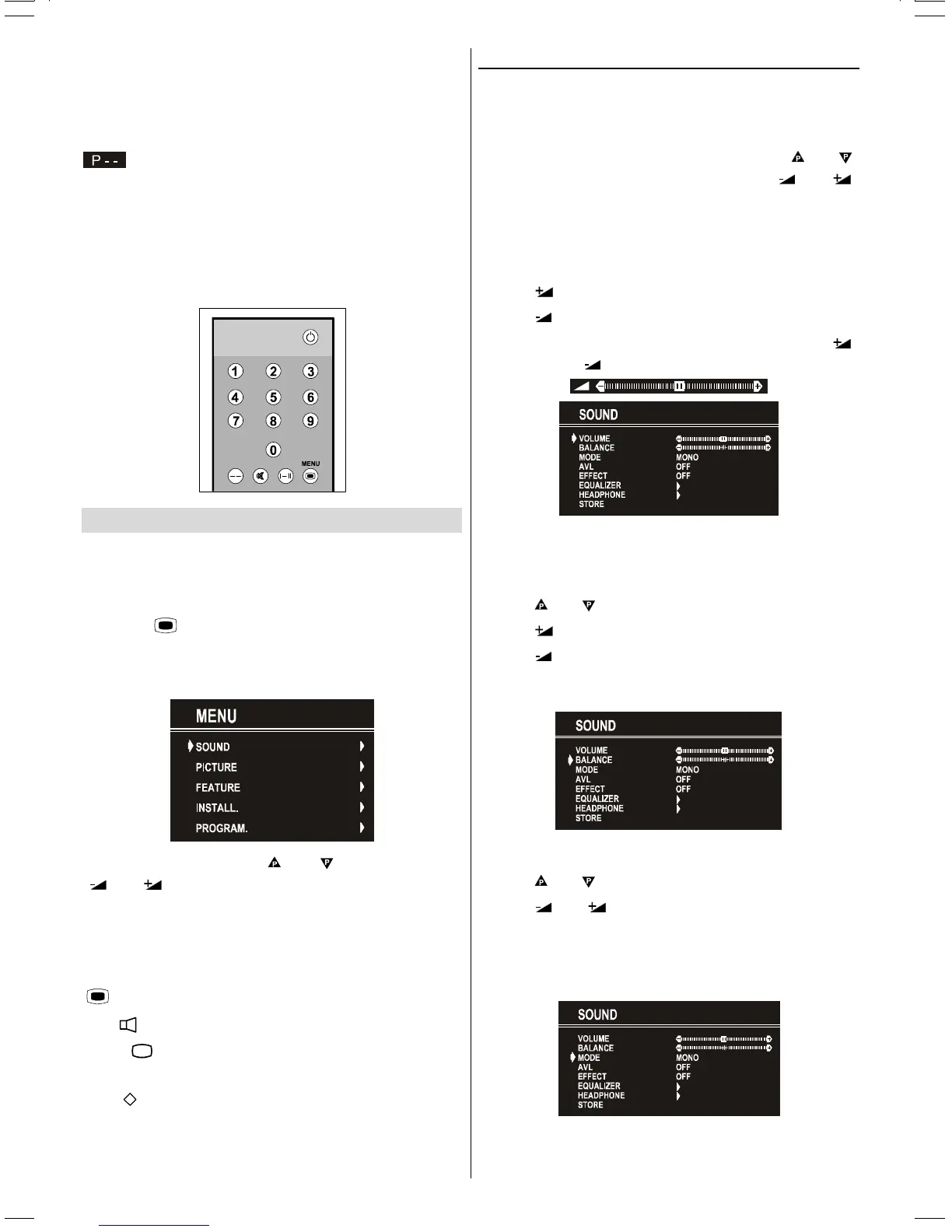
Programme Selecting (direct access):
Press digit buttons on the remote control handset to select
programmes between 0 and 9. TV will switch to the selected
programme. To select programmes between 10 - 99, you
must use the double digit button "- -".
this OSD is displayed at the left hand upper on the
screen.
After this, press the digit buttons consecutively for the pro-
gramme you want to select (eg. for programme 27, first press
2 and then 7). If the second digit is not entered within 3 sec-
onds, this function will disappear.
Press directly the programme number to reselect single digit
programmes.
Menu System
Your TV has been designed with a menu system, to provide
an easy manipulation of a multi-function system. The TV is
controlled by choosing the commands, which are displayed
on the screen.
Press the
MENU button. The Main menu will be dis-
played at the middle on the screen.
All the selected items in this menu system is indicated with
CYAN characters.
To select a sub-menu use or button, and press
or button. Each option can also be selected with
the coloured button.
MAIN MENU
The menu system is described below.
The short way in order to enter the menus, press :
MENU Button, Main Menu.
Red
Button, Sound Menu.
Green
Button, Picture Menu.
Yellow F Button, Feature Menu.
Blue
Button, Install Menu.
Menu button has two functions; first is opening or closing the
"MAIN MENU", and the second is closing the sub-menu and
then opening its parent menu.
Sound Menu
To change sound settings
Enter the Sound Menu directly, pressing the Red button or,
As you enter the main menu, sound will be the first selected
option. In the main menu, select SOUND using
or
button, then enter the sound menu pressing
or
button.
Setting Volume
As you enter the sound menu, Volume will be the first select-
ed option.
Press
button to increase volume.
Press
button to decrease volume.
Or you can directly change the volume settings using
(to increase) or
(to decrease) button.
Setting Balance
It allows adjusting the distribution between the left and right
speakers.
Using
or button select Balance.
Press
button to change balance rightward.
Press
button to change balance leftward.
When balance control is in mid position, the cursor is dis-
played with the two reciprocal arrows.
Selecting Mode
Using or button select Mode.
Press
or button to change Mode.
You can choose MONO, STEREO or DUAL (I-II) mode, only
if the selected channel supports that mode.
You can also change sound mode directly pressing I-II but-
ton on your remote control.
In case of bilingual broadcast (Dual Sound), you can select
original or dubbed language using mode option.
(C2143S)-ENG&2172HAV-2217-VST-BSI-AK30-STEREO-7P-HITACHI.p65 08.01.2003, 10:118


 To Next Page
 Loading...