EasyManua.ls Logo

Hitachi C50M6 - Setting the Parental Control

Hitachi C50M6
78 pages
Print Icon
To Next Page IconTo Next Page
To Previous Page IconTo Previous Page
Loading...
EN25
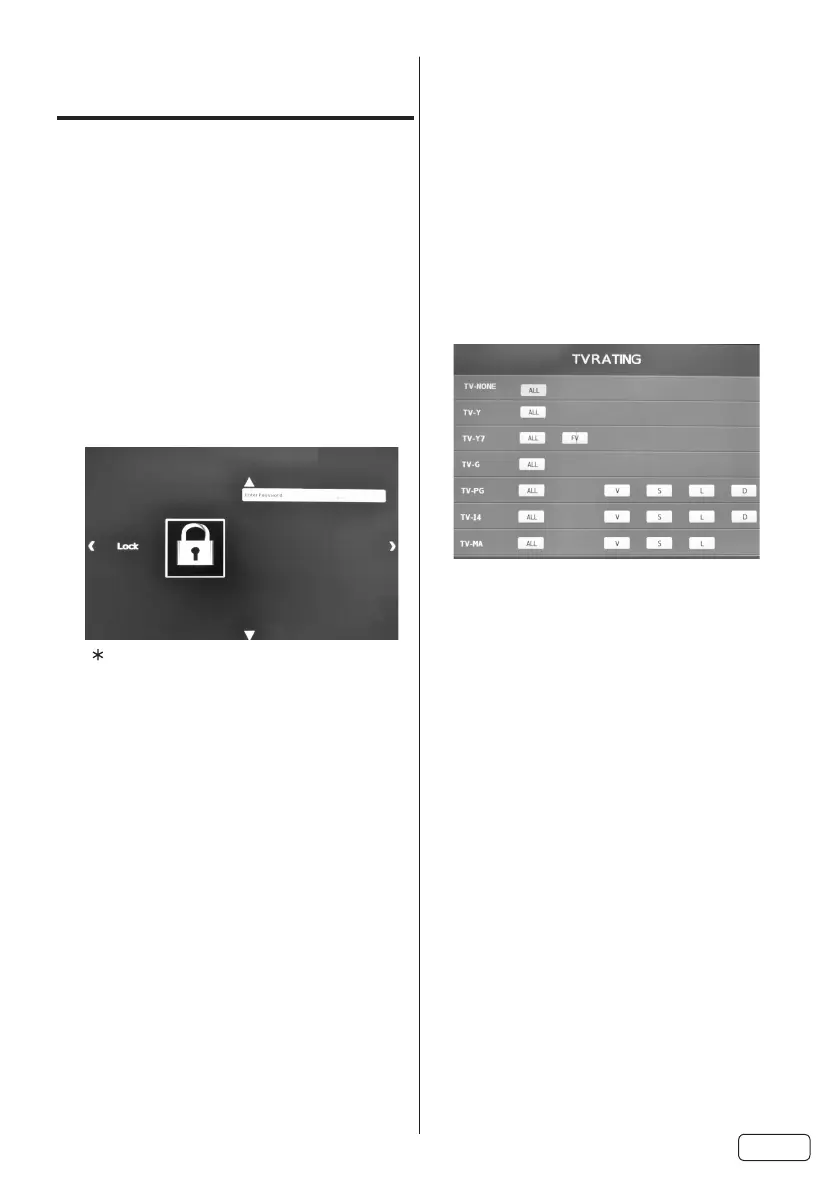
Setting the Parental
Control
An age limitation can be set to restrict
children from viewing or hearing violent
scenes or pictures that you may choose to
exclude. The restriction applies to “US” TV/
Movie Ratings and “Canada” English/French
Ratings if this data is transmitted. You may
set this restriction separately. To use the
Parental Control function, you must register
a password.
To enter a password

0000Direct Channel
Selection Buttons (0-9)


NOTE:
 
7777

 

How to enter the Parental Control
menu

Direct Channel Selection Buttons
(0-9)
To set the Parental Control

SELECT

  
SELECT
 
SELECT
4
 
SELECT

TV


Age:
TV-Y 
TV-Y7 
TV-G 
TV-PG 
TV-14 
TV-MA 
Genre:
FV 
D 
L 
S 
V 
 
SELECT

Related product manuals