ENGLISH
5.10.4 $XWRFRQÀJXUDWLRQ
:KHQWKHV\VWHPLVVWDUWHGIRUWKH¿UVWWLPHLWUHFRJQL]HVDOOWKHPDFKLQHVFRQQHFWHGWR+/LQN:LWKWLPHWKHDLUFRQGLWLRQLQJ
installation may undergo changes which have certain repercussions on CSNET Manager. If the system detects machines which
KDYHEHHQDGGHGDIWHU&61(70DQDJHUZDVLQVWDOOHGRUWKDWPDFKLQHVKDYHEHHQUHPRYHGIURPWKH+/LQNWKH$XWR&RQ¿JXUDWLRQ
function lets you recognize all the machines again.
7KHUHDUHWKUHH$XWR&RQ¿JXUDWLRQRSWLRQV
- Keep All: Only the machines found are added. The other machines in the table of indoor units are kept as they were.
- Delete Not Found: If there are machines in the table of indoor units which are not present in the H-Link, HC-A64NET will
delete these machines. All the machines which were not present in the table of indoor units but in the H-Link will be added.
- Delete all: All the machines in the table of indoor units will be deleted, and HC-A64NET will again detect all the machines
FRQQHFWHGWR+/LQN2QFHWKH\DUHDGGHG\RXKDYHWRUHPHPEHUWKDWWKHFRQ¿JXUDWLRQKDVWREHFDUULHGRXWDJDLQ
7RFDUU\RXW$XWR&RQ¿JXUDWLRQ
- Select the option required in the $XWR&RQ¿JXUDWLRQ selection table.
- Press the Start button at the right of the menu.
- If you return to the main window, you will see the progress as a percentage (%) in the bottom left of the screen.
5.10.5 7LPHFRQÀJXUDWLRQ
7KHWLPHFRQ¿JXUDWLRQLVXVHGWRV\QFKURQL]H&61(7:(%ZLWK\RXUWLPH]RQH,WLVYHU\LPSRUWDQWWKDWWKLVFRQ¿JXUDWLRQLVFRUUHFW
for the timer to work correctly.
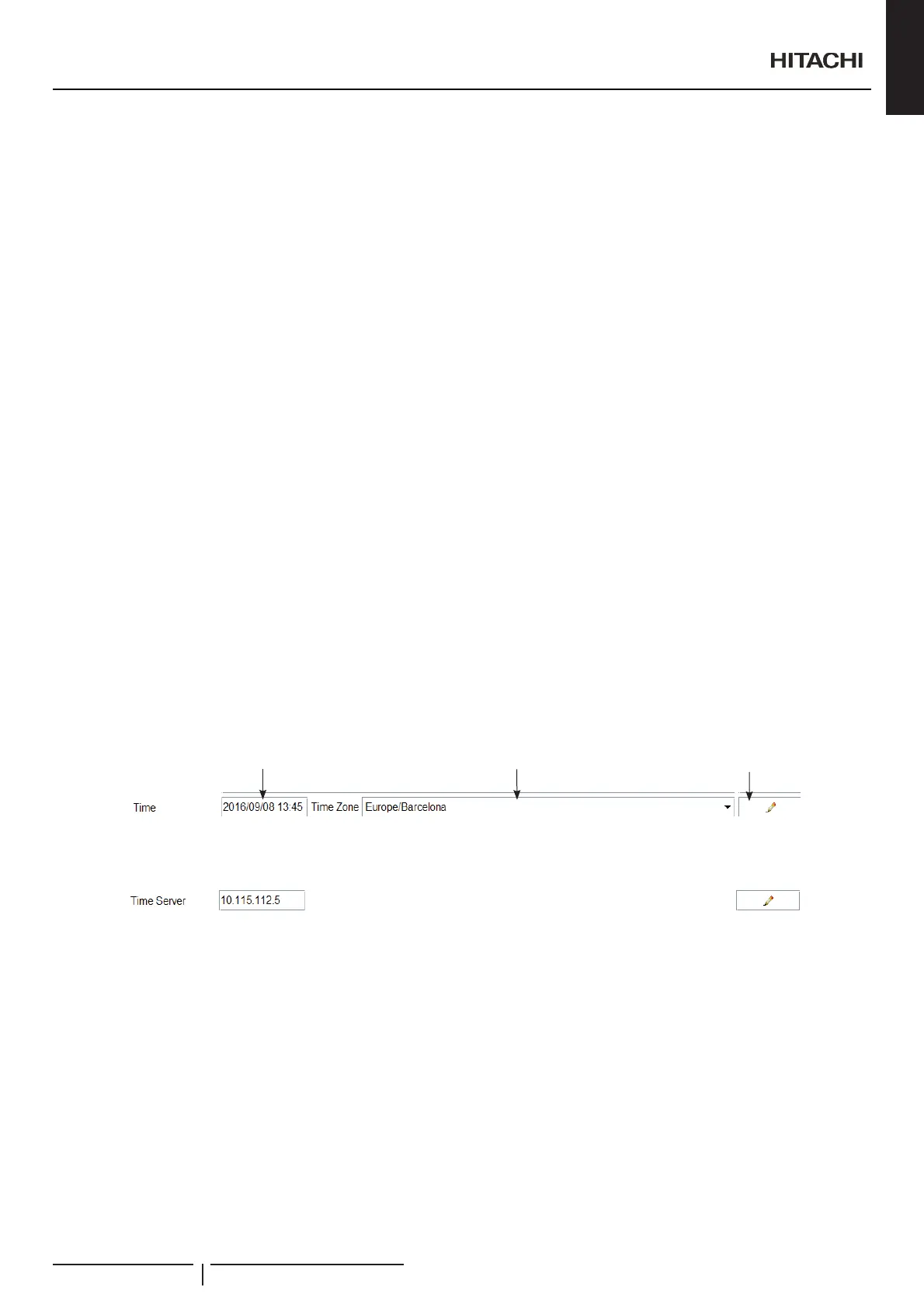
7RFDUU\RXWWLPHFRQ¿JXUDWLRQ
1 (QWHUWKHGDWHDQGWLPH,WLVYHU\LPSRUWDQWWRIROORZWKH\\\\PPGGKKPPIRUPDWDVIROORZVIRXU¿JXUHVIRUWKH\HDUDVODVK
³´WZR¿JXUHVIRUWKHPRQWKDVODVK³´WZR¿JXUHVIRUWKHGD\DVSDFH³³WZR¿JXUHVIRUWKHKRXULQKRXUIRUPDWDFRORQ³´
DQGWZR¿JXUHVIRUWKHPLQXWHV
2 Select the time zone. This is very important as CSNET WEB needs to know precisely the time zone in order to identify time
changes and how many hours to change.
3 :KHQ\RXKDYH¿QLVKHGFOLFNWKHChange button, which is in the bottom right of the window. When you press the button a
message appears and the application closes.
4 Wait for a couple of minutes and restart CSNET WEB.
1
2
3
CSNET WEB allow to set a time server that will automatically set the correct date and time.
,I\RXKDYHDVHUYHUZLWKWLPHDQGGDWH6173VHUYLFHHQDEOH\RXPXVWVHWWKH,3RIWKDWVHUYHURQWKH7LPH6HUYHU¿HOG
&RQ¿JXUDWLRQDQGGLVSOD\RSWLRQV
PMML0409A rev.1 - 10/201681


 To Next Page
 Loading...