5.10.6 %06FRQÀJXUDWLRQ
0RGEXV&RQÀJXUDWLRQ
&61(70DQDJHUDOORZVWRFRQ¿JXUHWKH%06V\VWHPLQ&61(7:(%GHYLFHVE\VHWWLQJWKH,'IRUHDFKLQGRRUXQLW7KLV
FRQ¿JXUDWLRQZLOOOLQNWKH%06ZLWKWKH+/,1.
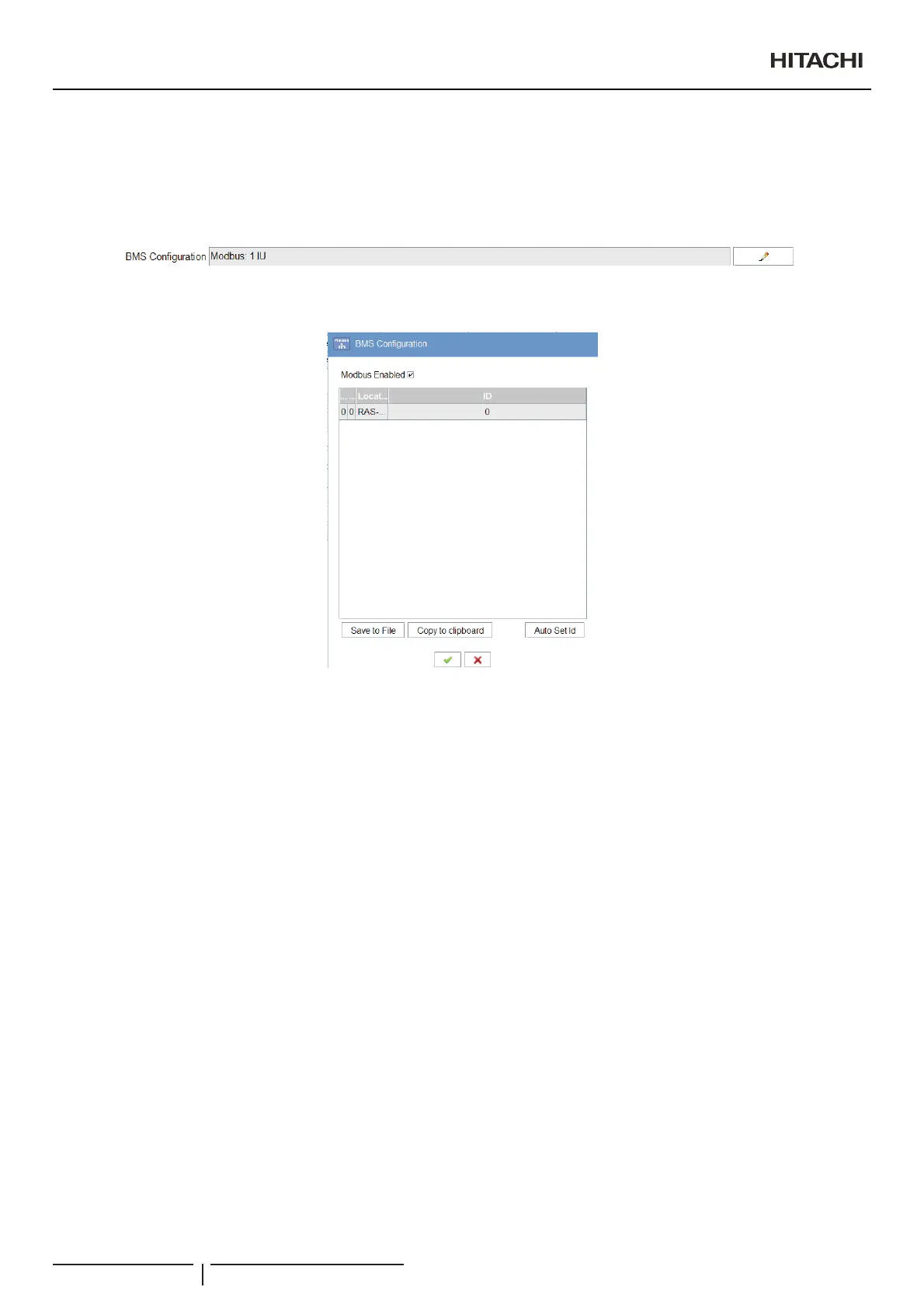
7RRSHQWKH%06FRQ¿JXUDWLRQFOLFNRQWKHFKDQJHEXWWRQ$IWHUFOLFNLQJWKHEXWWRQDGLDORJXHZLOODSSHDUDQG\RXFRXOGVWDUWWRVHW
WKHFRQ¿JXUDWLRQ
%06&RQÀJXUDWLRQIRU3DFNDJHG
In this dialogue you can enable the BMS to activate this option, and after this, set in each row the unit information.
- OU is the outdoor unit number.
- IU is the indoor unit number.
- /RFDWLRQLVWKHORFDWLRQ¿HOGRIWKHXQLW7KLV¿HOGLVRQO\HGLWDEOHIURPWKHXQLWVHWWLQJWDE
- ,'¿HOGLVDXWRPDWLFDOO\VHWDQGLVQRWPRGL¿DEOH
CSNET Manager automatically assigns an ID for each found unit. You can change this ID on the table.
7KH,'¿HOGFDQQRWEHUHSHDWHGLILWZLOORFFXUV&61(7:(%ZLOODVN\RXWRFKDQJHWKHUHSHDWHG,'
,QFDVHRI3DFNDJHG³$XWR6HW,G´EXWWRQZLOOEHDYDLODEOH7KLVEXWWRQRSHQDQHZZLQGRZZKHQXVHUFRXOGDXWRPDWLFDOO\DVVLJQ
the ID to the units. This assignation could be done in two ways:
- H-LINK I: BMS ID = OU x 16 + IU.
- H-LINK II: BMS ID is assigned following the order of OU & IU.
Export buttons
6DYHWR¿OHEXWWRQZULWHVLQDVHOHFWHGFRPPDVHSDUDWHGYDOXHV¿OHWKHFRQWHQWRIWKHWDEOH
Copy to clipboard button will set in your clipboard the content of the table, separating the information by tabs.
In both cases the information of the table is ready to create an easy view of the information and an easier exportation to other
programs like Excel.
$YDLODEOHGDWDIRU3DFNDJHG
The available data for CSNET WEB can be checked on the CSNET WEB document.
&RQ¿JXUDWLRQDQGGLVSOD\RSWLRQV
PMML0409A rev.1 - 10/201682


 To Next Page
 Loading...