6 CREATION OF BUILDING LAYOUT
6.1 CUSTOMIZATION AND CONFIGURATION OF BUILDING LAYOUT
Building Layout option allows to use a schema of your installation, showing you the installation information in a more friendly view. It
will make easy to manage your installation.
7RFUHDWHD%XLOGLQJOD\RXW¿OH\RXPXVWWRVWDUWWKH%XLOGLQJ/D\RXWHGLWRUDSSOLFDWLRQ7KLVDSSOLFDWLRQLVSURYLGHGLQ\RXU&61(7
Manager installation CD-ROM.
There are two concepts that you must know before start the Building layout creation:
Shape: marks the area of a unit or a zone.
Zone: is a slide that contains different shapes.
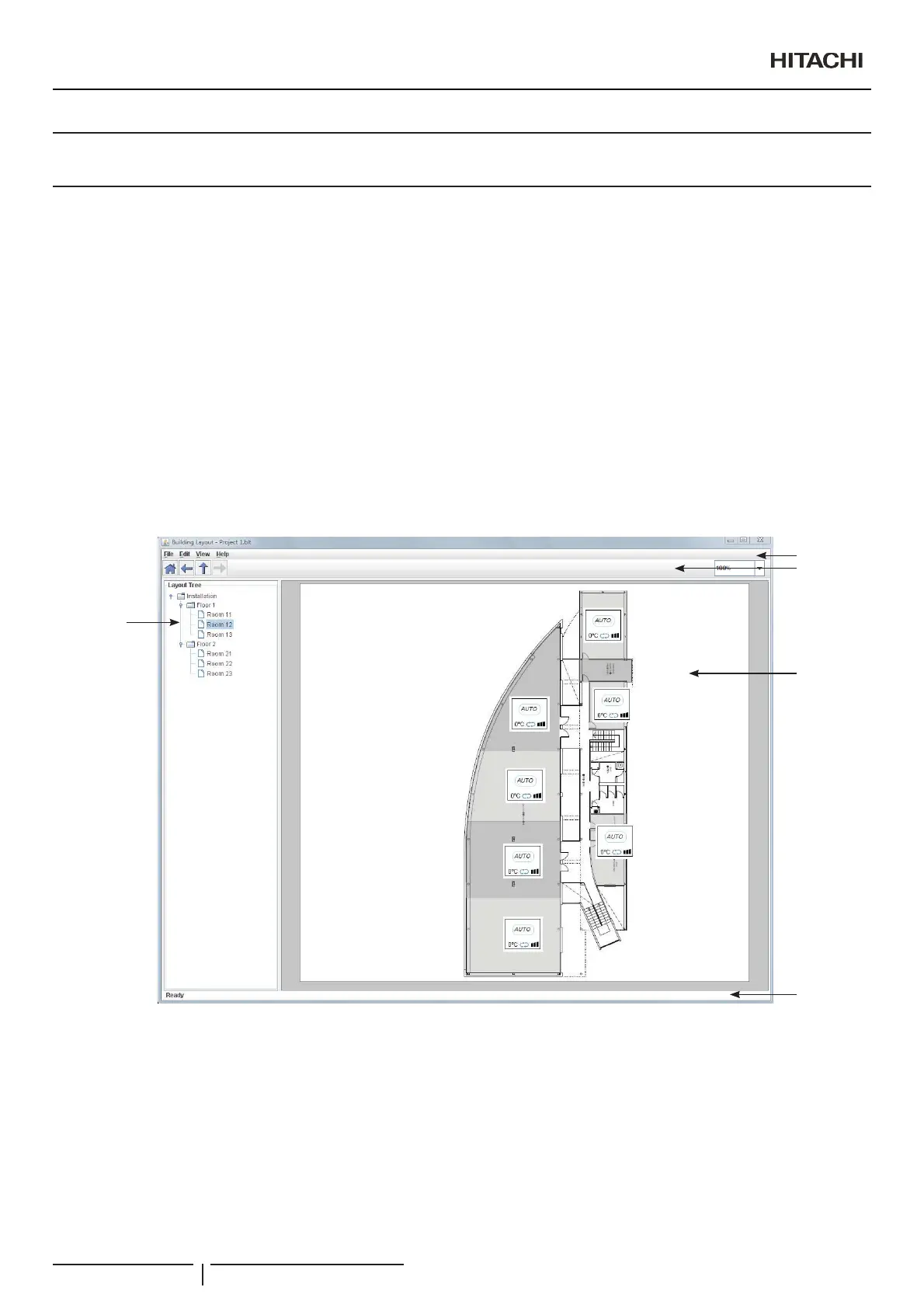
%XLOGLQJ/D\RXW(GLWRUKDV¿YH]RQHV
1 Tree: shows you the installation topology and allow the fast movement of zones.
2 Menu Bar: has general options of actions that you can do.
3 Tool Bar: has navigation and zoom buttons.
4 Edition zone: interface to create the shapes inside a zone.
5 Status Bar: has information of state of program.
2
4
1
5
3
Creation of Building Layout
PMML0409A rev.1 - 10/201684



 To Next Page