ENGLISH
6.2 IMPORT UNITS
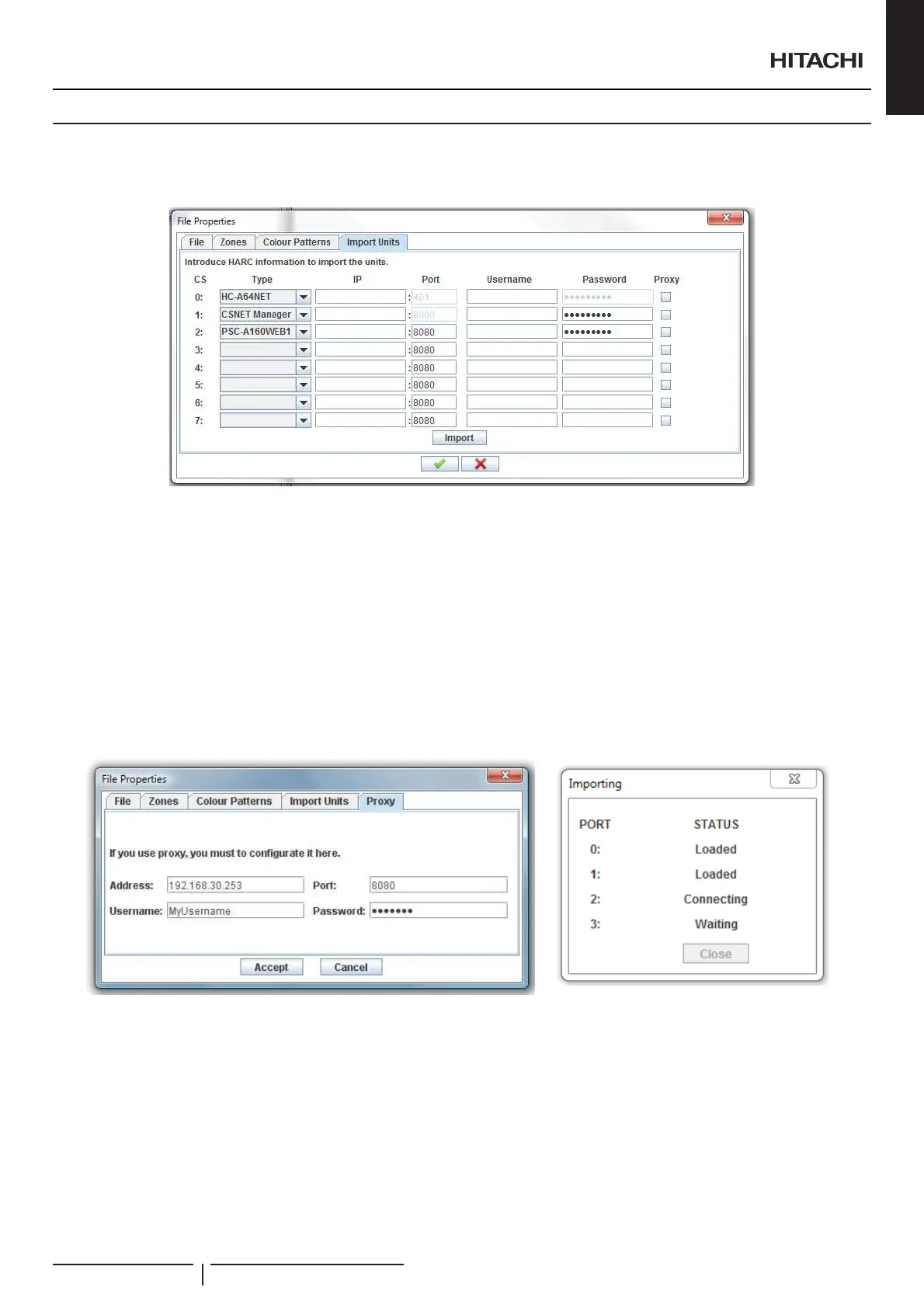
In order to make easy your layout creation you can import the current units of a CSNET Manager, PSC-A160WEB1 or a HC-
$1(77RGRWKLV\RXKDYHWRRSHQWKHRSWLRQ¿OHSURSHUWLHVDQGVHOHFWWKH,PSRUWXQLWVWDE
2QWKLVWDE\RXPXVWHQWHUWKH,3SRUWXVHUDQGSDVVZRUGRIWKHGHYLFHWRJHWWKHXQLWVH[LVWLQJRQWKHGDWD¿OHV
If you need to pass through a proxy to connect with one device you must set the check box of column proxy and after go to the proxy
WDEDQGVHWWKHSUR[\FRQ¿JXUDWLRQ
C A U T I O N
:KHQ\RXFRQ¿JXUH\RXULQVWDOODWLRQRQ&61(70DQDJHU\RXPXVWXVHWKHVDPHRUGHURI+$5&6WKDQKHUH,I\RXFKDQJHWKLVRUGHUWKHSRUWQXPEHU
of the units will be different and layout will consider these units as other ones
:KHQ\RXFOLFNLPSRUW%XLOGLQJ/D\RXWZLOOXVHWKHVH¿OHVWRORDGWKHXQLW¶VLQIRUPDWLRQDQGQH[WZLQGRZZLOODSSHDU
This dialog will show you the state of each import action.
$IWHUHQGWKHLPSRUWDWLRQSURFHVV\RXFDQ¿QGWKHXQLWVRQWKHVKDSHGLDORJXHFOLFNLQJRQRSWLRQORDG
Making this you can forget to write manually the information of each unit, and you only have to select which unit is on a list.
Creation of Building Layout
PMML0409A rev.1 - 10/201685


 To Next Page
 Loading...