EasyManua.ls Logo

Hitachi D-E95 - ADJUSTMENT; Adjustment Procedures

Hitachi D-E95
26 pages
Print Icon
To Next Page IconTo Next Page
To Previous Page IconTo Previous Page
Loading...
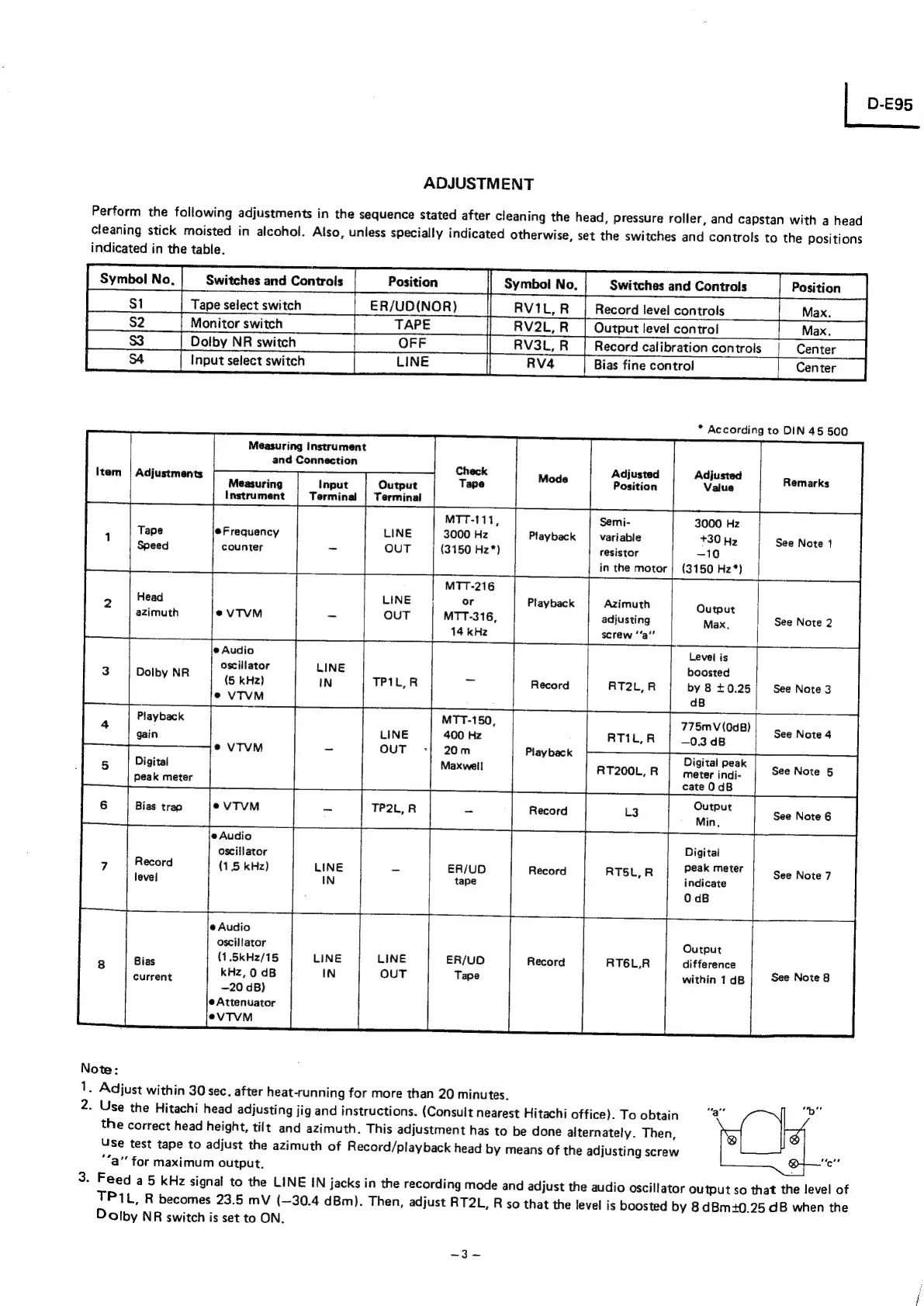
ADJUSTMENT
Perform
the
following
adjustments
in
the
sequence
stated
after
cleaning
the
head,
pressure
roller,
and
capstan
with
a
head
cleaning
stick
moisted
in
alcohol.
Also,
unless
specially
indicated
otherwise,
set
the
switches
and
controls
to
the
positions
Switches
and
Controls
Position
Record
{evel
controls
Max.
indicated
in
the
table.
|
4
Input
select
switch
LINE
|
Measuring
instrument
and
Connection
Measuring
Input
Output
Instrument
Terminal
|
Terminal
@Frequency
counter
Adjustments
MTT-111,
3000
Hz
(3150
Hz*)
Head
azimuth
@
Audio
oscillator
(5
kHz)
@VTVM
Dolby
NR
+.
Playback
gain
MTT-150,
400
Hz
20m
Maxwell
Digital
peak
meter
Bias
trap
oscillator
(1.5
kHz)
Symbol
No,
Switches
and
Controls
|__
Position
—_—||
Symbol
No,
|
__st__|
Tapeselectswitch
___|_ER/UD(NOR)
RV1L,
R
|
_S2___
|
Monitor
switch
[TAPE
|
RV2L,
RT|
Output
level
control
Playback
Playback
Playback
Record
Adjusted
Position
Semi-
variable
resistor
in
the
motor
Azimuth
adjusting
screw
‘‘a’’
RT200L,
R
—.
Bias
fine
contro!
3000
Hz
+30
Hz
—10
(3150
Hz*)
Output
Max.
Max.
Dolby
NR
switch
RV3L,
R_|
Record
calibration
controls
Center
*
According
to
DIN
45
500
Remarks
See
Note
1
See
Note
2
ee
ee
Level
is
boosted
by
8
+0.25
dB
775m
V(0dB)
—0.3
dB
Digital
peak
meter
indi-
cate
0dB
Output
Min,
Digital
peak
meter
indicate
0
dB
@
Audio
oscillator
Bias
(1,.5kHz/15
current
Note:
eae
RT6L,R
Output
difference
within
1
dB
See
Note
3
See
Note
4
See
Note
§
See
Note
6
See
Note
7
See
Note
8
Center
D-E95
1.
Adjust
within
30
sec.
after
heat-running
for
more
than
20
minutes.
2.
Use
the
Hitachi
head
adjusting
jig
and
instructions.
(Consult
nearest
Hitachi
office).
To
obtain
“8”
the
correct
head
height,
tilt
and
azimuth.
This
adjustment
has
to
be
done
alternately.
Then,
Use
test
tape
to
adjust
the
azimuth
of
Record/playback
head
by
means
of
the
adjusting
screw
"a"
for
maximum
output.
:
3.
Feed
a5
kHz
signal
to
the
LINE
IN
jacks
in
the
recording
mode
and
adjust
the
audio
oscillator
output
so
that
the
level
of
TP1L,
R
becomes
23.5
mV
(—30.4
dBm).
Then,
adjust
RT2L,
R
so
that
the
level
is
boosted
by
8
dBm+0.25
dB
when
the
Dolby
NR
switch
is
set
to
ON.

Related product manuals