EasyManua.ls Logo

Hitachi DA-1000 - Page 4

Hitachi DA-1000
39 pages
Print Icon
To Next Page IconTo Next Page
To Previous Page IconTo Previous Page
Loading...
audio
equipment.
The
jacks
themselves
are
con-
nected
to
the
amplifier’s
input
jacks
(DAD/AUX
or
_
TAPE
PLAY).
@
ouTPUT
jacks
(FIXED)
The
output
level
available
at
these
jacks
cannot
be
a)
Connect
the
unit’s.
OUTPUT
left
and
right
terminals
with
the
DAD/AUX
or
TAPE PLAY
left
and
right
in-
put
terminals
on
the
amplifier
using
the
accessory
connecting
pin
cord.
Connect
the
power
cord
to
the
auxiliary
power
outlet
on
the
rear
panel
of
the
stereo
amplifier
or
to
a
house-hold
AC
outlet.
@
m@
OPENING
The
door
cannot
be
opened
or
closed
unless
the
power
is
switched
on.
1.
Press
the
POWER
switch
@.
The
PLAY
button
@
in-
dicator
(>)
and
the
STOP
button
@
indicator
(Ml)
_
will
light
up.
2:
Press
the
OPEN/CLOSE
button
@
after
the
PLAY
button
indicator
(P)
light
goes
out
or
after
pressing
.
the
STOP
button
(i)
@.
e
When
a
disc
is
rotating,
first
press
the
STOP
(lM)
button
to
stop
the
disc
and
then
open
the
door
after
making
sure
that
the
disc
has
stopped.
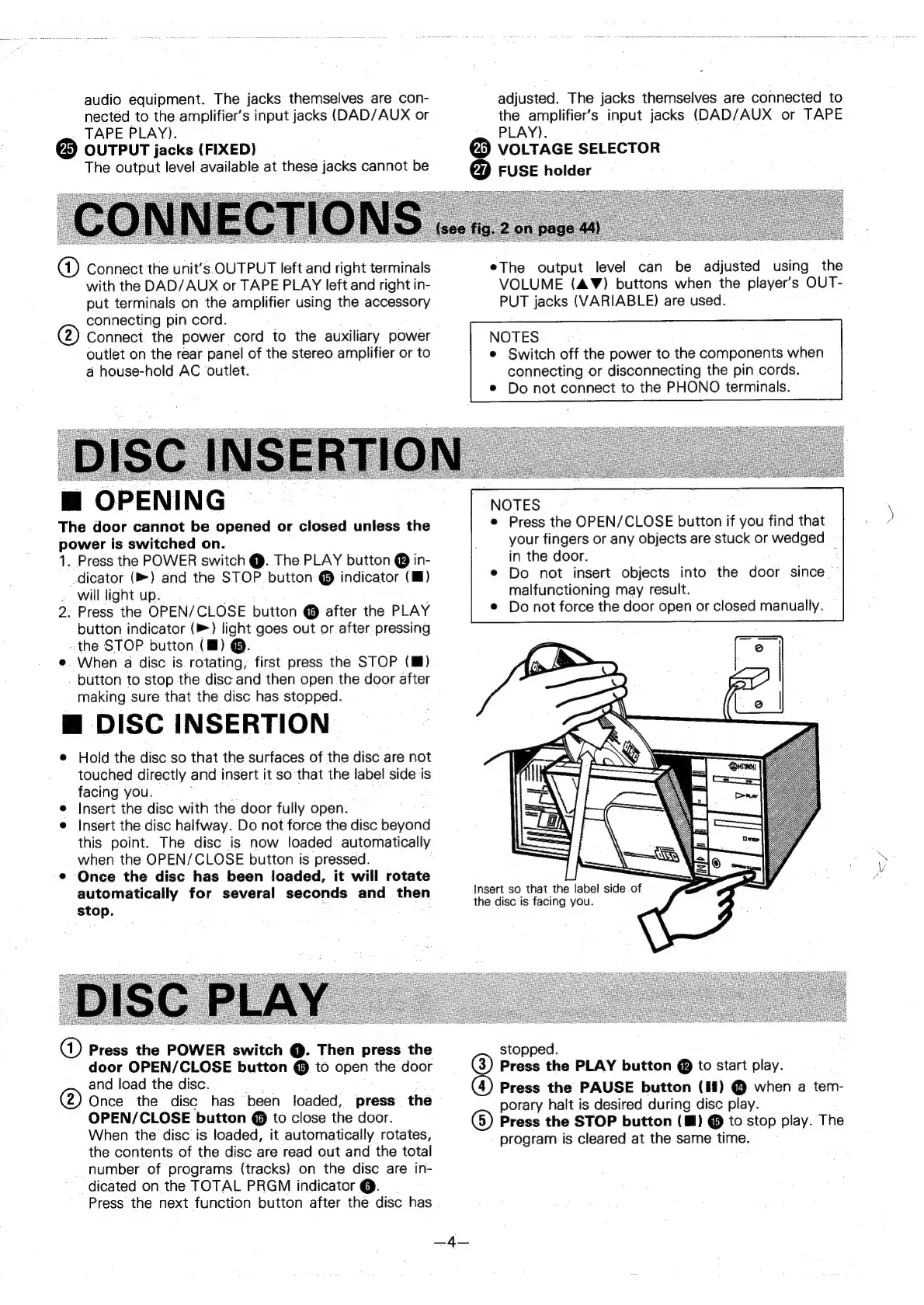
@
DISC
INSERTION
e
Hold
the
disc
so
that
the
surfaces
of
the
disc
are
not
touched
directly
and
insert
it
so
that
the
label
side
is
facing
you.
e
Insert
the
disc
with
the
door
fully
open.
e
Insert
the
disc
halfway.
Do
not
force
the
disc
beyond
this
point.
The
disc
is
now
loaded
automatically
when
the
OPEN/CLOSE
button
is
pressed.
®
Once
the
disc
has
been
loaded,
it
will
rotate
automatically
for
several
seconds
and
then
stop.
a)
Press
the
POWER
switch
@.
Then
press
the
door
OPEN/CLOSE
button
@
to
open
the
door
and
load
the
disc.
@
Once
the
disc
has
been
loaded,
press
the
OPEN/CLOSE
button
@
to
close
the
door.
When
the
disc
is
loaded,
it
automatically
rotates,
the
contents
of
the
disc
are
read
out
and
the
total
number
of
programs
(tracks)
on
the
disc
are
in-
dicated
on
the
TOTAL
PRGM
indicator
@.
_
Press
the
next
function
button
after
the
disc
has
adjusted.
The
jacks
themselves
are
connected
to
the
amplifier’s
input
jacks
(DAD/AUX
or
TAPE
PLAY).
@
VOLTAGE
SELECTOR
@®
FUSE
holder
eThe
output
level
can
be
adjusted
using
the
VOLUME
(AW)
buttons
when
the
player's
OUT-
PUT
jacks
(VARIABLE)
are
used.
NOTES
e
Switch
off
the
power
to
the
components
when
connecting
or
disconnecting
the
pin
cords.
¢
Do
not
connect
to
the
PHONO
terminals.
NOTES
e
Press
the
OPEN/CLOSE
button
if
you
find
that
your
fingers
or
any
objects
are
stuck
or
wedged
in
the
door.
:
¢
Do
not
insert
objects
into
the
door
since
malfunctioning
may
result.
©
Do
not
force
the
door
open
or
closed
manually.
Insert
so
that
the
label
side
of
the
disc
is
facing
you.
stopped.
@)
Press
the
PLAY
button
@
to
start
play.
@)
Press
the
PAUSE
button
(HI)
@
when
a
tem-
porary
halt
is
desired
during
disc
play.
6)
Press
the
STOP
button
(M)
@
to
stop
play.
The
program
is
cleared
at
the
same
time.
—_
SEK