EasyManua.ls Logo

Hitachi DA-1000 - Page 5

Hitachi DA-1000
39 pages
Print Icon
To Next Page IconTo Next Page
To Previous Page IconTo Previous Page
Loading...
)
NOTES
e
lf
the
disc
does
not
play
after
inserting
a
disc
e
|f
the
unit
does
not
play
after
pressing
the
and
pressing
the
PLAY
button,
re-insert
the
operating
buttons,
press
the
STOP
button
@
disc
or
check
that
the
disc
is
not
in
back
to
once.
front.
[1]
PROGRAM
PLAY
WITH
RANDOM
MEMORY
SEARCH
The
random
memory
search
program
function
searches
Q@)
First
press
the
PROGRAM
button
(PRGM)
@
and
for
the
desired
programs
on
the
disc
in
the
desired
order
then
select
the
desired
program
numbers
using
the
and
plays
them
automatically.
program
number
buttons
,
{1]®.
The
number
Load
the
disc
and
start
the
program
search
once
of
the
selected
program
is
indicated
on
the
PRGM
the
disc
has
stopped
rotating.
NO
indicator
@.
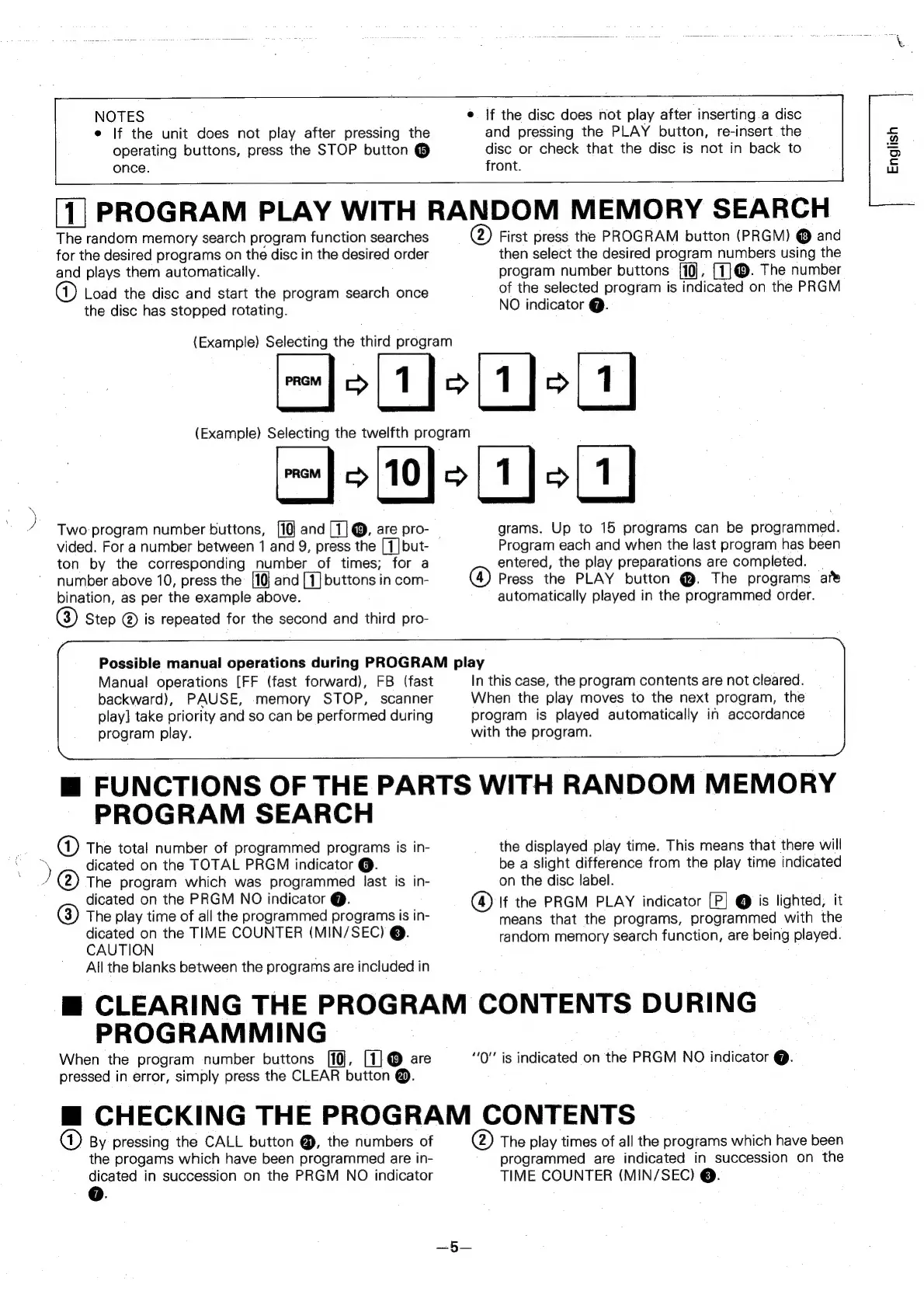
(Example)
Selecting
the
third
program
r}oLtjolyjolt]
(Example)
Selecting
the
twelfth
program
Gs
a)
a
Two:
program
number
buttons,
and
[1]
@,
are
pro-
grams.
Up
to
15
programs
can
be
programmed.
vided.
For
a
number
between
1
and
9,
press
the
[1]but-
Program
each
and
when
the
last
program
has
been
ton
by
the
corresponding
number
of
times;
for
a
entered,
the
play
preparations
are
completed.
|
number
above
10,
press
the
and
[1]
buttons
in
com-
@®
Press
the
PLAY
button
@.
The
programs
are
bination,
as
per
the
example
above.
automatically
played
in
the
programmed
order.
Step
@
is
repeated
for
the
second
and
third
pro-
Possible
manual
operations
during
PROGRAM
play
Manual
operations
[FF
(fast
forward),
FB
(fast
In
this
case,
the
program
contents
are
not
cleared.
backward),
PAUSE,
memory
STOP,
scanner
When
the
play
moves
to
the
next
program,
the
play]
take
priority
and
so
can
be
performed
during
program
is
played
automatically
in
accordance
program
play.
with
the
program.
m@
FUNCTIONS
OF
THE
PARTS
WITH
RANDOM
MEMORY
PROGRAM
SEARCH
a)
The
total
number
of
programmed
programs
is
in-
the
displayed
play
time.
This
means
that
there
will
>
dicated
on
the
TOTAL
PRGM
indicator
@.
be
a
slight
difference
from
the
play
time
indicated
The
program
which
was
programmed
last
is
in-
on
the
disc
label.
dicated
on
the
PRGM
NO
indicator
@.
@)
If
the
PRGM
PLAY
indicator
[P]
@
is
lighted,
it
3)
The
play
time
of
all
the
programmed
programs
is
in-
means
that
the
programs,
programmed
with
the
RULION,
the
TIME
COUNTER
(MIN/SEC)
@.
random
memory
search
function,
are
being
played.
All
the
blanks
between
the
programs
are
included
in
m@
CLEARING
THE
PROGRAM
CONTENTS
DURING
PROGRAMMING
When
the
program
number
buttons
[10],
[1]
@
are
“Q""
is
indicated
on
the
PRGM
NO
indicator
Q.
pressed
in
error,
simply
press
the
CLEAR
button
@.
mM
CHECKING
THE
PROGRAM
CONTENTS
By
pressing
the
CALL
button
@,
the
numbers
of
@)
The
play
times
of
all
the
programs
which
have
been
the
progams
which
have
been
programmed
are
in-
programmed
are
indicated
in
succession
on
the
dicated
in
succession
on
the
PRGM
NO
indicator
TIME
COUNTER
(MIN/SEC)
@.
GO.
English