EasyManua.ls Logo

Hitachi ED-X45N - User Manual

Hitachi ED-X45N
260 pages
Print Icon
To Next Page IconTo Next Page
Loading...
1
Projector
ED-X45N
User's Manual (detailed)
Operating Guide
Thank you for purchasing this projector.
Ź%HIRUHXVLQJWKLVSURGXFWSOHDVHUHDGDOOPDQXDOVIRUWKLV
SURGXFW%HVXUHWRUHDG³Safety Guide´¿UVW$IWHUUHDGLQJWKHPVWRUHWKHPLQD
VDIHSODFHIRUIXWXUHUHIHUHQFH
WARNING
7KHLQIRUPDWLRQLQWKLVPDQXDOLVVXEMHFWWRFKDQJHZLWKRXWQRWLFH
7KHPDQXIDFWXUHUDVVXPHVQRUHVSRQVLELOLW\IRUDQ\HUURUVWKDWPD\DSSHDULQ
WKLVPDQXDO
7KHUHSURGXFWLRQWUDQVIHURUFRS\RIDOORUDQ\SDUWRIWKLVGRFXPHQWLVQRW
SHUPLWWHGZLWKRXWH[SUHVVZULWWHQFRQVHQW
NOTE
Trademark acknowledgment
9DULRXVV\PEROVDUHXVHGLQWKLVPDQXDO7KHPHDQLQJVRIWKHVHV\PEROVDUH
GHVFULEHGEHORZ
$ERXWWKLVPDQXDO
WARNING
CAUTION
7KLVV\PEROLQGLFDWHVLQIRUPDWLRQWKDWLILJQRUHGFRXOGSRVVLEO\
UHVXOWLQSHUVRQDOLQMXU\RUHYHQGHDWKGXHWRLQFRUUHFWKDQGOLQJ
7KLVV\PEROLQGLFDWHVLQIRUPDWLRQWKDWLILJQRUHGFRXOGSRVVLEO\
UHVXOWLQSHUVRQDOLQMXU\RUSK\VLFDOGDPDJHGXHWRLQFRUUHFW
KDQGOLQJ
3OHDVHUHIHUWRWKHSDJHVZULWWHQIROORZLQJWKLVV\PERO
0DF
®
LVDUHJLVWHUHGWUDGHPDUNRI$SSOH,QF
:LQGRZV
®
LVDUHJLVWHUHGWUDGHPDUNRI0LFURVRIW&RUSRUDWLRQLQWKH86DQGRURWKHU
FRXQWULHV
9(6$DQG''&DUHWUDGHPDUNVRIWKH9LGHR(OHFWURQLFV6WDQGDUG$VVRFLDWLRQ

+'0,WKH+'0,ORJRDQG+LJK'H¿QLWLRQ0XOWLPHGLD,QWHUIDFHDUHWUDGHPDUNVRUUHJLVWHUHG
WUDGHPDUNVRI+'0,/LFHQVLQJ//&LQWKH8QLWHG6WDWHVDQGRWKHUFRXQWULHV
7UDGHPDUN3-/LQNLVDWUDGHPDUNDSSOLHGIRUWUDGHPDUNULJKWV
LQ-DSDQWKH8QLWHG6WDWHVRI$PHULFDDQGRWKHUFRXQWULHVDQG
DUHDV
$OORWKHUWUDGHPDUNVDUHWKHSURSHUWLHVRIWKHLUUHVSHFWLYHRZQHUV
NOTICE 7KLVHQWU\QRWLFHVRIIHDURIFDXVLQJWURXEOH
Question and Answer IconNeed help?

Do you have a question about the Hitachi ED-X45N and is the answer not in the manual?

Overview

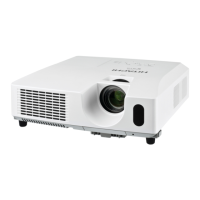
This document describes the Hitachi ED-X45N Projector, a liquid crystal projector designed for various presentation and display applications.

Function Description

The Hitachi ED-X45N Projector is a versatile device capable of projecting computer images, video, and still images from a USB storage device. It supports network functionality, allowing for remote control, monitoring, and presentation capabilities over a LAN. The projector can display images from multiple sources, including computers, video players, and USB devices, and offers various adjustment features to optimize the display quality. It also includes a "Messenger" function for displaying text messages sent from a computer and a "Network Bridge" function to control external devices via the projector.

Important Technical Specifications

  • Product Name: Liquid crystal projector
  • Liquid Crystal Panel: 786,432 pixels (1024 horizontal x 768 vertical)
  • Lamp: 190 W UHP
  • Speaker: 16 W mono (8 W x 2)
  • Power Supply/Rated Current: AC 100-120 V/3.2 A, AC 220-240 V/1.7 A
  • Power Consumption: AC 100-120 V: 310 W, AC 220-240 V: 290 W
  • Temperature Range: 5 - 35°C (Operating)
  • Size: 317 (W) x 98 (H) x 288 (D) mm (excluding protruding parts)
  • Weight: Approx. 3.5 kg
  • Computer Input Ports: D-sub 15 pin mini x1 (COMPUTER IN1, COMPUTER IN2)
  • HDMI Input Port: HDMI connector x1
  • Video Input Ports: RCA x3 (Y, Cb/Pb, Cr/Pr Component video), mini DIN 4 pin x1 (S-VIDEO), RCA x1 (VIDEO)
  • Audio Input/Output Ports: Stereo mini x1 (AUDIO IN1, AUDIO IN2), RCA x2 (AUDIO IN3 (R, L), AUDIO OUT (R, L))
  • Other Ports: USB-A x1, USB-B x1, D-sub 9 pin x1 (CONTROL), RJ45 x1 (LAN), Stereo mini x1 (MIC)
  • Lamp Type Number: DT01021
  • Filter Set Type Number: MU06481
  • Internal Clock Battery: CR2032 or CR2032H

Usage Features

The projector offers a wide array of usage features for flexible operation:

  • Input Source Selection: Users can easily switch between various input sources like COMPUTER IN1/IN2, HDMI, VIDEO, S-VIDEO, COMPONENT, LAN, and USB TYPE A/B.
  • Automatic Adjustment: Features like AUTO adjustment for image position and AUTO KEYSTONE for keystone distortion correction simplify setup.
  • Image Adjustments: Comprehensive controls for BRIGHTNESS, CONTRAST, GAMMA, COLOR TEMP, COLOR, TINT, SHARPNESS, ASPECT, OVER SCAN, V POSITION, H POSITION, H PHASE, and H SIZE allow for fine-tuning of the projected image.
  • Audio Controls: VOLUME, SPEAKER on/off, AUDIO SOURCE selection (including HDMI audio), MIC LEVEL, and MIC VOLUME are available.
  • Screen Settings: Options for LANGUAGE, MENU POSITION, BLANK screen, START UP image, MESSAGE display, SOURCE NAME customization, TEMPLATE selection, and Closed Caption (C.C.) settings.
  • Presentation Tools: Includes PC-LESS Presentation for projecting images directly from a USB storage device (supporting JPEG, BMP, PNG, GIF formats) and USB Display for projecting computer screens via a USB cable.
  • Network Functionality:
    • LiveViewer: Software for connecting the computer to the projector via a network, enabling image transmission and projector control.
    • Web Control: Allows adjustment and control of the projector via a web browser, including security settings, mail alerts, schedule settings, and projector control commands.
    • My Image Function: Stores and projects still images transferred via the network.
    • Messenger Function: Displays text messages from a computer on the projector screen.
    • Network Bridge Function: Controls external devices connected to the projector via RS-232C communication over the network.
  • Security Features: Password protection for network access, PIN lock for projector operation, and transition detector for unauthorized movement.
  • Remote Control: A dedicated remote control provides access to most functions, including power on/off, input selection, volume, mute, freeze, magnify, and menu navigation. It can also function as a simple PC mouse and keyboard for network presentations.

Maintenance Features

Regular maintenance is crucial for the projector's longevity and optimal performance:

  • Lamp Replacement: The lamp has a finite product life and needs replacement when it becomes dark, colors appear poor, or it burns out. The manual provides detailed instructions for safe replacement, including cooling time and handling precautions.
  • Air Filter Cleaning/Replacement: The air filter should be cleaned periodically to prevent dust accumulation, which can cause internal temperature rise and malfunction. The projector may display a "CHECK THE AIR FLOW" message or turn off if the filter is clogged. Replacement is necessary if cleaning is insufficient or the filter is damaged.
  • Internal Clock Battery Replacement: The internal clock uses a battery that may need replacement if the network function does not work correctly. Instructions for safe replacement are provided.
  • General Cleaning: The cabinet and remote control should be cleaned with a soft, dry cloth. Harsh chemicals or abrasive cleaners should be avoided. The lens should be cleaned with commercially available lens tissue.
  • Dealer Service: It is recommended to contact the dealer for internal cleaning of the projector annually, especially before humid periods, to prevent dust accumulation and potential malfunctions.
  • Consumables Lifetime: Lamp, LCD panels, polarizers, air filter, and cooling fans have different lifetimes and may require replacement after extended use. Continuous use (6 hours or more daily) can shorten their lifespan.

Hitachi ED-X45N Specifications

General IconGeneral
BrandHitachi
ModelED-X45N
CategoryDigital projectors
LanguageEnglish