OPTIONAL FUNCTIONS
PMML0293A rev.2 - 08/2016
21
11 OPTIONAL FUNCTIONS
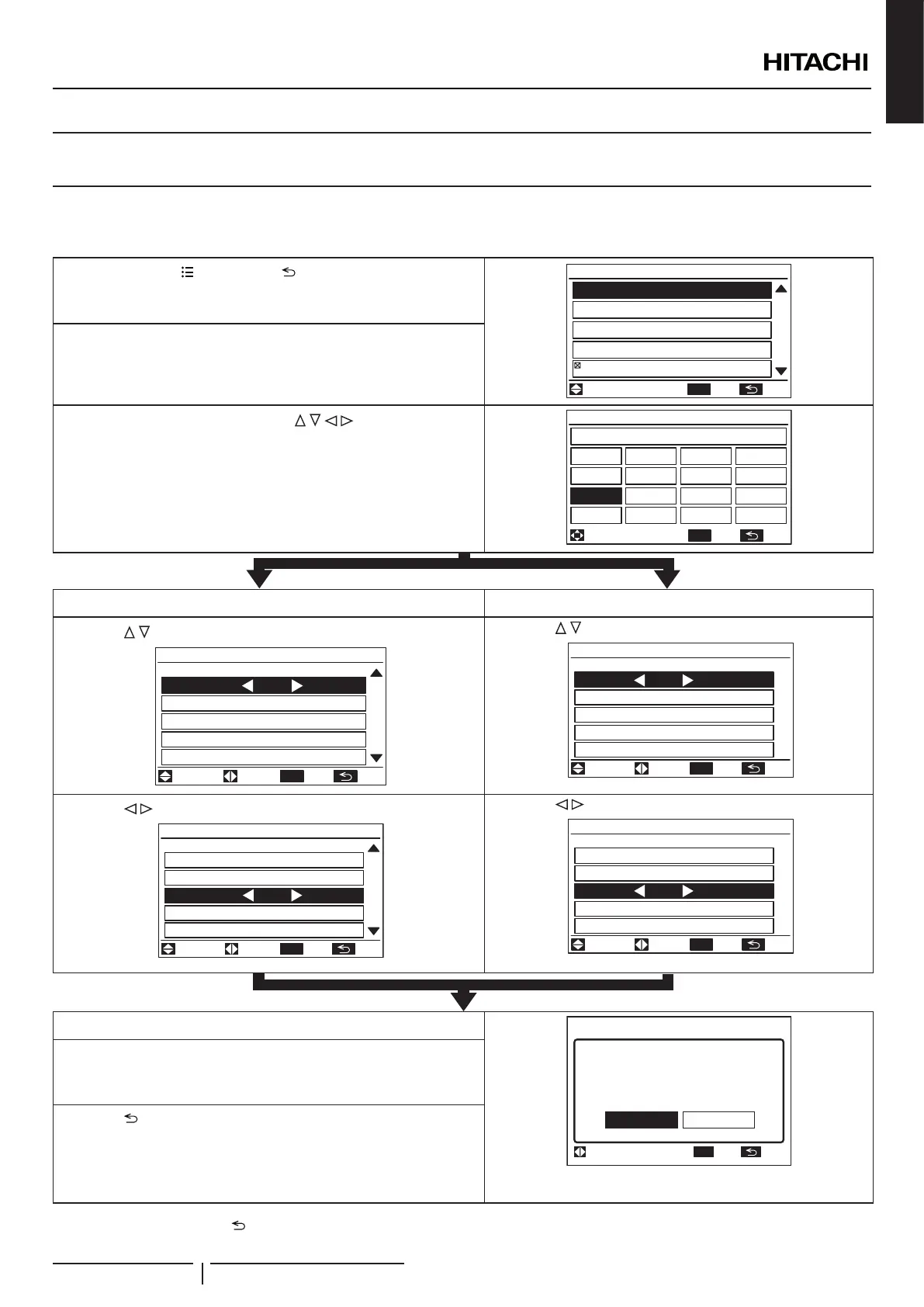
11.1 OPTIONAL FUNCTION SELECTION THROUGH PC-ARFPE
Function Selection and Input/Output
1 Press and hold “ ” (menu) and “ ” (return) simultaneously for
at least 3 seconds during the normal mode (when unit is not
operated). The test run menu will be displayed.
ADJ
/
OK
Test Run Menu
Test Run
Function Selection
Thermistor Selection
Input/Output
Function 5
01
03
ENT
TN.SEL.
2 Select “Function Selection” or “Input/Output” from the test run
menu and press “OK”.
3 Select the indoor unit by pressing “ ” and press “OK”.
(This screen is NOT displayed when the number of indoor unit
connected with the remote control switch is 1 (one). In this case,
(4) will be displayed.)
OK
Function Selection
All
01-01
01-02
01-03
01-04
ENT
TN.SEL.
Function Selection Input/Output Setting
4 Press “ ” and select the item.
OK
01
18
b1 00
b2 00
b3 00
b4 00
b5 00
Item Setting
/
ADJ ENT
TN.SEL.
4 Press “ ” and select the item.
OK
Input 1 00 CN3 1-2
Input 2 00 CN3 2-3
Output1 00 CN7 1-2
Output2 00 CN7 1-3
Output3 00 CN8 1-2
Item Setting Connector
ADJ ENT
TN.SEL.
5 Press “ ” and change the setting.
Function Selection:01-03
01
18
b1 00
b2 00
b3 01
b4 00
b5 00
Item Setting
/
ADJ ENT
TN.SEL.
OK
5 Press “ ” and change the setting.
OK
Input/Output:01-03
Input 1 00 CN3 1-2
Input 2 00 CN3 2-3
Output1 01 CN7 1-2
Output2 00 CN7 1-3
Output3 00 CN8 1-2
Item Setting Connector
ADJ ENT
TN.SEL.
6 Press “OK” so that the conrmation screen will be displayed.
OK
Confirm function
selection setting?
Function Selection:01-03
Yes No
SEL. ENT
TN.
(Figure for Function Selection)
7 Select “Yes” and press “OK”. The test run menu will be displayed
after the setting is conrmed. If “No” is pressed, the screen will
return to (4).
8 Press “ ” (return) on the test run menu to return to the normal
mode.
To set other units, press “ ” (return) at (4)(5) so that the screen will return to (3). (If the number of indoor unit connected with the
remote control switch is 1 (one), the screen will return to (1).)
ENGLISH


 To Next Page
 Loading...