OPTIONAL FUNCTIONS
PMML0293A rev.2 - 08/2016
22
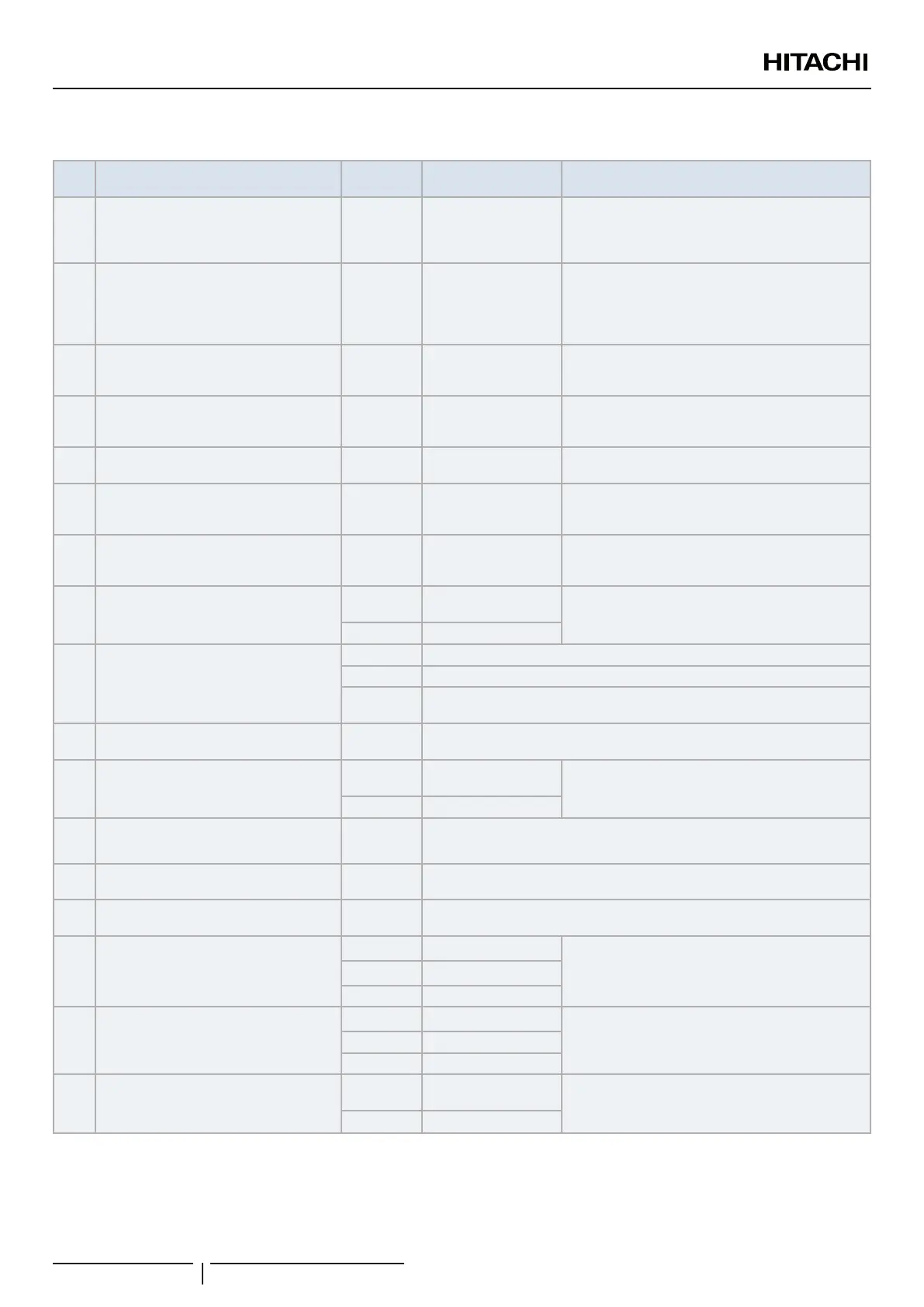
Table A Optional Setting Items for Function Selection
Items Optional Function
Setting
condition
Contents Description
b3
Enforced 3 Minutes minimum operation
time of compressor
00
01
Disable
Enable
With this option function, compressor cannot be OFF
during 3min after compressor ON, however, it is
STOP immediately at protection device activated. It
also be STOP immediately at stop by operation SW.
b4 Change of lter cleaning time
00
01
02
03
04
Standard
100 hrs
1,200 hrs
2,500 hrs
No indication
Fan operation time is accumulated and lter sign
turns on in at set time in the remote control.
b5 Fixing of operation mode
00
01
Standard
Fixed
Once the unit operating mode has been selected,
this function prevents it from being modied from the
remote control.
b6 Fixing of setting temperature
00
01
Standard
Fixed
Once the temperature on the unit has been selected,
this function prevents it from being modied from the
remote control
b7
Fixing of operation as exclusive cooling
unit
00
01
Standard
Fixed
Fix to use cooling mode only and to prevent heating
mode from being enabled.
b8 Automatic COOL/HEAT operation
00
01
Disable
Enable
Allows, from cooling mode, change automatically to
heating mode (for all units of the same refrigerant
cycle)
b9 Fixing of fan speed (Air ow x)
00
01
Standard
Fixed
Once the fan speed on the unit has been selected,
this function prevents it from being modied from the
remote control
C3 Fan stop delay
00
0 minutes
(Factory setting)
Airow is kept in setting airow after unit normal
stoppage during “Delay Time”.
01 60 minutes
C8 Thermistor selection for control
00 Control by inlet air thermistor (Factory setting)
01 Control by thermistor of remote control switch
02
Control by average value of indoor suction thermistor and thermistor of remote
control switch
Cb Selection of forced stoppage logic
00
01
Forced stoppage input: A Contact (contact closed)
Forced stoppage input: B Contact (contact open)
CC Fixed High ventilation fan speed
00
Disable (factory
setting)
The unit runs at maximum fan speed (RCS High
level) under any condition
01 Enabled
CF Fan stoppage delay
00
01
Disable
60 minutes
d1 Power supply ON/OFF 1
00
01
Disable
Enable
d3 Power supply ON/OFF 2
00
01
Disable
Enable
E1
“A” offset for Thermo ON/OFF in control
by Outlet for DX-Interface
00 0ºC (factory setting)
This function is used to set the value of the offset
in the formula for deciding about Thermo ON/OFF
condition by inlet air temperature for Control by Outlet
Temperature.
01 2ºC
02 4ºC
E4 Pre-cooling / Pre-heating period
00 Standard
This function delays start-up of the air conditioning
system.
01 30 minutes
02 60 minutes
E5 High ventilation after switch ON
00
0 minutes
(Factory setting)
The unit runs in high speed during a certain minutes
after switch on the unit. After that time the fan speeds
runs at set fan speed.
01 60 minutes
? NOTE
• After at least 3 minutes from the power ON, change the optional setting.
• Record the setting conditions for each optional setting in the “Setting” column of the table.


 To Next Page
 Loading...