This document describes the Hitachi Split Type Air Conditioner, models RAS-50YHA3/RAC-50YHA3 and RAS-60YHA3/RAC-60YHA3, covering its functions, technical specifications, usage, and maintenance.
Function Description:
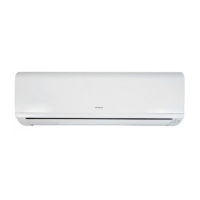
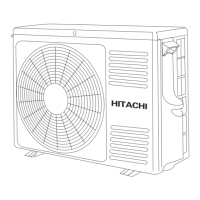
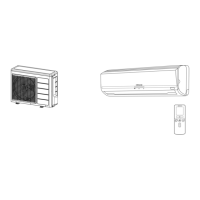
The Hitachi Split Type Air Conditioner is designed to provide cooling, heating, dehumidifying, and fan-only operation for indoor spaces. It consists of an indoor unit and an outdoor unit. The indoor unit houses the pre-filter, front panel, indoor unit indicators (FILTER LAMP, OPERATION LAMP, TIMER LAMP), horizontal and vertical air deflectors, and receives signals from the remote controller. The outdoor unit includes a drain pipe, connecting cord, insulation pipe for piping, and air inlets/outlets.
Important Technical Specifications:
The manual provides model names and dimensions:
- RAS-50YHA3, RAS-60YHA3 (Indoor Unit):
- Width: 1030 mm
- Height: 295 mm
- Depth: 207 mm
- RAC-50YHA3 (Outdoor Unit):
- Width: 850 mm
- Height: 650 mm
- Depth: 298 mm
- RAC-60YHA3 (Outdoor Unit):
- Width: 850 mm
- Height: 750 mm
- Depth: 298 mm
Recommended operating temperatures:
- Cooling Operation: Outdoor temperature range of -10°C to 46°C. Indoor dry bulb temperature range of 21°C to 32°C, and wet bulb temperature range of 15°C to 23°C.
- Heating Operation: Outdoor temperature range of -15°C to 21°C. Indoor dry bulb temperature range of 20°C to 27°C, and wet bulb temperature range of 1°C to 15°C.
- Dehumidifying Operation: Room temperature must be over 16°C. The recommended room temperature for dehumidifying is 20°C to 26°C.
Usage Features:
The air conditioner offers various operating modes and controls via a remote controller:
- Remote Controller: Controls the indoor unit from up to 7 meters away. It features a display for selected room temperature, current time, timer status, function, and circulation intensity. Buttons include START/STOP, SLEEP, TEMPERATURE (raise/lower), TIME (set/check), RESET, FUNCTION selector (AUTO, HEAT, DEHUMIDIFY, COOL, FAN), FAN SPEED selector (AUTO, HI, MED, LOW, SILENT), AUTO SWING, TIMER control (OFF-TIMER, ON-TIMER, RESERVE, CANCEL).
- Automatic Operation: The device automatically determines the operation mode (HEAT or COOL) based on the current room temperature. The fan speed can be set to AUTO, LOW, or SILENT.
- Heating Operation: Recommended for outdoor temperatures under 21°C and above -15°C. Users can set the desired room temperature and fan speed (AUTO, HI, MED, LOW, SILENT). Defrosting occurs automatically about once an hour for 5-10 minutes when frost forms on the outdoor unit's heat exchanger.
- Dehumidifying Operation: Operates when room temperature is over 16°C. The fan speed is set to LOW or SILENT. Users can set a desired room temperature between 20°C and 26°C.
- Cooling Operation: Recommended for outdoor temperatures between -10°C and 46°C. Users can set the desired room temperature and fan speed (AUTO, HI, MED, LOW, SILENT).
- Fan Operation: Allows the device to function as an air circulator, useful for drying the indoor unit. Users can select fan speeds (HI, MED, LOW, SILENT).
- Timer Functions:
- Time Setting: Allows setting the current time on the remote controller.
- OFF-Timer: Sets the device to turn off at a preset time.
- ON-Timer: Sets the device to turn on at a designated time.
- ON/OFF-Timer: Combines both, allowing the device to turn on and off at specified times.
- Sleep Timer: Sets the device to operate for a designated number of hours before turning off, with options for 1, 2, 3, or 7 hours. It can also be combined with the ON-timer.
- Air Deflector Adjustment:
- Horizontal Deflector: Automatically adjusts its angle. It can be swung up and down continuously or set to a desired angle using the "AUTO SWING" button. In cooling mode, continuous swinging for long periods is cautioned against to prevent condensation.
- Vertical Deflector: Manually adjusted by holding and moving it to direct airflow left or right.
- Auto Restart Control: In case of power failure, the unit automatically restarts with the previous operation mode and airflow direction once power is restored. This feature is not available when Timer or Sleep Timer mode is set.
- Temporary Switch: A physical switch on the indoor unit for starting and stopping operation if the remote controller is not working. It operates in the previously set mode or automatic mode if power was cycled.
Safety Precautions:
The manual emphasizes safety precautions during installation, shifting/maintenance, and operation:
- General: Do not reconstruct the unit. Use an earth line. Install a circuit breaker. Avoid installing near flammable gas. Ensure smooth drain hose flow. Do not install in machine shops or kitchens with oil vapor.
- Operation: Avoid prolonged direct airflow. Do not insert fingers or objects into air outlets/inlets. Do not use conductors as fuse wire. Disconnect power during thunderstorms. Keep spray cans and combustibles away from air outlets. Operate under manufacturer specifications. Do not operate with wet hands. Ventilate rooms when using burning equipment. Do not direct cool air at heating apparatus. Ensure stable outdoor mounting. Do not splash water on the unit. Avoid using aerosols near the indoor unit. Switch off power for cleaning. Turn off the circuit breaker for long periods of non-operation. Do not climb on the outdoor unit or place objects on it. Do not place water containers on the indoor unit. Do not place plants directly under airflow. Avoid operating with open doors/windows and downward deflector for long periods in high humidity to prevent condensation.
- Maintenance: Stop operation and turn off the circuit breaker before cleaning. Contact agents for maintenance, removal, or reinstallation. Replace damaged supply cords with authorized parts.
Maintenance Features:
- Pre-Filter Cleaning: The FILTER lamp on the indoor unit indicates when it's time to clean the filter (approximately every 200 hours of operation).
- Open the front panel by pulling it up at both sides.
- Remove the pre-filter by pushing upward to release claws.
- Attach air purifying filters to the pre-filter frame (if applicable).
- Attach the pre-filters back, ensuring "FRONT" faces forward, and close the front panel.
- Clean pre-filters by vacuuming dust or rinsing with water and a soft brush, then drying in shade. Clean every month or sooner if needed. Do not use hot water (above 40°C), detergents, or expose to direct sunlight.
- Washable Front Panel:
- Remove the front panel by holding it with both hands, pushing the right arm inward, and pulling it forward while slightly closing.
- Wash with clean water and a soft sponge, using neutral detergent if necessary, then rinse thoroughly and wipe dry.
- Attach by aligning projections with flanges and inserting into holes.
- Do not splash water on the unit body. Avoid hot water (above 40°C), benzine, gasoline, acid, thinner, or brushes, as they can damage plastic surfaces.
- Maintenance Before Long Off Period: Run the unit in FAN mode at HI speed for about half a day on a dry day to dry the unit, then switch off the power plug.
- Regular Inspection: Recommended every half-yearly or yearly by qualified service personnel to check earth line, mounting frame stability, and power plug connection.
Troubleshooting (When Asking for Service):
- Remote Controller Issues: Check if batteries need replacement or if polarity is correct.
- Unit Not Operating: Check fuse, voltage, circuit breaker, and operation mode settings.
- Ineffective Cooling/Heating: Check for blocked air filters, direct sunlight on the outdoor unit, obstructed outdoor unit airflow, open doors/windows, heat sources in the room, suitable temperature settings, blocked air inlets/outlets, or fan speed settings (LOW/SILENT).
- Notes: Slight flowing noise of refrigerant or rubbing noise from the fan casing are normal. Odors may be emitted due to smoke, foodstuffs, or cosmetics adhering to the air filter and evaporator, requiring regular cleaning.
- General: Contact the sales agent if issues persist after checks, providing model, production number, installation date, and fault details. Ensure power supply is at rated voltage. Replace damaged supply cords with authorized parts.

 Need help?
 General





 To Next Page
