–
40 –
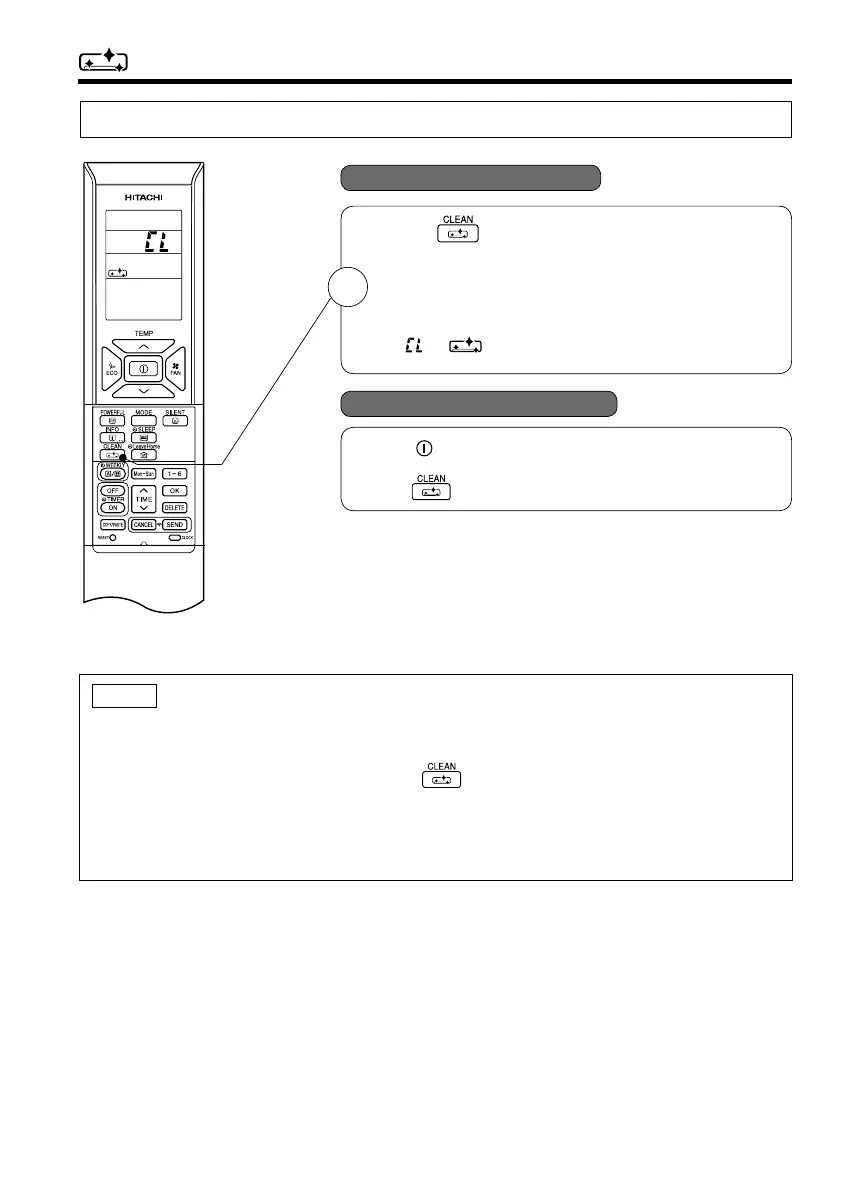
CLEAN (ONE TOUCH CLEAN) OPERATION
Drying indoor heat exchanger after cooling operation to prevent mildew.
■ To start CLEAN operation
■ To cancel CLEAN operation
● Press (CLEAN) button when unit is OFF.
Total time taken for One Touch Clean operation is 60 minutes.
During this operation, HEATING or FAN operation shall
operate.
During one touch clean, operation lamp is blinking.
“
”, “ ” is displayed on the LCD.
● Press (START/STOP) button. Or
● Press (CLEAN) button again.
1
NOTE
● When CLEAN operation fi nish, unit will switch OFF automatically.
● If Weekly Timer or Once Timer is set, there is a need to cancel those timer before operating CLEAN
function.
● For multi model connections, when pressing (CLEAN) button, operation is limited to FAN
operation.
3-262.pdf 13 3/12/15 9:50 AM




 To Next Page