–
48 –
Step 3: Copy and cancel the reservation schedule.
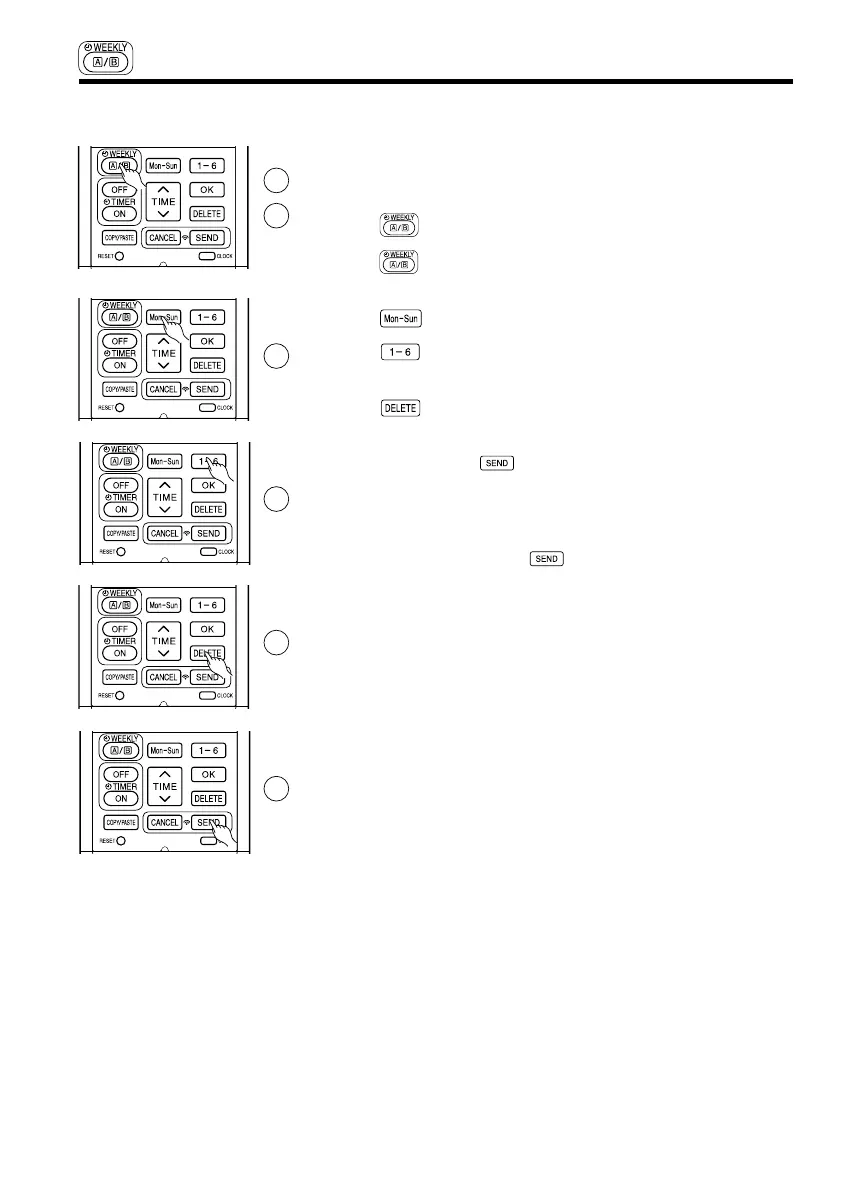
■ How to delete WEEKLY TIMER data.
[Delete one program number reservation]
1. Press (WEEKLY) button to select Mode A or Mode B.
2. Press (WEEKLY) button for 3 seconds to start editing the reserva-
tion schedule.
3. Press (DAY) button to select a day of the week to edit.
4. Press to select program number. Selected program number will
blink.
5. Press (DELETE) button. Reservation of selected program num-
ber is deleted.
6. After deleting, press (SEND) button while directing the remote
controller towards the indoor unit for about 3 seconds. Timer lamp on
the indoor unit will blink rapidly.
After beep sound emitted from indoor unit, TIMER lamp will light up.
Please ensure that the TIMER lamp lights up.
● Reservation will not change if (SEND) button is not pressed.
1
2
3
4
5
6
WEEKLY TIMER OPERATION
3-262.pdf 21 3/12/15 9:50 AM




 To Next Page