EasyManua.ls Logo

Hitachi VIP2000 - Page 2

Hitachi VIP2000
6 pages
Print Icon
To Next Page IconTo Next Page
To Previous Page IconTo Previous Page
Loading...
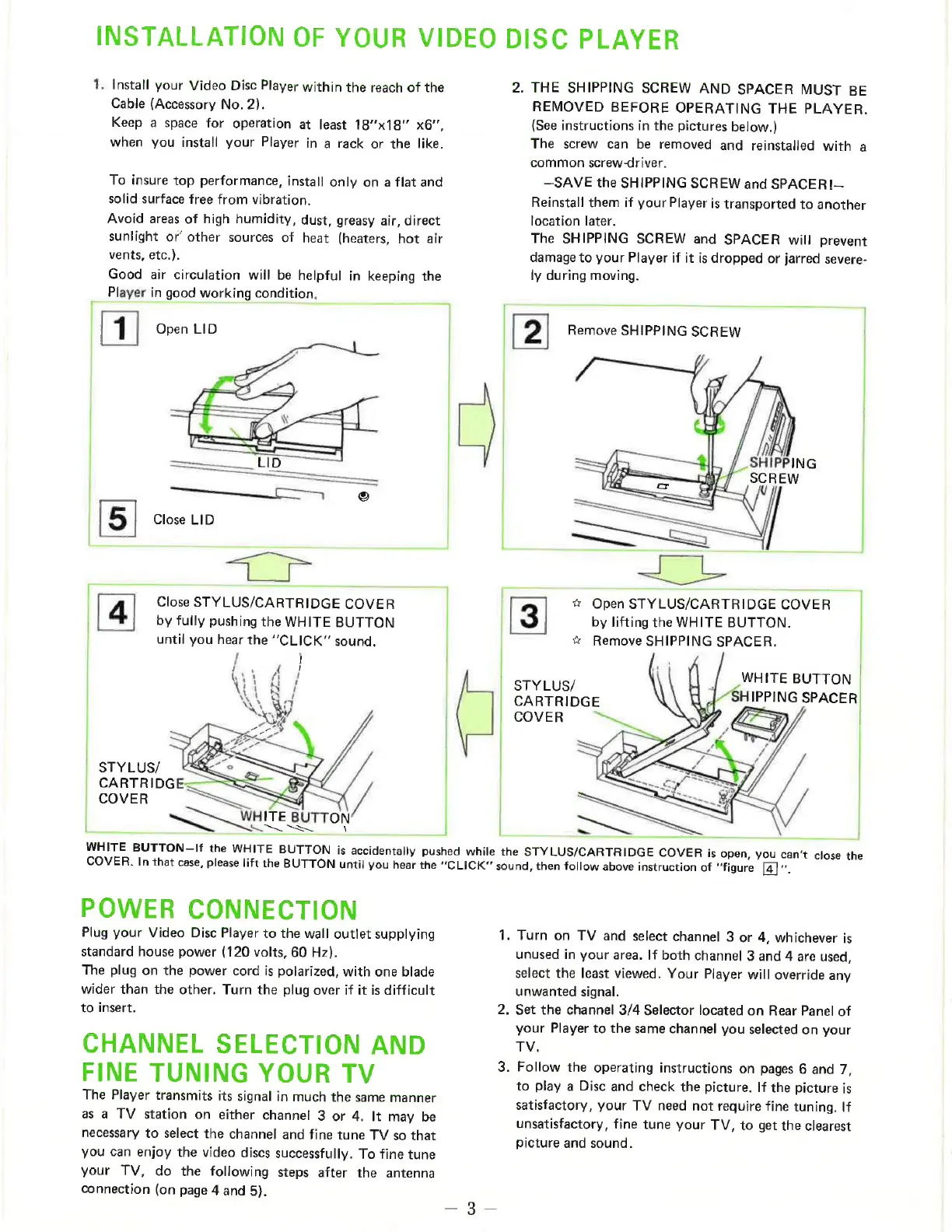
INSTALLATION
OF
YOUR
VIDEO
DISC
PLAYER
1.
Install
your
Video
Disc
Player
within
the
reach
of
the
Cable
(Accessory
No.
2).
Keep
a
space
for
operation
at
least
18x18"
x6”,
when
you
install
your
Player
in
a
rack
or
the
like.
To
insure
top
performance,
install
only
on
a
flat
and
solid
surface
free
from
vibration.
Avoid
areas
of
high
humidity,
dust,
greasy
air,
direct
sunlight
or’
other
sources
of
heat
(heaters,
hot
air
vents,
etc.).
Good
air
circulation
will
be
helpful
in
keeping
the
Player
in
good
working
condition.
EI
Open
LID
[5]
Close
LID
by
fully
pushing
the
WHITE
BUTTON
until
you
hear
the
“CLICK”
sound.
/
|
[4]
Close
STYLUS/CARTRIDGE
COVER
STYLUS/
CARTRIDG
COVER
|
mr”
2.
THE
SHIPPING
SCREW
AND
SPACER
MUST
BE
REMOVED
BEFORE
OPERATING
THE
PLAYER.
(See
instructions
in
the
pictures
below.)
The
screw
can
be
removed
and
reinstalled
with
a
common
screw-driver.
—SAVE
the
SHIPPING
SCREW
and
SPACER
!—
Reinstall
them
if
your
Player
is
transported
to
another
location
later.
The
SHIPPING
SCREW
and
SPACER
will
prevent
damage
to
your
Player
if
it
is
dropped
or
jarred
severe-
ly
during
moving.
[2]
Remove
SHIPPING
SCREW
by
lifting
the
WHITE
BUTTON.
[3]
#
Open
STYLUS/CARTRIDGE
COVER
|
ye
Remove
SHIPPING
SPACER.
WHITE
BUTTON
STYLUS/
|
i
CARTRIDGE
j
HIPPING
SPACER
COVER
$
WHITE
BUTTON-If
the
WHITE
BUTTON
is
accidentally
pushed
while
the
STYLUS/CARTRIDGE
COVER
is
open,
you
can't
close
the
COVER.
In
that
case,
please
lift
the
BUTTON
until
you
hear
the
“CLICK”
sound,
then
follow
above
instruction
of
“figure
[4].
POWER
CONNECTION
Plug
your
Video
Disc
Player
to
the
wall
outlet
supplying
standard
house
power
(120
volts,
60
Hz).
The
plug
on
the
power
cord
is
polarized,
with
one
blade
wider
than
the
other.
Turn
the
plug
over
if it
is
difficult
to
insert.
CHANNEL
SELECTION
AND
FINE
TUNING
YOUR
TV
The
Player
transmits
its
signal
in
much
the
same
manner
as
a
TV
station
on
either
channel
3
or
4.
It
may
be
necessary
to
select
the
channel
and
fine
tune
TV
so
that
you
can
enjoy
the
video
discs
successfully.
To
fine
tune
your
TV,
do
the
following
steps
after
the
antenna
connection
(on
page
4
and
5).
1.
Turn
on
TV
and
select
channel
3
or
4,
whichever
is
unused
in
your
area.
If
both
channel
3
and
4
are
used,
select
the
least
viewed.
Your
Player
will
override
any
unwanted
signal.
.
Set
the
channel
3/4
Selector
located
on
Rear
Panel
of
your
Player
to
the
same
channel
you
selected
on
your
TV.
.
Follow
the
operating
instructions
on
pages
6
and
7,
to
play
a
Disc
and
check
the
picture.
If
the
picture
is
satisfactory,
your
TV
need
not
require
fine
tuning.
If
unsatisfactory,
fine
tune
your
TV,
to
get
the
clearest
picture
and
sound.

Related product manuals