Supplement G
PLC Workstation
recipes, press the Download Recipes button on System Menu.
The Workstation displays the message "Waiting for
downloading...” when it is ready. You may download recipes
to the Workstation from a PC or another Workstation.
After downloading, the System Menu is active again.
G.10 Setting Operating Parameters
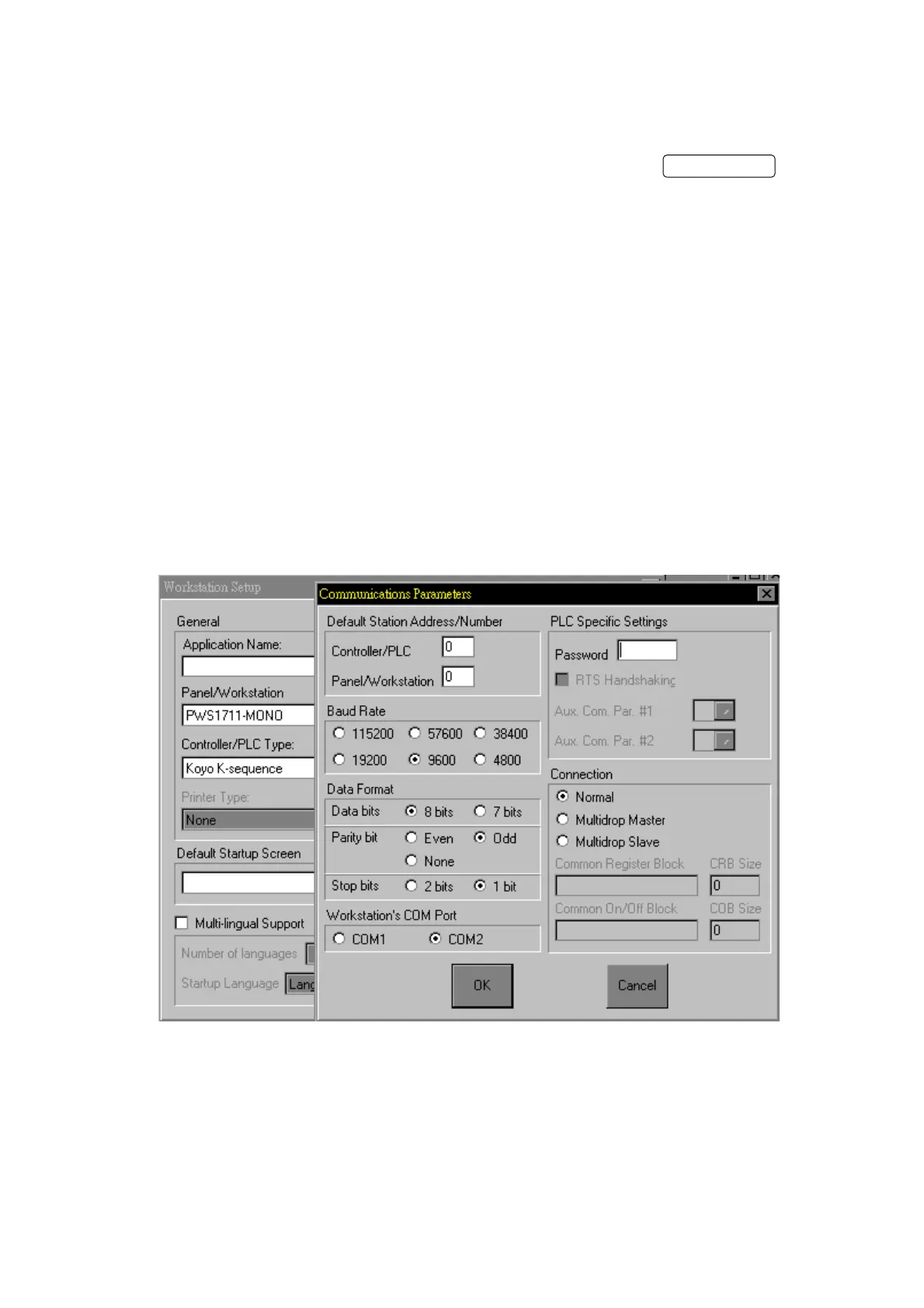
You can use Communication Parameter dialog box of ADP3 to
set the parameters for the communications between your
PWS1711/1760 and PLC. The parameters set in ADP3 is
transmitted to the Workstation along with all other data
when you download an application.
To get Communication Parameters dialog box, click
Communications button in Workstation Setup dialog box. The
Communication Parameter dialog box appears in Figure G-3.
The Workstation uses these parameters for PLC communications,
if the DIP switch No.5 is off.
Figure G-3 Communication Parameter dialog box
If DIP switch 5 is on, the parameters set in the
Configuration Table will be used for PLC communications. To
set up the Operating Parameters of the Workstation, press
the Configure button on System Menu. The Workstation
G-16


 To Next Page
 Loading...