About PWS1711/1760
Copy Recipes Allows you to copy recipes saved in
the Workstation to another
Workstation.
1
Exit Starts from the self-test again. 1-3
G.9 Downloading Application
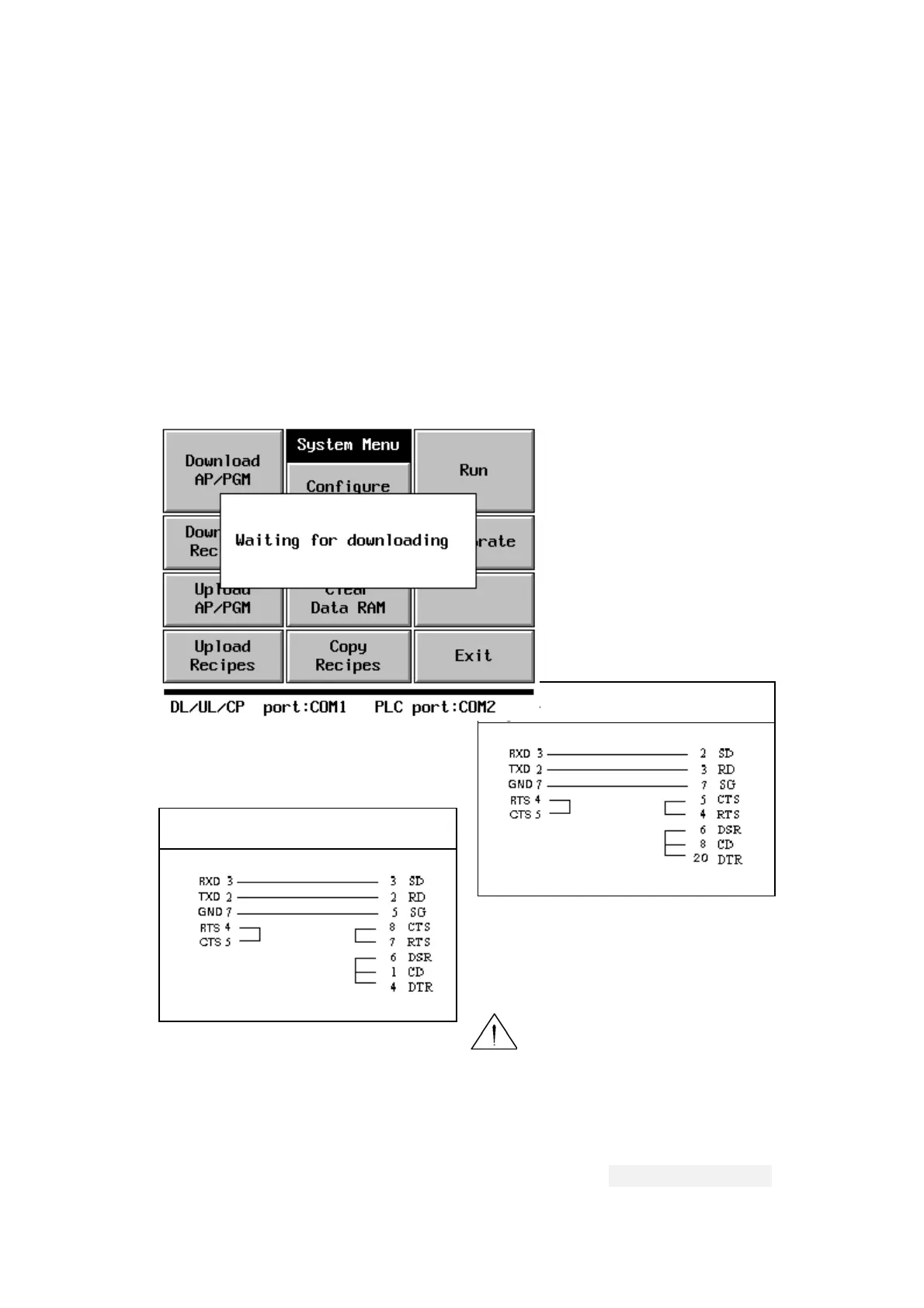
To make the Workstation ready for receiving downloaded
application, press the Download Application button on System
Menu. The Workstation displays the message "Waiting for
downloading...” when it is ready.
After downloading, the System
Menu is active again.
You should have a cable with
the following connection for
the download.
PWS to PC's 9-pin connector
PWS to PC's 25-pin connector
Warning: To avoid
electric shock, be sure to switch off the power
when connecting the communication/download cable to the
PWS unit.
PWS-COM2 PC COM RS232C
25-pin female --CABLE--- 9-pin female
PWS-COM2 PC COM RS232C
25-pin female --CABLE---25-pin female
G.9.1 Downloading Recipes
G-
To make the Workstation ready for receiving downloaded
15
Hitech Electronics Corp.


 To Next Page
 Loading...