Supplement B
PLC Workstation
B.10 Setting Operating Parameters
You can use Communication Parameter dialog box of ADP3 to
set the parameters for the communications between your 700T
and PLC. The parameters set in ADP3 is transmitted to the
Workstation along with all other data when you download an
application.
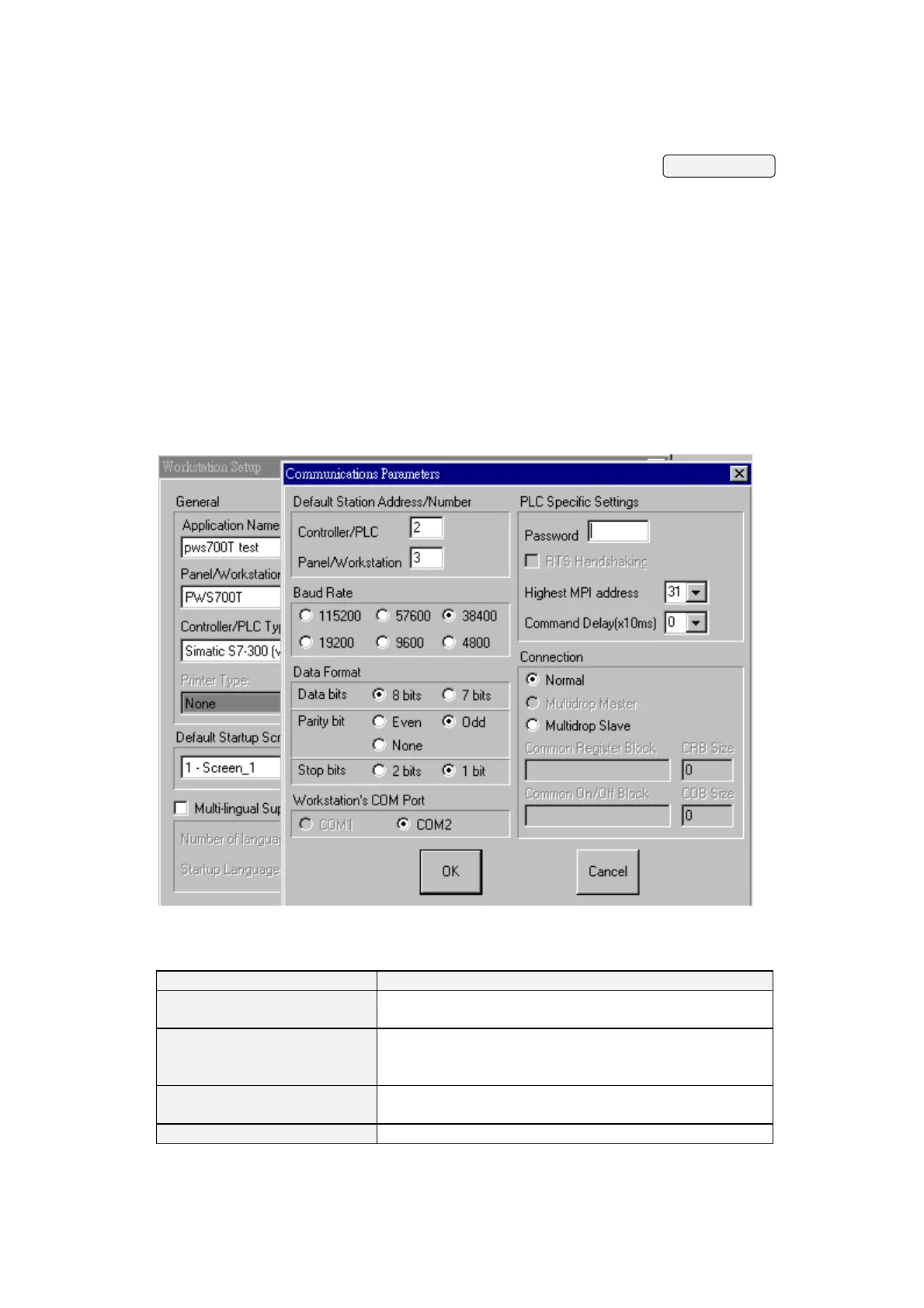
To get Communication Parameters dialog box, click
Communications button in Workstation Setup dialog box. The
Communication Parameter dialog box appears with the
following options:
Figure B-3
Following are descriptions of each of these options:
Options Description
Controller/PLC
Select a number to specify the address
of PLC.
Panel/Workstation Select a number to specify the address of
your 700T. This parameter is only useful
for some types of PLCs.
Baud Rate Specify the baud rate for communications
between the Workstation and the PLC.
Data Format S
ecif
the number of data bits, the
B-12


 To Next Page
 Loading...