Need help?
Do you have a question about the Hitecsa ETN-24 SUPER-SI Series and is the answer not in the manual?
Guide on separating the terminal front panel, removing the back panel, and fastening it to the wall with screws.
Detailed terminal assignments for compressor, fan, external sensor, and various electrical resistance connections.
Settings for fan economy mode, compressor time delay, operating modes, and window contact functionality.
Configuration of DIP switches for selecting internal/external room temperature sensors and operating modes.
Settings for heating/cooling stages, combustible systems, and heat pump (4-way valve) operation.
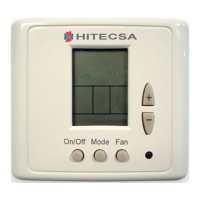
Instructions on switching the thermostat ON/OFF and adjusting the set point temperature using buttons.
Guidance on selecting operating modes and adjusting temperature limits and offset values.
Details on selecting automatic or continuous fan operation modes for ventilation.
Procedures for locking or unlocking the thermostat's control buttons to prevent unauthorized changes.
Information regarding the thermostat's operating frequencies and voltage tolerances.
 General
| Brand | Hitecsa |
|---|---|
| Model | ETN-24 SUPER-SI Series |
| Category | Thermostat |
| Language | English |

 To Next Page