2
Plug it in and switch the power socket on
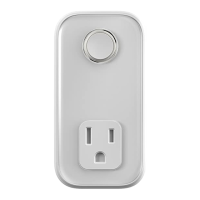
Once plugged in the LED light on the front
of your plug will begin to flash amber while
it searches to find your box.
Once your Hive Plug appears on the
screen, you can name it and press Save
to complete setup.
3
That’s it!
The LED light on your Hive Plug will stop
flashing amber once connected. Now you
can plug in the device you’d like to control
remotely.
When your Hive Plug is turned on the LED
light will be solid purple.
Remember: To use your Hive Plug, leave the device
and the power to the socket switched on, including
the extension cable if you’re using one.
3324_Hive_Plug_UG_65x130_12pp_FR_AW.indd 11 23/04/2018 13:42


 To Next Page